 Credit

Finding the best app to remove background from a photo can be a game-changer. Whether you're an ecommerce store owner creating clean product shots, a social media enthusiast making your profile picture pop, or just having fun with photo edits, a transparent background is the first step. But with so many options available, which one should you choose? You need a tool that is fast, accurate, and doesn't cost a fortune.
In 2025, AI has made this process easier than ever. You no longer need complex software like Photoshop or expert editing skills. Today’s tools can give you a perfect cutout in seconds. This guide will walk you through the top choices, helping you find the perfect photo app to remove background for your needs on both Android and iPhone.
Why a Good App That Cuts Out Backgrounds is Essential
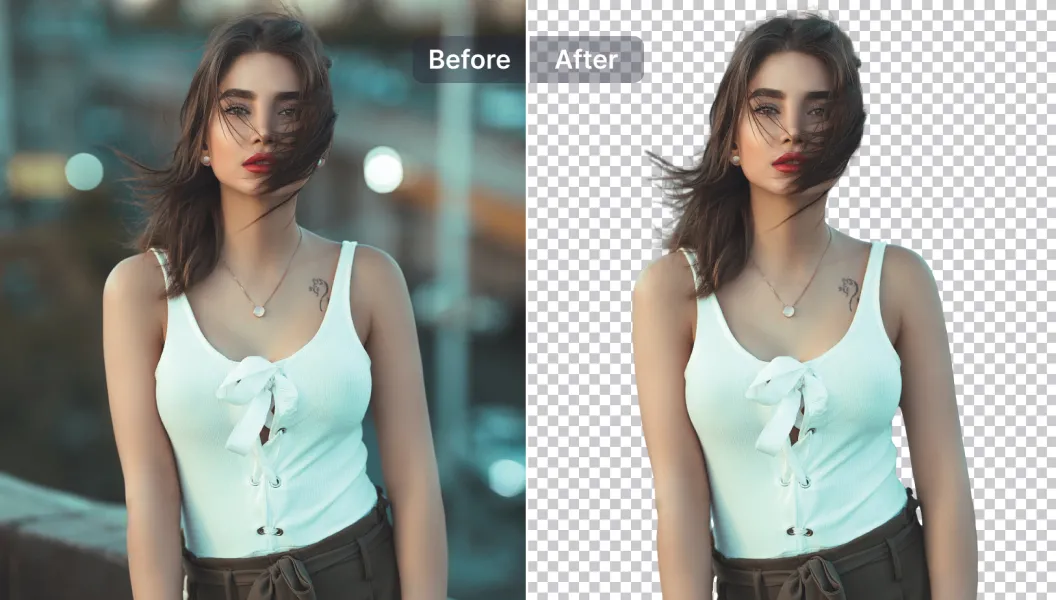
A high-quality background remover does more than just delete pixels. It isolates your subject with precision, preserving fine details like hair and fur. This is crucial for creating professional-looking content.
For online sellers, clean product images can directly increase sales. For designers and marketers, the ability to quickly place a subject into any new scene or design is invaluable. A good photo app delete background feature streamlines your workflow and unlocks your creative potential, saving you hours of manual work. The goal is to get a clean, transparent PNG file you can use anywhere.
Our Top Picks for the Best Background Remover App
We tested dozens of applications to find the best of the best. We judged them on accuracy, speed, ease of use, cost, and extra features. Here are the apps that made the cut.
1. Pixelfox: The Best Overall Free Background Remover App
Platforms: Web, iOS, Android (Coming Soon)
Pixelfox stands out as the best app to remove background because it masterfully combines power, simplicity, and a generous free offering. It uses advanced AI to deliver pixel-perfect cutouts in under three seconds. The process is incredibly simple: upload your photo, and the AI does all the work.
What makes Pixelfox the top choice is its accuracy. The AI handles complex edges, like hair or the fine details on clothing, better than most competitors. After removing the background, you can download the image with a transparent background, add a simple white or colored background, or get creative. You can easily remove backgrounds from your photos and then use the built-in editor to add new scenes.
For those looking to do more, Pixelfox also offers a powerful AI background generator that can create realistic, studio-quality backdrops from a simple text prompt. This is perfect for product photography. It even supports batch processing, making it an essential tool for e-commerce professionals who need to process hundreds of images efficiently.
Key Features:
- Completely Free: Offers high-quality background removal at no cost.
- AI-Powered Precision: Delivers clean cutouts, even with difficult subjects.
- Extremely Fast: Processes images in seconds.
- Extra Tools: Includes an AI background generator, batch processing, and other editing features.
- User-Friendly: No technical skills required.
For anyone looking for the best free background remover app, Pixelfox is the undisputed winner in 2025.
2. Adobe Express: Professional Creative Suite
Platforms: Web, iOS, Android
Adobe is a name synonymous with creative software, and Adobe Express brings that power to a more accessible platform. Its background removal tool is powered by Adobe Firefly, the same AI used in Photoshop, which means it's incredibly accurate and reliable.
Express is more than just a background remover; it's a complete design tool. Once your background is gone, you can immediately start a new project using countless templates for social media posts, flyers, and more. This makes it a great photo app to remove background for those who need an all-in-one content creation solution.
The main drawback is that the background removal feature is often part of the Premium plan. While Adobe sometimes offers it for free as a promotion, consistent access usually requires a subscription. However, if you already subscribe to an Adobe Creative Cloud plan, you likely have access to it.
3. Canva: The Design and Template Giant
Platforms: Web, iOS, Android
Canva is a favorite among marketers and content creators for its vast library of templates and user-friendly design interface. Tucked within its "Magic Studio" is a one-click background remover that is fast and effective for most images.
Like Adobe Express, Canva’s value lies in its integrated workflow. You can remove a background and immediately drop your subject into a new Instagram story, YouTube thumbnail, or presentation slide. It's an app that cuts out background and helps you finish the entire design.
The catch is that the background remover is exclusively a Canva Pro feature. While Canva often provides free trials, you'll need to pay for a subscription for long-term use. This makes it less ideal for users who just need a quick, free tool.
4. Pixelcut: Great for Ecommerce
Platforms: iOS, Android
Pixelcut is a mobile-first app that was built specifically for removing and changing backgrounds, with a strong focus on e-commerce. Its AI is excellent at detecting products and creating clean white backgrounds perfect for marketplaces like Amazon or Shopify. Many small businesses rely on it for their product photography needs.
The app is very easy to use and offers helpful templates and tools, such as adding realistic shadows to make products look more natural. While it offers a free version, the best features and unlimited exports are locked behind a Pro subscription. It is a fantastic tool, but for users seeking a completely best free background remover app, Pixelfox offers more at no cost.
5. Slazzer: The Quick Online Tool
Platforms: Web, Desktop, Photoshop Plugin
Slazzer is a fast and simple online tool dedicated to one thing: removing backgrounds. You upload an image, and it returns a version with a transparent background almost instantly. Its simplicity is its greatest strength.
It also offers integrations, including a desktop app for bulk processing and a Photoshop plugin, which can be useful for professional workflows. However, its pricing model is credit-based. While you get a few free credits, you have to pay for more, which can become expensive for users with high-volume needs. It's a great option for a one-off removal but less practical for ongoing use compared to a free tool like Pixelfox.
6. Background Eraser: Simple Tool to Remove Background on Android
Platforms: Android
For users looking specifically to remove background android, apps like Background Eraser are a popular choice. These apps are typically free but supported by ads. They are straightforward and get the job done for simple images.
Most offer both an automatic AI mode and a manual mode, allowing you to use your finger to erase or restore parts of the image. This can be helpful for tricky photos where the AI struggles. However, the accuracy of the AI is often not on par with more advanced tools like Pixelfox or Adobe Express. These apps are good for casual use but may not deliver the professional quality needed for business or design work. Sometimes you just need a blackout background app to make a sticker, and these apps are perfect for that.
How to Choose the Right Photo App to Delete Backgrounds
With so many choices, picking the right one depends on your specific needs. Here’s what to consider:
- Accuracy and Quality: How clean is the cutout? Look for an app that handles edges, hair, and transparent objects well. A professional result should have no blurry or jagged lines.
- Ease of Use: How quickly can you get the result you want? The best apps use AI to automate the process, requiring just one click. A complicated interface can slow you down.
- Cost: Are you willing to pay a subscription? If you only need to remove backgrounds occasionally, the
best free background remover applike Pixelfox is the logical choice. If you need a full design suite, a paid subscription to Canva or Adobe Express might be worth it. - Platform: Do you work on your phone, desktop, or both? Make sure the app is available on your preferred devices. Web-based tools like Pixelfox offer great flexibility since they work on any device with a browser.
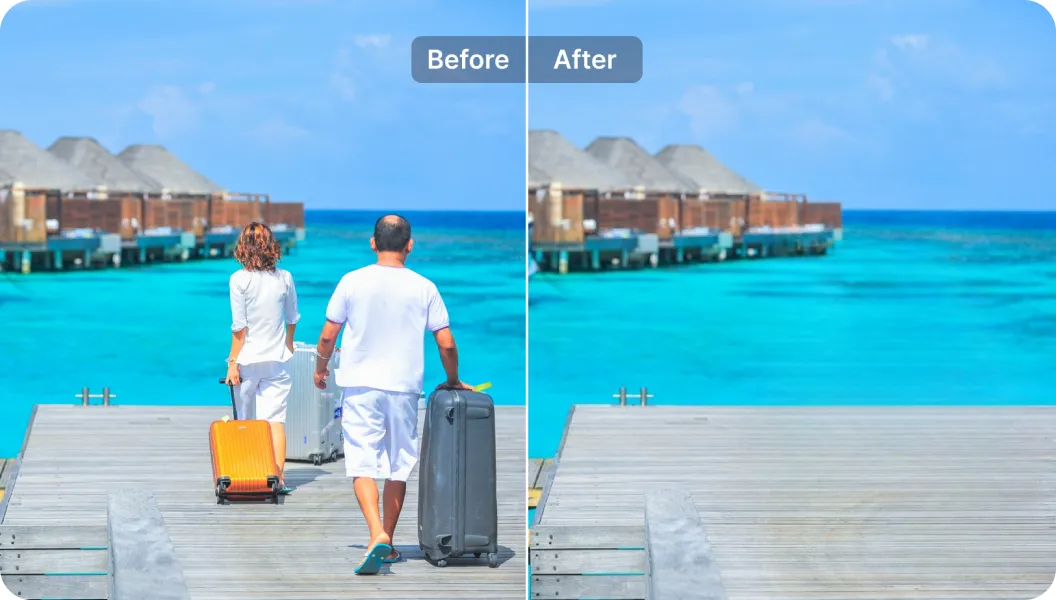
- Additional Features: Do you need more than just background removal? Tools like Pixelfox and Adobe Express offer other features like AI object removal, which lets you remove unwanted people or items, background generation, and templates that can add a lot of value.
The Final Verdict
After extensive testing, Pixelfox AI emerges as the best app to remove background in 2025. It offers the perfect blend of professional-grade accuracy, incredible speed, and an unbeatable price point: free. It empowers everyone, from e-commerce entrepreneurs to casual social media users, to create stunning, clean images without any hassle.
While tools like Adobe Express and Canva are powerful design suites, their core background removal feature is often behind a paywall. For users who need a dedicated, reliable, and free tool, Pixelfox is the clear winner. It's the smartest and most efficient app that cuts out background available today.
Ready to transform your photos? Try Pixelfox and see how easy it is to get a perfect cutout in seconds.