 Credit

Nowadays, we live in a digital era, and our phone memories are flooded with thousands of photos, most of which are duplicated, blurred, or not lit properly, and many of which we simply do not need. The quickest and simplest method of organizing a gallery by freeing up storage space and improving the quality of pictures is by using a free photo cleanup app. The good thing is that these apps do not require any technical expertise. They can automatically identify bad shots, eliminate unwanted objects and recommend which photos to delete, which makes photo management a breeze with AI technology.
Regardless of whether you need an application that can assist you in deleting images or an AI photo clean-up application that can enhance the quality of images, these apps would allow you to maintain a clean and attractive photo library.
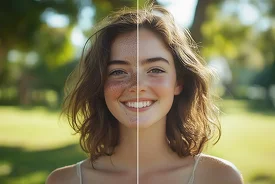
Why Photo Cleanup Up Apps Are Important
With time, photo libraries are filled with duplicates, screenshots, unintentional shots and poor-quality photos. This results in:
· Limited storage space
· Slower device performance
· Problem with locating valuable photos.
· Excessive disorderliness.
The best photo cleanup app fixes the issues immediately. These applications work on smart recognition and AI applications to scan, categorize, erase, and improve your photographs automatically. This will not only save you time but also save you the hassle of having too many pictures in your gallery.
Benefits of Using a Free Photo Clean-Up App
· Frees Up Storage Space
Deleting unnecessary pictures will make you reclaim space so that your device will be able to perform better and with higher speed.
· AI Photo Cleanup Technology
AI technology will automatically scan the blurred, dark, or low-quality images and will suggest how to improve them or take them out to ensure that your gallery is clean and beautiful.
· Enhances Photo Quality
Not all apps merely erase pictures; some can sharpen them, and they improve color and lighting to make them better.
· Automatic Duplicate Detection
The Photo Cleanup app scans and removes duplicates that are similar; it eliminates unnecessary clutter in your gallery.
· Saves Time and Effort
Rather than spending hours and hours going through thousands of pictures, AI will do the task on your behalf and make the cleanup process quicker and more precise.
How AI Transforms Photo Cleanup
The emergence of the AI technology has also transformed the manner in which we handle our photos. Photo clean-up functions assisted by AI make photo organization smarter in the following way:
Unwanted Object Removal
Automatically removes photobombers, trash, shadows or distracters.
Duplicate Detection
Finds duplicates and close duplicates and lets you delete the photos you don't need in a flash.
Smart Recommendations
The AI will analyze the quality of photos and will propose which ones should be deleted or saved.
Clutter-Free Organization
Photos are automatically labelled, and you can easily find valuable memories.

Best Apps for Photo Clean-Up
The process of selecting a suitable, complete photo cleanup app can go a long way in determining how effectively you use and improve the images. The following are the most recommended applications that can be used to clean up photos, remove duplicates, and optimize space with AI:
1. Cleanup.AI
This application relies on the latest AI technology to identify and eliminate the unwanted object, blemishes, or distractions in pictures. It works well with those users who require automatic cleaning without advanced editing.
2. Remo Duplicate Photos Remover
It is a fantastic choice to add to the list of the users that face storage problems because it scans the gallery of your phone to delete duplicate and similar photos and gives you the chance to free up the space immediately.
3. Snapseed
One of the most robust photo editing applications with built-in cleanup options like the healing brush tool, filters and color correction to fix image quality easily.
4. Gallery Doctor – Photo Cleaner
This smart application will identify bad, blurry, or poor-quality photographs and suggest what images should be deleted.
5. Cleanup Pictures (Web & App)
The app is ideal whenever you need to clean up your photos in a few seconds with perfect AI because you can delete objects, texts, and other blemishes without leaving your finger on the screen.
Final Thoughts
As storage is used more, and people have their photo libraries cluttered, a free photo cleanup app has become an absolute necessity among all normal users. With AI technology for photo cleanup, it is now possible to automatically delete unwanted photos, improve the best pictures, and save time all within a few taps. In case you want the best photo cleanup app to arrange and enhance your photo gallery, AI-powered applications are the quickest, most convenient, and most intelligent.
“Maintaining your photo collection is no longer a task – AI provides it without hassle, time, and expense.”
FAQs
What is a photo cleanupapp?
A photo cleanup app is a smartphone application that allows you to delete images, eliminate duplicates, and improve the quality of the photos automatically with the help of AI technology.
Are there free photo cleanupapps available?
Yes, there are various free versions of apps that have the option of duplicate detection, storage cleanup, and even AI image cleanup.
How does AI photo cleanup work?
AI can analyze your pictures and determine which pictures are of low quality, low resolution, or duplicates and recommend what to remove or improve for better storage management.