 Credit

Body Editor Online Free
The contemporary visual society values any photograph, a selfie on social media, or a professional portrait. Everyone wants to see themselves in the best times, and not everyone can afford to use some expensive editing software or possess a greater level of skills. And that is where a body editor online free tool will come in handy.
These smart AI-powered editors have the ability to transform, conceal and make your body and skin look better in real time. You may have smoother skin, the thin body shape or the ideal one, and the newest AI body editors enable you to do it with a few clicks.
We will talk about how these online tools work and their most desirable features and how you can use them to create your images with flawless, natural results.
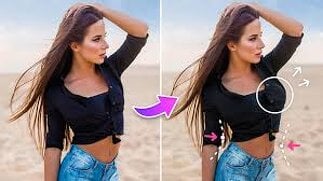
How Does an AI Body Editor Work?
A body editor on the Internet is easy and convenient to use. Most AI-based editors work in the following way:
Upload Your Photo
To start with, add a picture, either from the gallery or the computer of your choice. Most of the body editing online free tools available on the Internet can take the file format of JPG, PNG or JPEG.
AI Detects Your Body Automatically
The intelligence of the editor analyses your photograph and identifies your shape, pose, and lines, which enables the editor to understand what can be altered or modified.
Choose Editing Options
Select the objects to make the photos look like they have skinnier and smoother skin, a different waistline, darker or lighter arms or legs, and other posture changes.
AI Enhances Your Image
The AI body editor uses its way to enhance and fix any imperfection in the shapes and draw outlines and curve the shapes in a natural and well-balanced look.
Preview and Download
When you have been satisfied, preview your after image and download the high-resolution version.
It is quick and automatic, and the results are of professional quality without having to undergo manual retouching.
Top Features of Body Editor Online Tools
The most convenient free Body editor online websites possess the AI-based functionality that allows you to edit your body fast, easily and still naturally. Others include the most popular, which are:
Reshaping your body: Select the proportions, trim the waist, or add curves easily.
Skin Smoothing: Pimples, wrinkles or spots are gone to have the flawless smooth skin.
Posture Correction: Change your position to a straight or balanced one.
Adjustment of lighting and tone: Adjust exposure and shadows for natural highlights.
AI Auto Detection: The system will detect the body automatically to ensure the body is edited with precision.
Compare Before and After Preview: Compare transformations without further ado.
Free Access: This is a free online photo editor that is available without registration or payment.
The latter attributes also make AI-based body editor online tools the final ones to be used by influencers, photographers, or any other individual that wants to present the best version of themselves in photos.
Best Free Online Body Editor Tools for 2025
You can find some of the best-ranking ones that you can currently apply for in case you want the best body editor online for free:
Perfect ME
A minimalistic picture mobile application, which allows its users to slim body size, sculpt their muscles, and clean their skin through AI. It is ideal for social media images.
Fotor AI Body Editor
is a web application that is open-source and includes a body reshaper that is properly contoured with the addition of functions that are driven by AI.
Retouch Me
The most popular female body editor that is available on the Internet makes the pictures thinner, reshapes or tints them and yet makes them look natural.
YouCam perfect
It is a one-stop intelligent face retouching and body editor with an automatic feature offering skin-smoothing effects and lightening.
Body Tune
Body Tune will be aimed at being used in the quick editing process since the user can reshape photos and adjust their height, shape, and proportions within a few seconds.
Why Use a Body Editor Online?
The list of the reasons people resort to AI body editors is limitless because it may be applied to personal confidence and is applicable to photo preparation at their workplace. It is because of the fact that these editors are so popular:
· Natural Results: Proportions are also made natural and balanced by AI.
· Rapid Transitions: Instant editing and visual innovations.
· None of the necessary experience: Automatic and user-friendly.
· Free Access: A vast majority of the tools are fully free.
· Confidence Boost: Ideal when changing to fitness, portraits or fashion shots.
You can also employ them to make yourself as presentable as possible, be it you are posting something on your social media account or you are just editing pictures of yourself.
Final Thoughts
In the computer age, everyone has the right to look and feel good in the pictures. You can use a body editor online for free to easily enhance the pictures, reshape your body and smooth the skin of your body in a matter of a few seconds.
Such apps are authentic and minimalistic and provide the user with a chance to make edits without over-editing images and retouching natural beauty. The result is smooth, delicate and beautiful no matter whether you are using your slim picture app or your full-body AI editor.
No downloads, no subscriptions, no complex AI-powered creativity that allows your photos to shine.
FAQs
What is a body editor online free?
It is an artificial intelligence photo editing app that allows users to make images distorted, flipped proportions, and blurred skin without using money in a browser.
How can I Photoshop my photos to look skinny and with smooth skin?
You just need to take a photo of yourself and paste it in an AI body editor, choose slimming options and skin flatteners and allow the AI to work its magic on your photo.
Are body editor online tools safe to use?
Yes, most popular websites save user images in secret and delete them after editing.