 Credit

For so many people, identifying their face shape has been difficult enough when trying to improve their style and selecting the right haircut, but it also ultimately leads to better self-confidence. Many individuals rely on trial and error, comparing themselves to magazine images or online charts that never quite match. That’s where face shape AI comes in. Thanks to PixelFox’s powerful technology, users can analyze their face shape and get unique results based on their personal features.
PixelFox's face shape AI technology works without delay. All you have to do is upload a picture, and the AI will identify the shape of your face more accurately than a facial shape calculator in less than a minute. Eliminating guesswork will help you make more informed decisions about styles that fit you naturally.
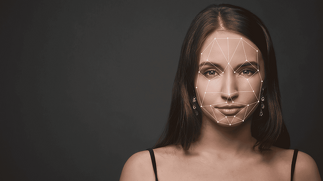
What is Face Shape AI Tool?
Face shape AI is a sophisticated system of machine learning and image recognition to detect the shape of your face. This means you can stop stressing about your face shape (round, oval, square, or diamond) - the program does it all for you. PixelFox's completion speed and accuracy with the task are what make it so special.
Why Use PixelFox Face Shape AI?
Ease of Use - PixelFox has created its tools to be user-friendly. There are not so many settings or steps to take, you only need to upload and get the answer.
Accuracy - It is critical to get as accurate a result as possible for face shape analysis. PixelFox will ensure that all detail is captured.
Innovative Technology - The AI gets updated frequently with improved data, so it can provide even smarter recommendations.
How Face Shape AI from Photo Works?
PixelFox makes it extremely simple to discover your face shape from a photo. All you need to do is:
Go to the PixelFox Face Shape AI tool.
Upload a sharp image of your face.
The system will scan and analyze your face.
Once you know what shape face you have, you can also use the additional PixelFox editing tools to see your changes.
Hair Simulation: You can visually try hairstyles and hair colors that suit your face shape.
Eye Wear Try-On: You can see frame styles and not have to get off the couch.
Makeup Preview: You can try looks that fit your face.
All of these are smoothly integrated, so you won't have to keep changing platforms.
How to Use PixelFox Face Shape AI
Upload just a clear photo of yourself facing forward in good lighting.
Ensure your hair is clear of your face.
Using the suggestions, practice different styles using the editing tools in PixelFox.
Keep the outcomes and redo them later to compare.
By following the recommendations, you will receive the most accurate and best possible outcomes.
Benefits of Knowing Your Face Shape
More Suitable Hairstyles:
A hairstyle that you like and see on someone else does not necessarily mean it will work well for you. PixelFox will identify the hairstyles that match your proportions.
Better Fitting and Performing Glasses:
Selecting frames will be that much clearer when you know what shapes work well with your features.
More Confidence:
When you look good, you feel good. Knowing your face shape allows you to celebrate your natural features.
Applications of Face Shape AI
Stylists and Barbers utilizing PixelFox results can recommend the best styles for your clients.
People with fashionable pursuits or everyone to easily match accessories, for example, earrings and hats.
To have an instant personal style reference.
Conclusion
Knowing your face shape in today’s style-conscious world gives you the upper hand no matter what. When determining face shape, it’s easy to rely on outdated charts or exhaustively trial and error face shapes. Good news is, PixelFox Face Shape AI is a precise, effortless, and innovative way to determine your true face shape so that you can leverage that knowledge to improve your style & confidence, and your daily life.
PixelFox tools add more than face shape analysis: they allow you to explore hairstyles, glasses, and make-up that enhance your best features. If you have ever been interested in what face shape you are from a photo, PixelFox is there with the quickest and most reliable way forward. What this means for you is improvement, confidence, and, as a result, smarter styling choices.
FAQs
1. What is PixelFox Face Shape AI?
PixelFox uses sophisticated image recognition technology that can look at and identify the structural aspects of your face from one image, and provide you with a precise identification of your specific shape.
2. Can the results be trusted for styling purposes?
Absolutely, PixelFox produces reliable, accurate, and consistent results when identifying hairstyles, glasses, and make-up.
3. Do I have to be professional to use?
Not at all. PixelFox is suitable for all clients; just upload your image, and it will immediately complete the task.