 Credit

In digital design and printing, DPI (Dots Per Inch) is one of the most important factors determining image clarity and resolution. Whether you’re preparing photos for print, web, or design projects, understanding how to use a DPI converter can help you enhance image quality and achieve the best visual results.
The PixelFox free DPI converter makes it simple to adjust image resolution online without losing detail or sharpness. Let’s explore how it works and why DPI matters for every creator.
What Is DPI and Why Does It Matter
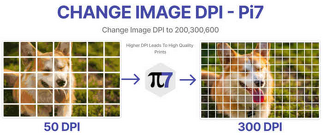
DPI refers to how many tiny dots of color appear in every inch of your image. The higher the DPI, the more detail the image has. Most professional prints and publications require at least 300 DPI, while web images typically range between 72–150 DPI.
When you increase DPI, you’re enhancing the image’s density and clarity, making it appear sharper and more realistic, perfect for posters, brochures, and high-quality prints.
How to Increase the DPI of an Image
If you’re wondering how to increase the DPI of an image, the process is easier than you think. With PixelFox’s image DPI converter, you can simply upload your picture, set the desired resolution (like 300 DPI or 600 DPI), and download the upgraded version instantly.
To convert an image to 300 DPI, follow these steps:
Visit PixelFox DPI Converter.
Upload your image or photo file.
Choose your preferred DPI value (300 or 600 DPI).
Click “Convert” and download the image in seconds.
PixelFox uses AI enhancement technology to make sure your image retains quality while boosting resolution.
How to Find or Check the DPI of an Image
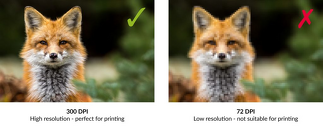
Before changing the DPI, it’s useful to know your image’s current resolution. Here’s how to check the DPI of an image on your computer:
Windows: Right-click the image, select Properties > Details, and look for “Horizontal Resolution” and “Vertical Resolution.”
Mac: Open the image in Preview > Tools > Show Inspector > More Info.
Online: Use the online image DPI checker on PixelFox to instantly detect an image’s DPI value without downloading software.
Knowing your DPI helps you determine whether your photo is ready for print or needs adjustment.
How Do You Change the DPI of a Picture?
If you’re asking, how do you change the DPI of a picture? The answer is straightforward: with a free DPI converter like PixelFox, you can upload your image and modify its resolution setting. You can also increase it to 300 DPI for professional printing or 600 DPI for ultra-high-resolution images.
Unlike manual resizing that stretches pixels, AI-based converters analyze image data and intelligently enhance sharpness to preserve detail.
When Should You Use a 300 DPI Converter?
A 300 DPI converter is ideal for:
Business cards and posters
Magazines or print advertisements
Product photography
Art portfolios or resumes
Printing an image below 300 DPI may cause blurriness or pixelation, so it’s always better to upscale before printing.
For ultra-clear visuals, the 600 DPI converter option can deliver even greater sharpness, especially for fine art or large-format designs.
How to Make an Image Have More DPI Without Losing Quality
Many tools increase DPI but cause images to blur or pixelate. PixelFox uses AI sharpening and enhancement to make the image clearer as it raises the DPI. This ensures your final picture remains crisp, bright, and professional.
If you’ve ever struggled with dull prints or blurry photos, increasing DPI through PixelFox is a quick solution that preserves quality and adds precision.
Why Use PixelFox DPI Converter
PixelFox simplifies the process of adjusting image DPI online for free. Here’s what makes it stand out:
Converts images to 300 or 600 DPI instantly
No installation or signup required
Compatible with PNG, JPG, and WebP formats
AI enhancement for sharper, cleaner output
It’s the perfect choice for designers, photographers, and marketers who need fast results with professional quality.
Conclusion
A DPI converter is essential for anyone working with digital or printed images. Whether you want to check DPI of image, convert a photo to 300 DPI, or increase image resolution, PixelFox gives you an accurate, AI-powered solution in seconds.
Visit PixelFox DPI Converter today to transform your photos into high-resolution masterpieces ready for any platform.
FAQs
1. How can I increase the DPI of a picture for free?
You can use PixelFox’s free DPI Converter to upload your image, select the DPI value, and download your enhanced photo instantly.
2. How do I find the DPI of an image online?
Simply upload your file to the PixelFox DPI Checker, and it will display your image’s DPI value without needing to install software.
3. Can I convert an image to 300 DPI for printing?
Yes, converting to 300 DPI ensures your photo is print-ready with the clarity required for professional-grade results.