 Credit

Introduction:
In the contemporary visualized world, your picture may create the first impression, whether it is on social networking, work-related sites, or even on dating applications. A glow-up filter online would come in handy there. It is an easy and quick way to beautify your photos, clean up your complexion, and make yourself look brighter with a single button press.
The AI glow-up filter is a smart retouch filter that performs a natural retouch on a photo. You can have radiant skin and an even tone, or even a photo just needs to look fresh and confident; this tool can do all that, and in no time, too, without having to use complicated software or downloads.
Why the Glow up Filter Matters
Your photos must show your best, rather than your flaws due to the bad lighting or the quality of the camera used. The glow-up filter is used to automatically correct these faults. You do not have to spend hours editing; you have the ability to get a perfect and natural appearance in a few seconds.
It’s especially useful for:
Influencers that prefer regular, professional posts.
Photographers improving portraits in a hurry.
· Casual users seeking to lighten up their selfies to share them with their social networks.
Regardless of who you are, a glow filter on photos online saves time and makes any photo immediately beautiful.
Main characteristics of an online glow-up filter
The online glow-up tool is so strong and simple to use because of the following:
· AI-Powered Beauty Enhancement: Scans the face and improves the expression in a natural manner.
· Skin Smoothing Filter: Soft skins without losing any detail.
· Makeup and Tone Correction: The correction with a slight color balance to make it radiant.
· Brightness & Contrast Optimization: Sliders to brighten your face.
· Instant Preview: You glow up in real time, before you save.
· No Download Needed: Edit your photos in your browser and do it simply and quickly.
The AI beauty filter can make sure that all of the enhancements are natural, not excessive, unlike a regular photo editor.
Advantages of Using a Glow-Up Filter
Photo glow filters are not just another touch-up; they boost your self-confidence and make your photos look their best everywhere.
Natural Enhancement: Retains your original features and also increases the lighting and tone.
Professional Quality: Produces studio-quality results in real time.
AI Precision: Scans skin, eyes and lips to make fine-tuning changes.
Universal Usage: Edits selfies, portraits, or even group photos.
Free Access: No subscriptions or software necessary.
A glow-up face filter AI tool guarantees that even non-edited photos appear like they are professionally edited, without the duration and expense.
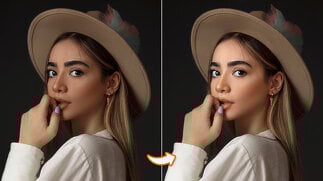
How It Saves Time and Effort
The retouching process can be burdensome when it comes to manual retouching, which involves correcting the brightness, colour and blemishes one by one.
The whole process is automated by a glow-up filter online for free.
· Post your portrait or selfie.
· Let the AI analyze your photo.
· Use automatic glow-up effects.
· Download or share instantly.
This is the reason why it is ideal for a person who wishes to upgrade his or her photo speedily without the need to understand sophisticated photo editing software.
How to Get the Perfect Glow
In order to maximize your selfie with an AI glow-up filter, consider the following tips in a few seconds:
· Take your photo in natural lighting.
· Clean up your background so that it can be better detected by AI.
· Practice with low-intensity or intense glow effects.
· Send an edited photo in HD to have a clear and crisp appearance.
Minor modifications can assist in making your image appear natural but looking ethereally glamorous.
Why Glow-Up Filters Are Popular Today
With the visualization of social media, the need for AI photo enhancers and beauty filters becomes more and more popular. The population is no longer interested in filters and edits so much in photos; they are interested in real and natural outcomes.
The glow-up filter online provides just that, a combination of realism and sophistication. It enhances your image and preserves your personality.
It is an online utility to showcase your best sides, whether it is a new profile picture, a portfolio picture or just a have-to-take selfie.
Final Thoughts
The glow-up filter online is not just a trend, but it is a necessity for every person wanting to make himself/herself look and feel good in pictures. It is an AI-powered technology that smooths, whitens, and enhances your image in a natural way and makes you feel confident all the time.
You do not need editing and costly programmes. Just upload, glow up, and shine. Your selfies will shine with appeal and self-confidence, no matter where you are, any time you have the correct AI beauty filter.
FAQs
What is a glow-up filter online?
It is an artificial intelligence-powered web app that can improve your online photos by adding lighting, skin color, and general appearance automatically.
Is the glow-up filter online free to use?
Yes! There are numerous applications that enable you to use the glow-up effect without downloading software or using expensive apps online.
Will the glow-up filter make my photo look fake?
No. The most ideal AI glow-up filters are the ones that bring out natural and realistic improvement.