 Credit

Photos are more than just pictures in the digital world of today; they tell stories. And those stories come to life when music is added. You can now easily create mini music videos that capture personality and emotion by adding music to photos online in a matter of seconds thanks to clever AI tools.
Adding music to images or pictures without any prior editing knowledge is made easy with tools like Pixelfox.ai, whether you're creating a creative portfolio, a birthday slideshow, or a social media post.
This post explains how it functions, why it's so well-liked, and how to do it for free while maintaining an SEO-friendly and user-focused approach.
What Does “Add Music to Photo” Mean?
An image and a soundtrack are combined to create a brief video clip when you add music to a picture. It's an easy yet effective technique to add movement and emotion to still images.
You could, for instance, include your favorite song in a vacation picture.
Combine a wedding photo with romantic music.
Make brand-promoting posts with a jingle.
To put it briefly, adding music to a picture turns it into a multimedia experience that is perfect for storytelling and social media sharing.
Why Add Music to Photos or Images?
Adding sound to visuals makes them more memorable. Studies show that people are 65% more likely to engage with visual content when it includes music or sound.
1. Boost Emotional Impact
Music sets the mood—whether it’s happy, nostalgic, or dramatic. A calm song can make a sunset photo more touching, while upbeat tracks make party shots come alive.
2. Improve Engagement
Posts with audio-visual elements perform better on platforms like Instagram, Facebook, and TikTok.
3. Simplify Video Creation
You don’t need to shoot or edit a video. Just upload your image and add a track—it’s that easy.
4. Perfect for All Occasions
From birthdays and anniversaries to product launches, adding music turns ordinary pictures into attention-grabbing media.
How the Process Works
Modern tools like Pixelfox.ai use AI to automate the process of syncing music with visuals. Here’s how it works:
Upload Your Photo or Image
Choose your favorite picture from your device or cloud storage.Select or Upload Music
You can pick from a built-in music library or upload your own track.AI Syncs the Two Together
The system matches rhythm, tone, and timing to create a seamless blend.Add Transitions or Captions (Optional)
You can add fade effects, text, or even filters to personalize it.Download or Share
Export your final video in MP4 or MOV format, ready for social media or presentations.
How to Add Music to a Photo Using Pixelfox.ai
Pixelfox.ai makes this process simple enough for anyone to use. Here’s the step-by-step breakdown:
Step 1: Visit Pixelfox.ai
Go to Pixelfox.ai. It runs directly in your browser, no software download needed.
Step 2: Upload Your Photo
Click “Upload Image” and choose your picture. High-resolution photos give the best results.
Step 3: Choose or Upload Music
Browse through royalty-free tracks or upload your own MP3 or WAV file.
Step 4: Let the AI Process
Pixelfox automatically aligns the image and music to produce a short, well-timed video.
Step 5: Preview and Download
You’ll see a preview of your video with background music. Once satisfied, export it in HD quality.
That’s it. In under a minute, your image becomes a professional-looking short video ready to post.
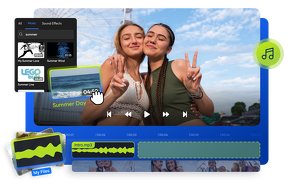
Top Benefits of Using Pixelfox.ai to Add Music to Photos
1. Immediate Automation by AI
Pixelfox's AI takes care of everything, from syncing to rendering, so no prior editing knowledge is required.
2. No Cost
Short music-image videos without a watermark can be made for free.
3. Personalization Choices
To make your project unique, add overlay filters, text, or fade transitions.
5. Private and Safe
For the highest level of privacy, your uploaded files are automatically removed after editing.
Creative Ways to Add Music to Pictures
Here are some fun and practical ways people use this tool:
1. Social Media Posts
Turn vacation photos into aesthetic reels by syncing them with trending songs.
2. Invitations or Greetings
Make digital invitations with background tunes—great for weddings, birthdays, and announcements.
3. Brand Promotions
Small businesses can add catchy jingles to images of their products to stand out online.
4. Slideshows
Combine multiple photos into a mini slideshow with background music.
5. Personal Keepsakes
Add romantic songs to couple photos or nostalgic tracks to family albums.
Example:
A user uploads a single graduation photo, adds a celebratory track, and gets a short video clip perfect for Instagram stories—all in under 60 seconds.
Features That Make Pixelfox.ai Stand Out
Pixelfox.ai is designed for simplicity, speed, and creativity. Here’s why it’s one of the best tools to add music to images online:
AI-Powered Music Sync
AI automatically adjusts timing and fades so your photo transitions smoothly with the rhythm.
Wide Format Support
Supports JPG, PNG, and WebP for photos—and MP3, WAV, or AAC for music.
One-Click Export
Export in HD, 4K, or optimized social media formats instantly.
No App Needed
Works directly in your browser—no downloads, no updates.
Multi-Platform Sharing
Share directly to Instagram, TikTok, Facebook, or YouTube.
How AI Improves the Add-Music Process
Pixelfox.ai doesn’t just merge an image with a song—it uses AI to make it feel cinematic.
Smart Beat Detection
AI analyzes the track’s rhythm and syncs effects or transitions to match.
Audio Balancing
Volume levels are adjusted automatically for smooth playback.
Lighting Match
The system enhances the image brightness and color to complement the chosen music mood.
Emotion Mapping
AI detects whether a track is upbeat or calm and tweaks visual tone accordingly.
The result: a personalized, emotionally aligned video that feels handcrafted.
Why Adding Music to Pictures Is Trending
Music-based visuals are more popular than ever thanks to social media sites like YouTube Shorts, Instagram, and TikTok.
Adding music to a single image provides a rapid, impactful storytelling format that allows users to express emotion and creativity in a matter of seconds.
Trend Analysis:
It is anticipated that 70% of all social media posts in 2025 will be short-form content that combines sound and images. That movement is being led by AI-powered tools such as Pixelfox.ai.
Tips for Creating the Best Music + Photo Videos
Pick the Right Song:
Match your photo’s emotion with a fitting track. A romantic image pairs well with soft piano or acoustic tunes.Use Clear Images:
High-quality images ensure better visual results after rendering.Keep It Short:
10–15 seconds is ideal for social media posts.Add Text or Captions:
A short quote or message enhances storytelling.Experiment with Filters:
Try black-and-white or warm filters for different moods.
Is It Worth Using an Online Tool to Add Music to Photos?
Yes—especially when AI does the heavy lifting.
Using an online tool like Pixelfox.ai saves time, avoids the need for expensive software, and produces ready-to-share results.
Short answer:
Yes. If you want to turn still images into engaging, music-backed visuals, an AI-powered online tool is the best solution.
How Pixelfox.ai Ensures Quality and Safety
Pixelfox.ai places a strong emphasis on trust and creativity.
Data privacy: After rendering, files are automatically erased.
No Hidden Fees: Premium upgrades are optional, while core features are provided without charge.
Consistent Output: AI consistently produces results of HD quality.
Easy to Use: Anyone, from novices to marketers, can easily understand it.
Pixelfox.ai is a preferred platform for imaginative visual storytelling because of this dedication.
FAQ: Add Music to Photo, Image, or Picture
1. How can I include music in an online photo?
The AI will produce a brief video with synchronized music if you go to Pixelfox.ai, upload your image, and select a song.
2. Can I use it for free?
Indeed. You can make watermark-free videos with Pixelfox.ai's free version.
3. Can I post a song of my own?
Of course. You can choose from the platform's library or use your own MP3 file.
4. Do I need prior editing experience?
No. The procedure is user-friendly and completely automated.
5. Can I post my video straight to social media?
Indeed. You can download or share music to Instagram, TikTok, and other platforms right away after adding it to your photo.
Final Thoughts
One of the simplest ways to enhance the expressiveness and shareability of images is to incorporate music into them. All you need is a picture, a song, and a few seconds; no sophisticated equipment or editing abilities are required.
Pixelfox.ai allows you to instantly create music videos that capture style and emotion by adding music to photos online for free. This AI-powered tool makes creativity effortless, whether it's for marketing, fun, or memories.
Try the add music to photo feature today and see how simple it is to turn still pictures into moving stories.