 Credit

Introduction
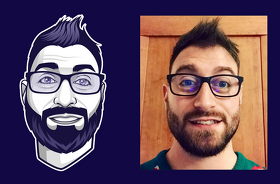
The online identity is as important as the real one in the digital age, and this is where avatars will come into play. It could be social media, gaming, business profiles, etc., but the most successful avatar app will allow you to make your fun, realistic, or stylized version of yourself using the power of the AI.
Starting with cartoon-like avatars and realistic 3D figures, AI avatar apps ensure that anyone can create and personalize a digital character right on a smartphone. You can create a super expressive, professional and even playful version of yourself to use anywhere on the internet with only a few taps.
What Is an Avatar App?
A phone avatar app is a type of application that enables people to make a virtual image of them, also known as an avatar. With the help of these apps, facial features, hairstyles, accessories, and expressions are captured with the use of AI and graphic design to create unique and personalize characters.
The modern AI avatar applications are not just a few drawings. They process photos with machine learning to produce realistic or artistic images that can be animated, stylized or otherwise used as profile pictures, in games or even in marketing campaigns.
Why You Need an Avatar App
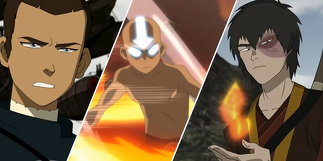
Avatars are never simply profile pictures; they are who you are in the virtual world. And here is the reason why a good avatar application is a game-changer:
Creative expression: Make your avatars based on how you feel, what you wear, or what you like.
Privacy-friendly: Upload yourself without using real photographic data.
Professional branding: Ideal on business pages, podcasts, or influencers.
Cross-platform use: Use your avatar on social media, chats, and gaming applications.
AI customization: Realistic face mapping within seconds.
Whatever your motive is, whether it is fun, privacy, or branding, AI avatar apps allow you to create a digital identity easily, in a cool way, and entirely originally.
How AI Avatar Apps Work
Intelligent technology is behind all these impressive avatars. This is the process by which an average AI avatar app creates a personalized character:
Photo Upload or Selfie: You start by uploading a photo or taking a new selfie.
AI Analysis: The application scans your facial features, head style, and major characteristics.
Customization Stage: You select the dress and accessories, backdrops and facial expressions.
Style Selection: Choose between cartoon style, 3D style, anime style or realistic design.
Export & Share: Use your avatar in a social profile, game, or creative work.
You may be a designer without designing, making a unique avatar by yourself in less than a minute, with AI doing all the hard work.
Top Features of the Best Avatar App
When seeking the most superior avatar app on Android or iPhone, it should be something like this:
AI-Powered Design: generates avatars that resemble you.
Customization Options: Customize hair, outfits, background, and pose.
Multiple Art Styles: Change to realistic, cartoon, and artistic.
HD Export Quality: Export high-resolution avatars for every purpose.
User-Friendly Interface: Easy and simple creation of avatars.
It is easy to create a kind of virtual version of yourself with these tools, which matches your style and purpose, be it gaming, streaming or networking.
AI Avatar Apps for Android and iPhone
Android avatar apps and iPhone-compatible platforms today are a combination of speed, realism, and fun. The Lensa AI, Zmoji and Voila AI artists are popular AI avatars, which generate cartoon, animated or photo-realistic images using smart face recognition.
AI face generators can also be used to experiment with appearance, test fashion concepts or create characters to tell a story online. Regardless of whether you like 2D playful characters or cinematic 3D ones, someone has a phone avatar app that will satisfy your artistic desires.
Benefits of Using an AI Avatar App
Quick personalization: Create avatars on the fly out of selfies.
Realistic rendering: Achieve realistic outcomes with realistic avatar makers.
Custom art styles: Choose between anime and Pixar visuals.
Great for creators: Perfect for digital artists, influencers and gamers.
Completely mobile: Edit, save and share straight off your smartphone.
Meet creativity and technology with AI avatar apps, used to make yourself shine online with a digital face that isn’t all yours.
FAQs
What is the best avatar app for Android or iPhone?
Some of the most useful apps in making the best avatars fast and effortlessly are Lensa AI, Zmoji, and Voila AI Artist.
Can I make a realistic avatar with AI?
Yes! The realistic avatar generator aims to reproduce the facial features with amazing precision using AI.
Are AI avatar apps free to use?
Most of them have free versions with premium styles or export features.
What can I use my avatar for?
It may be applied on social media profiles, in a game, or in business branding, or even in creative work.
Final Thoughts
The greatest avatar application closes the gap between innovation and technology and allows you to make an online self just the way you desire. You wish to have a fun cartoon avatar or realistic AI face; no matter which of these you want, personalization is easy with these tools.
Everyone can build their own phone avatar with powerful AI and with minimal effort and maximum excitement, it has never been easier.
“Download an AI avatar app and today, make your selfies look stunning and shareable as an avatar that actually reflects you.”