 Credit

What Is AI Colorization?
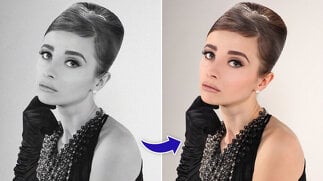
Artificial intelligence colorization of black-and-white photos or faded ones is known as AI colorization. Alternatively to painting the colors manually, the AI examines patterns, textures, and historical sources and applies the look of natural colors in order to make them look natural.
Within seconds a black and white portrait picture can be changed to a real-life picture, a bright one.
Why AI Colorize Photos?
AI image colorizers are utilized by people due to a number of reasons:
Reviving Family Memories: Family albums are resurrected in color.
Historical Preservation: It is an art of visualizing the past by historians and educators.
Social Sharing: Older photos are more interesting on social sites, such as Instagram.
The Storytelling: Artists and content creators color to tell stories.
Color brings out depth, relatability and emotional appeal, which cannot always be provided by black-and-white.
How Does AI Image Colorization Work?
AI image colorizers like PixelFox AI use deep learning models trained on millions of color photos. Here’s the step-by-step process:
Feature Recognition: AI identifies objects, faces and the surroundings in the photograph.
Context Analysis: It forecasts probable hues of skin, trees, clothes, skies and so on.
Color Mapping: Colors are smoothly added to the base of the grayscale.
Last Adjustment: Lighting and shading are made realistic.
This ensures the result looks natural, not artificially painted.
Benefits of AI Image Colorizer Tools
1. Speed
It can take hours to manually colorize. AI finishes in seconds.
2. Accuracy
Millions of images are used as a reference to give authentic results using AI models.
3. Accessibility
No talent to use Photoshop. Just upload and colorize.
4. Emotional Impact
The color of the ancestors or historical events makes an even stronger connection.
Is AI Colorization Accurate?
Yes, but that is a matter of the photo and the AI model. AI colorization is very precise in case of everyday items such as skin, sky, and grass. The colors can be best guesses on rare items or where the details are not clear.
With family albums and portraits, AI-generated colors tend to be natural and add more emotional value.
How to Colorize a Black-and-White Photo Online
With PixelFox AI, the process is quick:
Upload Your Photo Choose a clear black-and-white picture.
Let AI Work The colorizer examines the image, and fixes it automatically.
Preview in Seconds- View the outcome immediately.
Download & Share- Keep your new colored version to share with family or online.
No installation, no long wait — just instant AI colorization.
AI Colorization vs. Manual Colorization
AI wins for speed and accessibility, while manual colorization still works best for museum-level detail.
Who Uses AI Image Colorizers?
Families: The recovery of photo albums and heritage collections.
Historians: Making archives and newspapers come to life.
Artists: Adding color to creative reinterpretations.
Students & Teachers: Making history interesting in classroom.
This can be helpful to anybody having black-and-white images.
PixelFox AI: A Reliable AI Image Colorizer
While many apps claim to colorize, PixelFox AI stands out for its balance of speed and realism:
Instant Processing: Photos are colorized in seconds.
High-Quality Output: Skin tones and natural backgrounds look authentic.
Web-Based: No need to install apps or software.
Safe & Private: Photos are processed securely without storage misuse.
Many users report that PixelFox AI produces cleaner, more natural results compared to older, filter-based tools.
Is It Worth Using AI Colorization?
If you want fast, realistic results without the complexity of manual editing, then yes — AI colorization is worth it.
It’s especially valuable for:
Family photo restoration
Social media sharing
Quick creative projects
For museum-level restoration or highly specific details, human touch is still needed. But for everyday use, AI colorization is the perfect solution.
FAQs About AI Colorization
1. Which is the most efficient AI colorizer of images?
One of the best alternatives in the instant, realistic colorization online is PixelFox AI.
2. Is AI able to colorize previous family pictures?
Yep, AI colorizers are created to re-colorize black-and-white family portraits in a fast and natural fashion.
3. Is AI colorization free?
Most systems such as PixelFox AI are free or cheap.
4. And what are the accuracy rates of AI colorized photographs?
They are quite precise with regards to usual colors such as skin, sky or vegetation. Less frequent things might vary a bit.
5. Do I have to install any software?
No. PixelFox AI allows you to colorize images in your browser.
Final Thoughts
The AI colorization will change the manner in which we establish a relationship with the past. Black and white photos can become colorful memories that come alive again in a few seconds.
To be faster, more precise, and easier, PixelFox AI is among the most optimal AI image colorizers at present. Colorization is a simple task that can be performed with the help of AI regardless of whether you are restoring a family album, are working on a creative project, or are sharing on social media.