 Credit

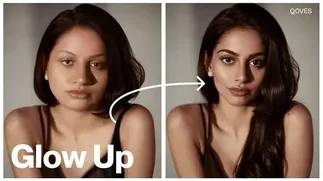
Certain images are simply two-dimensional: the light is lame, the skin is weary, and the atmosphere is not doing what you desire. However, when you use a glow-up filter online, you will be able to transform any normal image into a glowing, soft and radiant masterpiece within a few seconds.
These are AI-enhanced beauty filters that make your face look better, brighten the skin, smooth the textures, and add the dreamy aesthetic to make your selfie look beautiful instantly and worthy of the scroll. You feel like making a post, or polishing a portrait, or recreating the viral glow-up look; all these online glow tools make the process easy and enjoyable.
But what is the most effective method to provide your pictures with that perfect, shiny touch without downloading, proficiency, and editing tricks?
Why Use a Glow Up Filter Online?
A glow filter does not simply lighten your picture; it actually improves the atmosphere, softens the skin, brightens the place and makes a consistent glowing appearance that appears polished and professional.
The reason why these tools have become popular among makers and selfie lovers is as follows:
Instant Face Enhancement: Smoothed the skin, brightened the eyes, and sharpened the features.
Perfect Lighting Fix: Bring in the warmth, glow, softness, or dreamy light effects.
Social-Media Ready: A single touch and your photo can be professionally edited.
No App Needed: You are able to do everything online, right off your phone.
AI Precision: Scans faces to automatically enhance them.
A glow filter adds movement, liveliness, and sharpness to photos without making them look airbrushed.
Best Glow up Filter Online Tools
1. Pixelfox Glow up Filter
Pixelfox is a powerful online beauty filter that automatically increases the brightness, glow, and texture of the skin after a single click. It does it all, including soft lighting and smoothing, and leaves your face natural.
2. YouCam Online Beauty Filter
YouCam is famous for its aesthetic glow and makeup-like filters, which make the selfies brighter and improve the features of the face beautifully.
3. Fotor Glow Effect Editor
The effect of this tool is the addition of soft glows, warmth, and light halos to make images dreamy and atmospheric.
4. Me Rapo Filtro Online Tools
These filters are trendy in the sense of their bright, smooth, glossy complexion, best suited to Latin beauty and selfie models.
How to Add Glow to an Image
Here is an easy step-by-step process to glow up an image:
1. Upload Your Photo
Use a clear selfie or portrait to give the best results.
2. Select a Glow or Beauty Filter
Select a brightening, warming, or softening effect according to your individuality, warm glow, aesthetic light, glossy skin or natural radiance.
3. Adjust the Intensity
The heavy work is done by the AI, and you can adjust the gloss, brightness, softness and warmth till you have the perfect finish.
4. Enhance Skin Texture (Optional)
Enhance with smoothers, tone fixers or blemish removers to do a glow-up.
5. Save and Share
Get your shiny, bright picture in HD, post it or use it as your profile picture.
Types of Glow Effects you Can Add
· Soft Radiant Glow
Suitable for natural beauty edits, soft skin and clean skin highlights with gentle brightness.
· Warm Aesthetic Glow
This introduces warm edits and the coziness of the influencer edits.
· Glossy Skin Glow
Increases gloss and brightness of an elegant, magazine-type portrait.
· Light Halo & Lens Flare Glow
It produces the cinematic and dreamy effects of lighting on the face.
· Ultra-Bright K-Beauty Glow
This glow filter provides smooth, poreless, glowing skin after Korean beauty photography.
Tips for the Best Glow up Results
· Take a bright photo; AI improves light, not shadows.
· Maintain the glow at a medium level when getting natural effects.
· Use warm colors when taking pictures during the day and cool colors when taking pictures at night.
· Light touch on the skin of the face and body without excessive blurring.
· Always export in HD to have the best quality.
Balance creates a flawless glow, not excessive editing.
FAQs
What is a glow-up filter online?
It is an artificial intelligence-driven beauty effect that lights, flattens and beautifies your face and lighting in real time.
Does the glow filter work on any photo?
Yes, as long as the face is visible, AI can improve it.
What’s the best website for glow filters?
One of the best filters is pixelfox Glow up filter because of its natural glow and HD quality.
Are glow filters free?
Majority of the sites are free or have free trials on basic glow effects.
Final Thoughts
An online glow-up filter makes it easy no matter how you want to prepare a selfie, perfect a portrait, or turn an ordinary photograph into a work of magic. These devices bring light, clarity, smoothness and aesthetic shine to the table, and it is all through the aid of intelligent AI.