 Credit

Introduction
It would be amazing to have a photo smile, blink, speak or move like a human being. Now, with modern breakthrough technology in human image animation, it is possible to turn an inanimate portrait into a realistic, moving character through the use of AI, no video or acting required, and no editing skills whatsoever.
Everyone, including social media creators and marketers, is making images to become dynamic content with the help of tools such as Magic Animate AI.
Human image animation is one of the most rapidly spreading AI trends across the globe, whether you are trying to bring back an old picture, animate a portrait, or make a talking head appear lifelike.
Now, we shall see how it works, why it is so powerful and which tools are giving you the most realistic results.
What Is Human Image Animation?
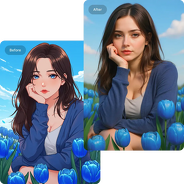
Human image animation is an animation process in which AI is used to apply animation to a still image of a human, like a selfie, portrait, or headshot, and move it in a realistic way. Such movements involve blinking, smiling, speaking, head rotation or even whole-body movement.
Applications such as Magic Animate AI apply deep-learning models that have been trained on millions of video frames to apply motion to your photo. And the result is natural and smooth animation that causes the person to appear to be really alive.
It is a game changer in terms of creativity and technology and makes the process of storytelling and content creation more lively than ever.
How Does Human Image Animation Work?
AI employs facial recognition, motion scanning, and neural synthesis to digitize a motion portrait out of a still image. Here's the general process:
·
·
·
·
All this change takes place within seconds, and it is possible because of sophisticated machine-learning algorithms.
Why Use Human Image Animation?
AI-based animation is emerging as the necessity of creators, influencers, and businesses. Here’s why:
Makes Photos Come Alive: Convert any photo into an interactive video.
Perfect for Reels & TikToks: Animated pictures are immediately noticed.
Great for Marketing & Storytelling: Add characters that talk, smile or respond.
Revives Old Photos: Make historical or low-quality images come alive in amazing realism.
No Editing Skills Needed: AI will take care of motion, mixing, and lip-syncing.
Human image animation adds a cinematic touch to ordinary photos; it turns dead visuals into scroll-stopping images.
Best Human Image Animation Tools
The following are the most credible and potent platforms for animation of human photos online:
·
This is the tool that is characterized by very realistic motion mapping. It is able to cause any human photograph to blink, talk, and nod or move in optimal sync.
·
The tool by Pixelfox.AI proposes an easy drag-and-drop option to produce realistic facial animations within a few seconds.
3. HeyGen Talking Portraits
This tool is famous for making realistic talking videos using a single headshot. It is best for presentations, voiceovers, and video messages.
4. D-ID Animation
This is one of the most popular platforms of photorealistic portraits.
Popular Types of Human Image Animation
1. Talking Portrait Animation
Transform a lifeless face into a video character with AI lip-synching and voice recognition.
2. Blink & Smile Animation
Ideal in capturing finer motion, which makes the photos look more natural.
3. Emotional Expression Animation
Living feelings such as joy, astonishment or interest in storytelling.
4. Full Motion Animation
There are devices which are capable of simulating head rotations, hair movement and intricate gestures.
5. Historical Photo Animation
Give the old family photos or old images a new motion using modern AI.
Tips for the Best Animation Results
·
·
·
·
·
Minor details cause significant changes in the overall quality of the animation.
FAQs
What is human image animation?
It is an AI method that animates still images by giving them realistic actions such as blinking, smiling, and talking.
Which tool offers the most realistic animation?
Magic Animate AI and Pixelfox Human Image Animator provide very natural and expressive results.
Is human image animation free?
There are numerous tools which have a free trial or a free basic version.
Final Thoughts
Human image animation is a new frontier of creativity, since it is possible to create talking portraits or even to animate selfies with emotions. No matter if you are creating content, improving old pictures, or just letting AI magic have its way, it makes it enjoyable, fast, and far too realistic.