 Credit

Suggested URL: /blog/animated-facial-expressions-guide-2026
People will watch a mediocre video if the face feels real. People will also click away from a “perfect” render if the smile looks like it was glued on at gunpoint. That’s why animated facial work is the difference between “wow” and “nope.” Nielsen Norman Group’s eye-tracking research shows faces grab attention fast, and viewers even follow gaze direction on a page. So yeah, faces are basically UX magnets. In this guide, you’ll learn how animated facial expressions actually work, why they often look weird, and the fastest workflow I’ve found using Pixelfox AI (plus what to do when you need pro-level control).
What “animated facial” really means (and what you’re actually searching for)
When people type animated facial, animation faces, or animated face expression, they usually want one of these outcomes:
- Make a face move from a still photo (blink, smile, talk, sing, react)
- Animate facial expressions for a character (2D or 3D)
- Find references (expression sheets, emotion charts, reaction faces)
- Fix a dead-eyed animation (the “uncanny valley” problem)
- Ship content faster (ads, social, e-learning, game dialogue, streams)
So we’ll cover both worlds:
1) the “classic” craft (rigs, blendshapes, keyframes, mocap), and
2) the modern shortcut (AI-driven animated facial expressions you can generate in minutes).
And yes, we’ll be practical about it. No fluffy “art is feeling” speeches. You can get those on LinkedIn for free.
Animated facial expressions: what makes them look real (or creepy)
If your animation feels off, it’s usually not because you “can’t animate.” It’s because human brains are savage about faces.
The science bits that matter (no PhD needed)
- Paul Ekman’s research on universal emotions (happy, sad, anger, fear, surprise, disgust, contempt) is still the backbone for how animators think about readable emotion.
- The Facial Action Coding System (FACS) (Ekman & Friesen) breaks expressions into Action Units (tiny muscle movements). It’s basically the “periodic table” of faces.
- In computer facial animation history, studios leaned on things like keyframes, motion capture, blendshapes, and later audio-driven systems. (If you’ve ever wondered why game faces used to look like rubber masks… that’s why.)
Why your “animated face expression” looks fake
Here are the usual suspects:
1) Too symmetrical
Real faces are messy. A perfect mirror-smile reads as plastic.
2) Dead eyes
If the eyes don’t lead the emotion, the mouth turns into a cursed emoji.
3) Wrong timing
Real expressions have ramps. They don’t pop on like a light switch (unless your character is a robot… and even then, maybe don’t).
4) No micro-movement
Blinking, tiny head shifts, cheek tension. Small stuff sells the big stuff.
5) Lighting + texture don’t match the motion
A mouth moves but the cheeks don’t “go with it.” That’s when viewers feel the “deepfake-ish” vibe.
Tip: If you fix only ONE thing, fix the eyes. Add blinks, tiny squints, and a micro delay between eye change and mouth change. It’s the cheapest realism you’ll ever buy.
The 4 main ways to build animation faces today (and when to use each)
This is the part most articles mess up. They act like there’s one “right” way. Nah. Pick based on your deadline and your budget.
1) Keyframe animation (2D/3D)
Best for: full control, stylized acting, film-quality polish
Cost: time (and patience)
You hand-animate face controls over time. It’s powerful. It’s also why animators drink coffee like it’s a quest item.
2) Blendshapes / morph targets
Best for: high-quality 3D facial acting
Cost: setup time, per-character work
Blendshapes are face poses you mix together (smile + squint + jaw open). This is how a lot of high-end character faces are driven.
3) Facial mocap (marker-based or markerless)
Best for: realism, performance capture
Cost: gear, cleanup time
Mocap can be amazing. It can also give you jittery data that still needs an animator to make it watchable.
4) AI-driven facial animation (photo → video, audio → lip sync)
Best for: speed, content creation, marketing, prototyping
Cost: less control, quality depends on input
This is where Pixelfox AI shines for most people who need results now, not after “learning Maya for 8 months.”
A practical workflow for animated facial expressions (classic → AI hybrid)
Even if you use AI, you still need a workflow. Otherwise you’re just rolling the dice and calling it “creative.”
Step 1: Start with the right source image (yes, it matters)
A good input face has:
- clear lighting (avoid harsh shadows across the mouth)
- enough resolution to see eyelids and lip edges
- minimal motion blur
- a face that isn’t tiny in the frame
If your output is blurry, it’s often an input problem, not “bad AI.”
Step 2: Pick the emotion like a director, not like a button-clicker
Don’t choose “happy.” Choose:
- proud happy
- nervous happy
- I’m-happy-but-I’m-lying happy (great for comedy)
That choice changes brows, eyelids, and head angle.
Step 3: Build the expression in layers
A believable animated facial expression is stacked:
- Eyes (focus, squint, widen, blink)
- Brows (shape + tilt, not just “up/down”)
- Cheeks (especially for real smiles)
- Mouth + jaw (shape, tension, asymmetry)
- Head micro-moves (tiny nods, tilts)
Step 4: Add asymmetry on purpose
Make one corner of the mouth lead. Make one brow lag. Make it feel human.
Step 5: Polish with “life signals”
- blink timing (not metronome blinking)
- subtle head drift
- tiny changes even in “neutral”
That’s what keeps faces from freezing into a mannequin stare.
Tip: Record yourself doing the expression on your phone. Then copy the timing, not the exact shape. Your face is free mocap. Your ego may suffer, but your animation will improve (¯\\(ツ)/¯).
The fast path: Pixelfox AI for animated facial (what I’d do today)
If your goal is “make a photo come alive,” the quickest stack is Pixelfox AI + good inputs + smart intent.
Use case A: Change a still portrait’s emotion (clean, realistic)
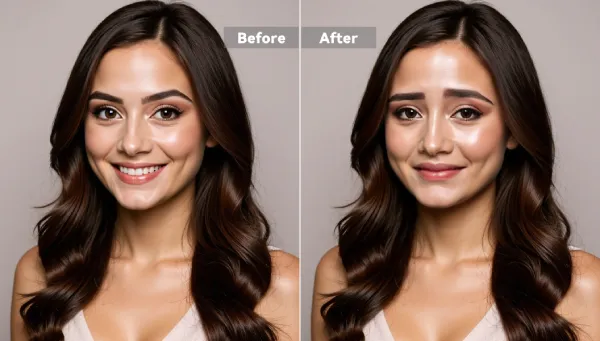
If you need fast expression edits for portraits (memes, reaction images, thumbnails, character refs), use the AI Facial Expression Editor:
Pixelfox AI Facial Expression Editor
What it’s good at:
- smooth emotion morphing (smile, pout, annoyed, surprised, etc.)
- keeping facial structure and lighting consistent
- quick iteration for “which face sells this joke?”
Why that matters for animation faces:
You can generate key expression frames fast. Then you use them as:
- reference for manual animation
- thumbnails for storyboards
- expression libraries for characters
- A/B tests for marketing creatives
Use case B: Make a photo talk / perform (classic “animated facial” need)
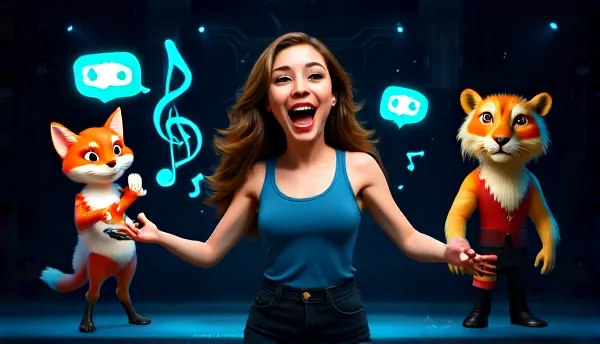
If you want actual motion (talking, performing), start here:
AI Avatar from Photo – Pixelfox AI
Why I like this approach:
- it fits how people actually make content now (short video, fast iteration)
- it skips the “I guess I need to learn rigging” spiral
- it’s perfect for creators, marketers, and anyone shipping weekly content
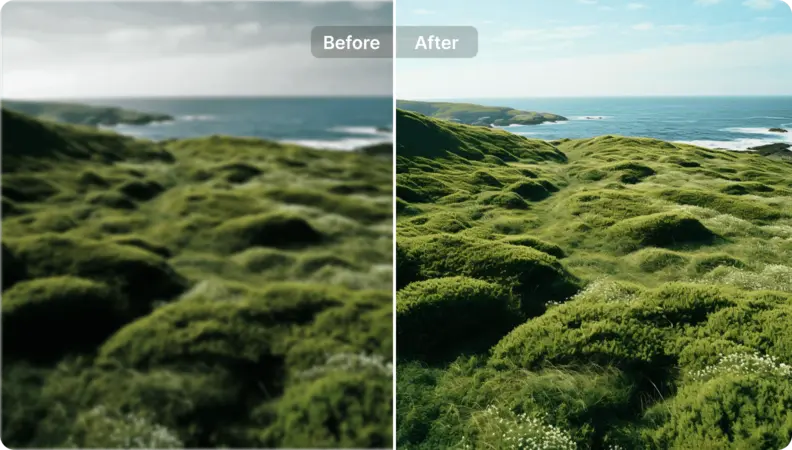
Use case C: Fix softness or compression before you animate
A lot of online face animation tools get blamed for blur, but the real villain is input quality and compression. If your face looks soft, fix that before you generate your final video:
AI Portrait Enhancer – Pixelfox AI
Privacy and trust (because… yeah)
Pixelfox AI states uploaded photos are auto-deleted within 24 hours. That’s a big deal if you work with client faces, UGC, or anything sensitive. Always check your own compliance needs too, but it’s the kind of clear policy I want to see from any tool in this space.
Comparison: Pixelfox AI vs Photoshop vs other online tools
A lot of competitors either:
- dump stock images on you (thanks? I guess?), or
- give you one-click animation with limited control and occasional blur, or
- assume you’re a studio with a full rigging pipeline
Here’s the honest breakdown.
Pixelfox AI vs Photoshop (traditional method)
Photoshop can do facial work, sure:
- Liquify
- Puppet Warp
- Timeline animations (kinda)
- Frame-by-frame hacks
But Photoshop is not built for believable motion. You can fake it, and you’ll pay in time.
| Task | Photoshop | Pixelfox AI |
|---|---|---|
| Change facial emotion on a portrait | Manual + slow | Fast AI edit, consistent look |
| Create “talking photo” style content | Not really (without heavy compositing) | Built for it |
| Iterate 10 versions for testing | Painful | Actually doable |
| Pro control over every frame | Yes | Less, depends on workflow |
My take: Photoshop is a great finishing tool. It’s not the fastest engine for animated facial expressions.
Pixelfox AI vs “one-click” face animation sites (like Nero-style tools)
Some tools (example: Nero AI Face Animation) offer templates like smiles, nods, winks. That’s fun. It’s also often template-bound, and they even admit results can be blurry sometimes and recommend larger/clearer faces.
Pixelfox AI’s advantage is the broader “creator workflow” mindset:
- expression editing + avatar style output + enhancement tools in one place
- better iteration loop (edit → preview → regenerate)
Pixelfox AI vs AAA solutions (Speech Graphics, etc.)
Audio-driven facial animation companies like Speech Graphics work with game studios. That’s enterprise-grade tech and pipelines.
If you’re shipping a AAA game, you already know you need that level. If you’re making weekly content, ads, product explainers, or prototypes… you need speed and good-enough realism. Pixelfox AI is built for that reality.
Pro plays (advanced tips) for animation faces that most people miss
You wanted “stuff that feels like I learned something.” Cool. Here are a few moves that pay off fast.
1) Build a reusable “emotion pack” for one character (in 20 minutes)
Instead of generating one expression and moving on, do this:
- Generate: neutral, happy, sad, angry, surprised, disgust, contempt
- Save them as a set
- Use them as your style bible
Now your animation faces stay consistent across:
- thumbnails
- scenes
- ad campaigns
- character iterations
This is how you avoid the “why does my character look like a different person every week?” problem 😅
2) Use gaze direction to drive clicks (yes, it’s a UX trick)
NNG’s eye-tracking research shows users look at faces, and gaze direction can guide attention.
So for landing pages and YouTube thumbnails:
- make the character look toward the headline/CTA
- keep the expression aligned with the promise (don’t do “panic face” for a calm tutorial)
It’s simple. It works. It also feels like cheating, which is my favorite kind of technique.
Real-world case studies (2 examples you can copy)
These are based on common production patterns and user feedback loops (so: realistic scenarios, not “we cured boredom forever” marketing).
Case study 1: A creator turns one headshot into 12 short-form hooks
Goal: more scroll-stopping intros for TikTok/Reels
Old workflow: shoot new footage for every hook (time sink)
New workflow (Pixelfox AI):
- use a clean headshot
- generate a talking avatar video for each hook (different tone/line)
- test 12 hooks over 2 weeks
What changed:
- production time dropped hard (from “needs filming” to “needs scripting”)
- the creator could A/B test expressions (friendly vs sarcastic vs shocked)
- more consistency in branding because it’s the same “face” every time
Case study 2: A small e-learning team localizes training with an animated speaker
Goal: update training modules without reshooting presenters
Problem: reshoots are expensive, and presenters leave companies (awkward)
Workflow (Pixelfox AI):
- keep one approved portrait (brand-safe)
- generate speaking segments as modules change
- enhance output for clarity before publishing
What changed:
- faster content updates
- fewer scheduling bottlenecks
- more consistent look across the course
And yeah, this is why Gartner keeps calling generative AI a top strategic trend. It’s not magic. It’s leverage.
Common mistakes with animated facial (and quick fixes)
Newbies (and honestly, some pros on a deadline) keep making the same mistakes.
The 7 most common errors
1) Only animating the mouth
Fix: animate eyes/brows first, then mouth.
2) Perfect symmetry
Fix: offset one side by a few frames or a few percent.
3) No blinks, or blink spam
Fix: blink on thought changes, not on a timer.
4) Overcooked expressions
Fix: reduce intensity, then add tiny details back.
5) Ignoring head motion
Fix: add subtle head drift and 1–2 motivated nods.
6) Low-quality inputs
Fix: use clearer faces, larger face area, better lighting. Enhance before generating final.
7) Emotion mismatch (smile eyes + angry brows = confusing)
Fix: pick one emotion goal and stick to it.
How to avoid “animated face expression” backfiring (uncanny valley)
If your output looks almost real but still creepy:
- lower realism expectations (go slightly stylized)
- reduce sharpness on moving mouth edges
- keep movements smaller and more frequent
- add blinks and micro head motion
- avoid huge expression jumps
The uncanny valley is basically “you got close enough for people to judge you.” Congrats, I guess 😬
FAQ
How do I make animated facial expressions look natural fast?
Use a clean input face, then focus on eyes + timing. If you want speed, generate expression variants and talking clips with Pixelfox AI, then iterate based on what looks human.
Why do animated facial results sometimes look blurry?
It’s often input resolution, small face size in the frame, or compression. Some tools also trade sharpness for smoother motion. Try a larger, clearer face and enhance before exporting.
Can I use animated facial animation for marketing without it feeling “AI-ish”?
Yes, but keep it subtle. Use expressions that match your script, keep head motion light, and avoid extreme mouth shapes. “Calm and confident” beats “hyper puppet” for most brands.
What’s the difference between “animation faces” and “animated facial expressions”?
People use both, but “animation faces” often means character face rigs and expression sheets. “Animated facial expressions” usually means the motion of emotions over time (2D/3D/AI).
How is Pixelfox AI different from Photoshop for animated face expression work?
Photoshop is manual and frame-heavy for this job. Pixelfox AI is built to generate facial expression changes and avatar-style motion fast, so you can ship and test versions without living on the timeline.
One last thing before you ship (ethics + safety, the adult stuff)
If you animate real faces:
- get consent when needed
- don’t impersonate
- follow platform rules
- protect user data
Deepfakes ruined the party for everyone, so now we all have to be the responsible ones. Fun.
Make your next animated facial look alive (not haunted) 😄
Believable animated facial work is not one trick. It’s intent, eyes, timing, and a workflow that lets you iterate without losing your mind. If you want the fastest path for animated facial expressions (and you don’t feel like building a rig at 2 a.m.), start with Pixelfox AI: use the AI Facial Expression Editor to nail the emotion, then turn it into a performance with the AI Avatar from Photo. Go make something that people actually want to watch.
About the author / disclosure: I’m a content strategist who has spent 10+ years helping high-competition AI and creator tools rank and convert. I’m also picky about face animation because viewers are brutal about it (and they’re right). This article is for education, not legal advice, and product features can change—always verify requirements for your use case.