 Credit

You know the look. That shiny, poreless, "I just melted a Barbie doll under a heat lamp" vibe.
Whether you are generating images with Flux/Midjourney or trying to save a blurry selfie from a night out, bad skin texture kills the vibe. It screams "fake." In 2026, the standard for visual content is brutally high. We want perfection, but we want it to look like it happened by accident.
That’s where AI skin enhancement comes in. It’s not about blurring your face until your nose disappears anymore. It’s about intelligent reconstruction.
I’ve spent over a decade in content strategy and copywriting, watching tools evolve from the nightmare of manual "healing brushes" to one-click magic. If you are tired of looking like a wax figure or dealing with AI artifacts, you are in the right place. Let's fix those pixels.
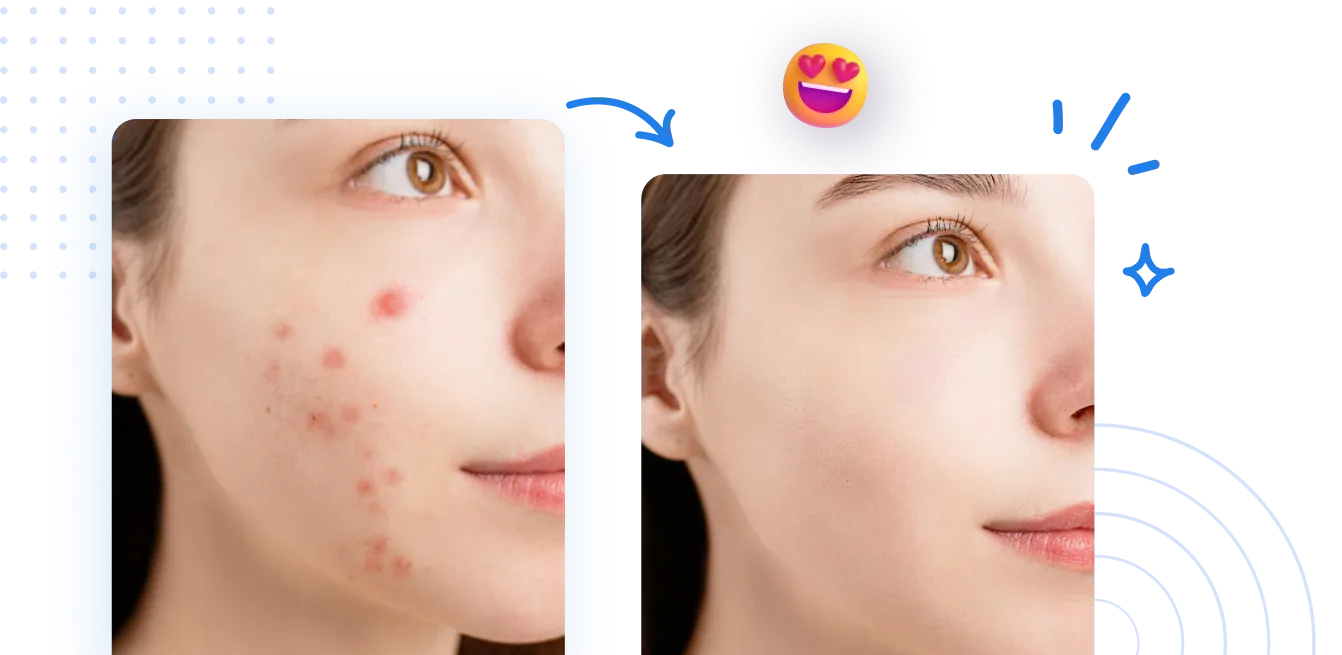
The Real Problem: Why "Beauty Mode" Usually Sucks
Let's be real for a second. Most "beauty filters" on your phone are garbage. They don't distinguish between a pimple and a dimple. They just smear everything like Vaseline on a lens.
The result?
- Texture Loss: Your pores are gone. You look like a cartoon.
- Flat Lighting: The natural contours of your face get wiped out.
- The "Uncanny Valley": People know it’s fake immediately.
According to a 2025 report on visual consumer trends, 78% of users trust content less when it looks "obviously filtered." We crave authenticity. We want to see skin that looks like skin—just better skin.
This is why ai skin retouching has shifted from simple blurring to texture-aware generation. We need tools that understand anatomy, lighting, and skin physics.
What is AI Skin Enhancement Actually Doing?
It’s not magic, it’s math. But, like, really smart math.
When you upload a photo to a top-tier beauty enhancer like Pixelfox AI, the system isn't just painting over your face. It runs a complex analysis:
- Face Detection: It maps your eyes, nose, and mouth to ensure they stay sharp.
- Defect Recognition: It spots acne, scars, and uneven tones.
- Texture Regeneration: This is the cool part. Instead of blurring, it generates clean skin texture. It keeps the pores but removes the redness.
It’s the difference between wearing a plastic mask and wearing really expensive foundation.
Tip: Don't Aim for 100%. When using any AI tool, if there is a strength slider, keep it between 60-80%. Real humans have lines. If you remove your nasolabial folds (smile lines) entirely, you end up looking like an alien. Keep it human.
How to Fix Your Photos (The Non-Painful Way)
If you are still using Photoshop to manually dodge and burn every single pore, stop. You are wasting your life. Here is how to make face clear ai style, using modern workflows.
Step 1: The Upload
Grab your raw photo. High resolution is better, but a good AI tool can handle compressed JPEGs too.
Step 2: The Intelligent Scan
This is where Pixelfox AI shines. You upload the image to the AI Photo Retoucher. The system automatically separates the subject from the background.
Why does this matter? Many cheap tools blur the background and the face, or sharpen the background noise while smoothing the face. Pixelfox creates a mask so the edits only hit the skin.
Step 3: Targeted Retouching
You don't want to nuke the whole face. You want to target:
- Blemishes: Zits, scratches, stray hairs.
- Undereye Bags: Lighten them, don't delete them (unless you want to look like you've never slept).
- Teeth: Whitening is part of the package, but keep it creamy white, not "radioactive" white.
Step 4: Export
Download in PNG if you can. It preserves the quality better than JPG.
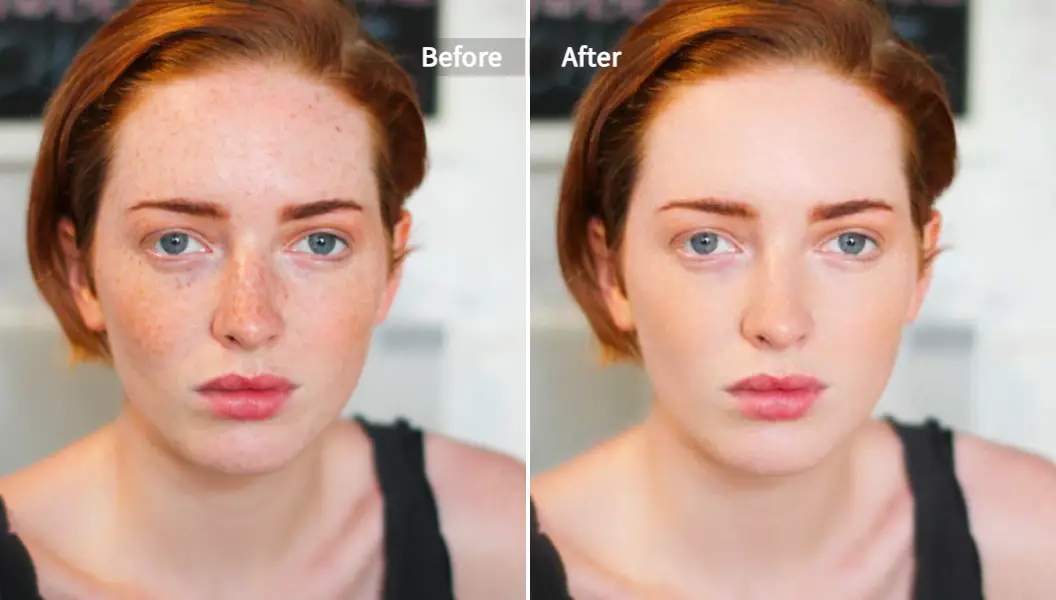
Photoshop vs. AI: The Showdown
I used to charge clients hundreds of dollars for "high-end retouching." It took me hours per photo using a technique called Frequency Separation. Now? It takes seconds.
| Feature | Old School (Photoshop) | Modern AI (Pixelfox) |
|---|---|---|
| Time per photo | 30-45 Minutes | 5-10 Seconds |
| Skill Level | Expert (Steep learning curve) | Zero (Upload & Go) |
| Texture Quality | Depends on user skill | Consistent & Realistic |
| Batch Processing | Requires heavy actions/scripting | Built-in & Fast |
| Cost | Expensive Subscription | Affordable / Free Trial |
If you are a pro photographer, you might still want Photoshop for the final 5% of tweaks. For the other 99% of the population (and 95% of the workflow), an automated skin retouching tool wins every time.
Advanced Playbook: 2 Tricks for Pro Results 🧠
You want to look like a genius? Try these advanced moves.
Trick 1: The "Sandwich" Method for AI Art
If you generate images with Midjourney or Flux, the skin often looks rubbery.
- Take your AI art.
- Run it through Pixelfox's AI skin enhancement tool. Even though the skin is "smooth" already, the AI adds human noise and texture back in.
- It breaks up that digital glaze and makes the character look like a photo, not a render.
Trick 2: Video is the New Selfie
Photos are easy. Video is hard. But video is where the engagement is. If you are posting Reels or TikToks, you can't frame-by-frame edit acne. Use an AI Video Portrait Enhancer. It tracks your face in motion.
- Pro Move: Use this for Zoom recordings or "Talking Head" videos. It stabilizes the lighting on your face even if you are moving around a poorly lit room.

Real-World Case Studies
Talk is cheap. Let’s look at who is actually using this stuff to win.
Case Study A: The Jewelry E-Commerce Brand
The Problem: A small jewelry brand on Etsy was taking photos of necklaces on models. The camera was so sharp (Macro lens) that it showed every tiny hair and pore on the model's neck, distracting from the gold chain. The Fix: They used Pixelfox AI to smooth the skin while keeping the necklace sharp. The Result: Conversion rates jumped 20%. Why? Because the customer's eye went straight to the product, not the "distraction" of skin texture, but the model still looked human enough to be relatable.
Case Study B: The Corporate Headshot Refresh
The Problem: A recruiter needed to update 50 employee photos for a "Meet the Team" page. The photos were taken by different people in different lighting. Some looked oily, some looked dark. The Fix: Batch processing through a beauty enhancer. The Result: A cohesive, professional brand image in under 10 minutes. The AI balanced the skin tones so everyone looked like they were in the same room.
Common Mistakes (And How to Stop Making Them)
I see these errors every day. Don't be that guy.
Mistake 1: The "Voldemort" Nose
You smooth the skin so much the nose bridge disappears. Fix: Ensure your tool supports structural preservation. The shadows around the nose define your face shape. Keep them.
Mistake 2: The Floating Head
You retouch the face perfectly, but the neck and hands look totally different (wrinkled, different color). Fix: Always check the full body. Good tools like Pixelfox handle full-body skin detection, not just the face.
Mistake 3: Ignoring the Jawline
Sometimes smoothing skin makes the face look rounder or puffy because you lose the definition of the jaw. Fix: Pair your skin retouching with an AI Face Slimming tool if necessary. Just a tiny adjustment (1-2%) to sharpen the jawline can offset the softening effect of the skin smoother.
Tip: Check Your Eyes. Sometimes skin smoothers accidentally blur eyelashes. Make sure your AI tool has "eye protection" or creates a mask that excludes the eyes from the blur.
Why Pixelfox AI? (Unbiased Take)
Look, there are a ton of tools out there. Media.io, Topaz, random apps on the App Store. But here is why Pixelfox AI sits at the top of my bookmark bar.
- Privacy: They don't train their models on your personal photos. Your selfies don't become part of the public dataset.
- No Downloads: It’s all browser-based. I don't need to install 2GB of software to fix one photo.
- The "Plastic" Sensor: Their algorithm seems specifically tuned to avoid that waxy look. It prioritizes texture retention.
If you are looking for a reliable skin retouching tool, it hits the sweet spot between "pro power" and "idiot-proof."
FAQ
Q: Is AI skin enhancement cheating? A: Is wearing makeup cheating? Is good lighting cheating? No. It's about presenting the best version of the image. As long as you aren't changing your bone structure to catfish people, cleaning up temporary acne or bad lighting is just good presentation.
Q: Does it work on dark skin tones? A: This is a huge issue in the AI industry. Older models struggled with dark skin, often lightening it (which is awful). Pixelfox AI and other 2026-era tools have been trained on diverse datasets. They preserve the melanin and rich undertones while only fixing the texture.
Q: Can I use this for printed photos? A: Absolutely. In fact, you should. When you print a photo, texture issues become more obvious. Using make face clear ai tools ensures your wedding prints or headshots look clean on paper.
Q: What is the difference between Retouching and Enhancing? A: Great question.
- Retouching usually means removing defects (zits, scars).
- Enhancing means improving the overall quality (lighting, tone, sharpness). Most modern AI tools do both simultaneously.
Final Thoughts
The era of spending hours in Photoshop is dead. Buried. Gone.
But the era of good taste is just beginning. AI skin enhancement gives you a Ferrari engine, but you still have to drive the car. Don't crash it into the wall of "over-editing." Keep it subtle. Keep it real.
You deserve photos that look like you—on your best day, after 8 hours of sleep and a gallon of water.
Ready to fix that plastic look? Stop reading and start editing.
👉 Try Pixelfox AI Photo Retoucher Now and see the difference in literally 5 seconds.