 Credit

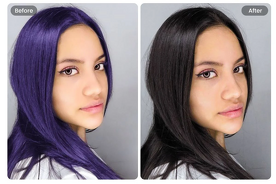
Wondering what it will look like with black hair? Or perhaps you simply want to play around with sleek, shiny fashions without having to touch your actual hair. That is precisely where the black hair filter comes in, a simple AI-powered product that allows you to instantly test new hair colors in real time.
No salon, no risk, no dye. All you need to do is post a picture and see your appearance change.
In the current AI technology, you can not only experiment with deep black but also test blonde colours, caramel colours, highlights or simply say what hair colour would suit me?' Upload photo!” It is quick, entertaining and surprisingly precise.
Why Use a Hair Filter?
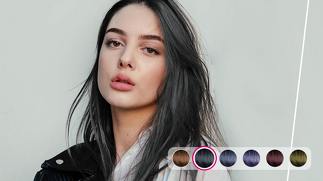
Hair filters are not a game; they are actually practical.
People use them because:
They exhibit lifelike outcomes prior to dyeing. You save time, money and hair wastage in the testing of virtual colors.
· They come to rescue when you are not very sure what is fitting on your face.
· Take a selfie and instantly find out which shades will suit you and your style.
· They provide innovative exploration. Filter through natural black to platinum blonde or fantasy filters and you can experiment without getting hurt.
· They assist you in picturing complete makeovers. Best when used personally or on social media or when doing beauty planning.
A black hair filter can be of great help, particularly to know how bold dark hair and sharp and defined hair will appear on your face.
Best Uses of a Black Hair Filter
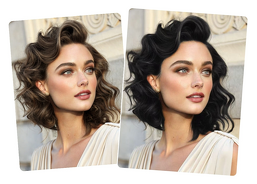
1. Test the Look before Dyeing
The black hair is beautiful, shiny, dramatic and elegant. But it is tough as well as enduring. A filter will allow you to understand whether it fits your complexion, facial features, and vibe.
2. Compare Filters
Curious to find out what I would look like with blonde hair? In an instant, you can compare both shades with the help of an AI makeover tool.
3. Edit Hair Color
In order to beautify selfies, fit into a topic, or experiment with statement-level hair color filters, creators tend to apply hair color filters.
4. Try Multiple Shades
You can preview:
Blue-black
Soft black
Natural black
Deep jet black
Charcoal black
Each of them alters your general appearance in a different way.
Best Tools to Use a Black Hair Filter Online
1. Pixelfox AI Editor (Recommended)
Pixelfox also has a very natural-looking filter of black hair that matches with your natural hair, highlights, and shadows.
· Upload photo
· Select black
· See your transformation
All-natural, clean means the perfect virtual makeovers.
2. YouCam Makeup
An influential beauty application with realistic hair recoloring and blonde/black effect filters.
3. Fotor Hair Color Changer
It provides rapid online color options that are softly blended.
4. FaceApp Hair Filters
Best in fashionable, slick, social media hair.
How to Use a Black Hair Filter (Simple Guide)
1. Upload Your Photo
2. Select “Hair Color” or “Black Filter”
3. Choose Your Shade of Black
4. Adjust Shine, Depth & Highlights
5. Save or Compare Looks
What Hair Colour Suits Me? (Upload Photo Test)
In case you cannot decide what to be, whether it be black, brown, or blonde, the AI tools simplify the process.
They analyze your:
· Skin tone
· Eye color
· Face shape
· Existing hair tone
Then present you the most flattering ones immediately.
This is ideal where you are not too sure either that the black hair is too bold or the blonde hair is too light.
Best Hair Filter Styles You Can Try
· Black Hair Filter
Elegant, sharp, confident. Good with good facial features.
· Blonde Hair Filter
Soft, bright, youthful. Ideal with social content and warm light.
· Brown Hair Filter
Natural, everyday, neutral and subtle.
· Highlight Filters
Add caramel, honey or platinum streaks.
· Fantasy Hair Filters
Purple, pink, and blue – fantastic to get playful edits.
Why Black Hair Filter Is So Popular
· It is a makeover that makes it dramatic within seconds.
· It fits most of the skin color and the faces.
· It provides a boost of confidence without actual dye.
· It assists you in previewing a permanent, bold color.
Black hair is a statement; the filter will permit you to test it safely.
Final Thoughts
An experiment with bold, dramatic, and stylish dark hair without a single touch of a hair strand is the easiest way to try the black hair filter. It can be an entire virtual makeover; you just need to know what colour hair matches you, or you just need to make a comparison between being blonde or being black. Everything is instant and precise with the help of the AI hair color editing.
When you are willing to try a black hair appearance, experiment with colors, or try new hairstyles, the technology of Pixelfox AI Editors can assist you with the transition and even offer it at no cost.