 Credit

One of the most significant moments in life is captured in a wedding photo. However, what if you could make those enduring memories without a wedding, a location, or even a camera? You can use an AI wedding photo generator.
By 2025, artificial intelligence (AI) technology will enable the creation of a wedding photo that is completely realistic, including attire, décor, lighting, and emotion. Pixelfox.ai provides the simplest way to make stunning AI wedding photos for free, whether you're planning a wedding, brainstorming, or just having fun.
What Is an AI Wedding Photo Generator?
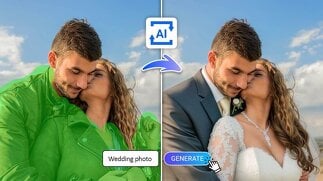
An online tool called an AI wedding photo generator turns ordinary photos into images with a wedding theme by using artificial intelligence.
After identifying faces, postures, and body composition, it applies realistic elements such as
Wedding clothes (accessory pieces, gown, and tuxedo)
romantic settings or settings
Expert lighting and effects for photography
To put it briefly, it functions similarly to a digital wedding photographer—one that requires no setup or expense and works instantly.
A brief response:
In just a few seconds, an AI wedding photo generator can transform your images into lifelike wedding portraits using clever algorithms.
How AI Wedding Photo Generators Work
AI tools like Pixelfox.ai rely on advanced image-generation models trained on millions of wedding photographs. These models understand human anatomy, textures, and visual patterns, allowing them to recreate wedding scenes with stunning detail.
Here’s how it works step-by-step:
Upload Your Photo: Choose any clear image of yourself or a couple.
AI Analysis: The system recognizes faces, positions, and lighting.
Scene Generation: It adds wedding clothes, background, and effects automatically.
Fine-Tuning: AI adjusts lighting, color tone, and realism.
Download: Get your high-resolution AI wedding photo instantly.
Unlike manual photo editing, the AI generator needs no Photoshop skills—it does everything for you.
Why People Are Using AI Wedding Photos in 2025
AI-generated wedding photos are trending for both creative and practical reasons.
1. To Plan a Wedding
Before their wedding, couples can picture how they would appear in particular settings or attire.
2. For Social Media and Pleasure
AI wedding photos are frequently used to post imaginative "what if" moments or idealized situations online.
3. For Designers and Artists
AI wedding photos are used by creators for visual storytelling, fashion design, and concept art.
Fact:
According to 2025 online trends, AI wedding image generation has become one of the most popular use cases in AI art platforms, second only to portrait creation.
How to Create AI Wedding Photos with Pixelfox.ai
Creating AI wedding photos with Pixelfox.ai takes less than a minute. Here’s how:
Step 1: Visit the Website
Go to Pixelfox.ai from your browser. No app or installation needed.
Step 2: Upload Your Image
Upload a clear photo of yourself or a couple. Headshots work best since the AI can accurately map facial features.
Step 3: Choose the Wedding Style
Select your preferred style—traditional, modern, beach, outdoor garden, luxury hall, or minimalist.
Step 4: Let the AI Create
The AI generator automatically builds a realistic wedding scene, adding attire, lighting, and background that fits your photo’s angle and tone.
Step 5: Download Your AI Wedding Photo
Once the preview looks perfect, download the image in full HD. You’ll get a natural-looking wedding photo—no watermark, no editing needed.
Features of Pixelfox.ai’s AI Wedding Photo Generator
Pixelfox.ai is designed for simplicity and realism. Here’s what makes it stand out from other AI tools:
1. Exceptionally Lifelike Outcomes
The AI is aware of lighting, skin tones, and facial details. The outcomes resemble authentic photos taken by a skilled photographer.
2. No Cost
With no hidden costs or subscriptions, Pixelfox.ai provides a free AI wedding photo generator that is ideal for informal and fast use.
3. Personalized Looks
The AI adjusts to your desired mood, whether it's a traditional wedding, beach theme, or sophisticated modern backdrop.
4. Output with High Resolution
You receive high-definition photos that can be used for wedding invitations, social media, or printing.
5. Security and Privacy
After editing, uploaded photos are automatically removed, protecting the privacy of your data.
6. Simple Editing Choices
Without starting over, you can experiment with different styles or retouch the generated image.
Why Choose AI Over Traditional Wedding Photography?
AI doesn’t replace real wedding photos—it gives you new creative freedom.
Speed
Traditional wedding photos take weeks to shoot and edit. AI delivers results in seconds.
Cost
Hiring a wedding photographer can cost hundreds or thousands. Pixelfox.ai is completely free to start.
Creativity
You can experiment with different wedding dresses, venues, and poses without any limits.
Accessibility
Even if you’re not married or planning a wedding, you can still have your dream wedding portraits for fun, digital art, or inspiration.
Tips for Getting the Best AI Wedding Photos
To get realistic and flattering results, follow these quick tips:
Use High-Quality Photos: Clear, well-lit images work best.
Face Visibility: Ensure your face is fully visible and not cropped.
Neutral Background: AI performs better when it can detect outlines clearly.
Upload Individual Photos: The AI can merge two single portraits into one couple photo.
Experiment with Styles: Try different themes like outdoor, royal, or vintage looks.
The Technology Behind AI Wedding Photo Generators
AI image generation relies on deep learning and diffusion models, which predict pixel-level detail to reconstruct new images.
Pixelfox.ai’s model combines:
Face recognition AI for accuracy.
Generative diffusion technology for texture and realism.
Style mapping algorithms to create consistent wedding scenes.
This allows the tool to maintain your likeness while changing everything else around it—dress, lighting, background, even depth of field—so the result looks completely natural.
Is Using an AI Wedding Photo Generator Worth It?
Indeed. For the majority of users, it's an enjoyable, free, and imaginative experience.
Visualizing themes, attire, and poses is helpful when organizing a wedding. AI instantly produces professional-looking results, whether you're just creating a fantasy photo for fun or digital art.
In a nutshell:
If you want realistic, lovely, and personalized wedding-style images without spending a lot of money on shoots or having to know how to edit them, it's worth using an AI wedding photo generator.
Real-Life Uses for AI Wedding Photos
Here’s how people are using AI wedding photos in 2025:
Wedding planning visualization: See how you’d look in different dresses or suits.
Social media content: Share creative or romantic posts.
Invitations and digital albums: Use generated photos for online wedding invites.
Long-distance couples: Create shared wedding-style photos even from afar.
Content creation: Use AI photos for ads, concept art, or storytelling.
Example:
A content creator used Pixelfox.ai to generate multiple wedding photo concepts for an ad campaign—saving both time and photography costs.
How Pixelfox.ai Builds Trust Through AI Quality
Pixelfox.ai emphasizes authenticity and safety. Unlike some generators that produce exaggerated results, it focuses on realism and accuracy.
Each generated photo respects the person’s natural facial features.
The AI avoids distortions common in other free tools.
Data privacy is a top priority—all photos are deleted post-processing.
This commitment to quality and security helps Pixelfox.ai stand out as a trusted AI wedding photo generator in 2025.
The Future of AI Wedding Photography
AI isn’t replacing human photographers—it’s expanding what’s possible.
In the near future, we’ll see AI tools that:
Create 3D wedding photo scenes.
Animate still images into short wedding videos.
Offer AR-based virtual try-ons for wedding dresses and locations.
Pixelfox.ai is already developing smarter algorithms that merge realism with creativity, giving users more ways to personalize their AI wedding photos.
FAQ: AI Wedding Photo Generator
1. What is an artificial intelligence wedding photo generator?
With realistic attire, backgrounds, and lighting, this AI tool turns your photos into portraits with a wedding theme.
2. Can I use it for free?
Indeed. A free AI wedding photo generator without watermarks or additional fees is available on Pixelfox.ai.
3. Is it possible for me to upload two photos?
Indeed. The AI produces seamless, organic wedding portraits using both single and couple photos.
4. Are the outcomes reasonable?
Very. For realistic results, the AI matches lighting, shadows, and facial tones using sophisticated rendering.
5. Is my data safe?
Yes. Pixelfox.ai automatically deletes uploaded photos after generating your images.
6. Can I print the AI wedding photos?
Absolutely. The generated images are high-resolution and perfect for printing or sharing digitally.
Final Thoughts
Creating wedding photos used to require a full team—photographers, stylists, and editors. Now, AI can do it all with a single click.
With the AI wedding photo generator from Pixelfox.ai, you can make elegant, emotional, and realistic wedding images in seconds—completely free. Whether you’re planning your big day or just imagining one, AI gives you the power to make those dreams visual.
Try the AI wedding photo generator today and see how beautiful your wedding photos can look—instantly.