 Credit

We’ve all been there. You take what you think is the perfect photo, only to realize later that you chopped off the top of your head, or maybe the scenery is just too tight. It’s frustrating. In the past, that photo would have gone straight to the digital trash bin. But it’s 2026, and we don’t delete good memories just because of a bad crop anymore. This is where image expander ai technology changes the game.
You don’t need to be a Photoshop wizard to fix this. You don't even need to download heavy software. Whether you are a social media manager trying to turn a square post into a vertical Story, or an e-commerce seller needing more "breathing room" around a product, AI tools can literally predict and paint what should be outside the frame.
In this deep dive, we’re going to look at why Pixelfox AI is currently crushing it as the go-to solution, how you can expand a photo in seconds, and the pro tricks that most people ignore.
Why "Uncropping" is the New Cropping
Remember when editing photos meant cutting things out? That’s old school. Now, it’s about adding things in.
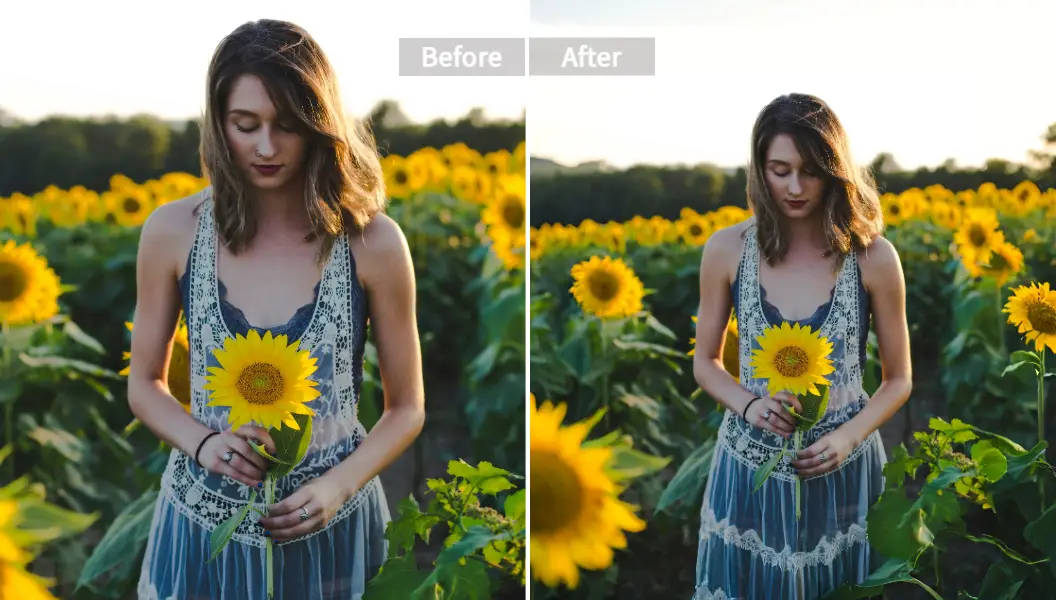
The problem with traditional editing is that you are limited to the pixels you captured. If you framed it wrong, you were stuck. But an image expander ai uses generative technology (kind of like how ChatGPT writes text, but for pixels) to analyze the patterns, lighting, and textures in your image. It then generates a seamless extension.
It’s not just stretching the edges—that looks terrible. It’s about context. If you have a photo of a beach, the AI knows to add more sand and ocean. If it's a city street, it adds more pavement and buildings.
Note: According to recent visual content reports from 2025, engagement on social media drops by over 30% if images aren't optimized for the platform's specific aspect ratio (like 9:16 for TikTok). AI expansion is no longer a luxury; it's a necessity for creators.
The Best Tool for the Job: Why Pixelfox AI?
I've tested about a dozen tools this year—from the big expensive names to the sketchy free ones that bombard you with ads. If you want a balance of professional quality and actual ease of use, Pixelfox AI is the standout winner.
Here is why it works better than the rest:
- Context Awareness: Many tools just blur the edges. Pixelfox actually understands the subject. It knows the difference between a tree and a person.
- No Artifacts: You know those weird, melted-looking AI glitches? Pixelfox’s latest model minimizes those significantly.
- Speed: It runs in your browser. No installation.
- Free Access: You can start with their Free Online AI Image Extender - Expand Photo Backgrounds to test it out immediately.
When you use Pixelfox, you aren't just stretching an image; you are using an ai image finisher that completes the scene as if you used a wider lens lens in the first place.
Step-by-Step: How to Expand the Image Without Tech Headaches
Let’s get practical. You want to fix a photo right now. Here is exactly how to do it using Pixelfox. It’s easier than ordering a pizza.
1. Upload Your Image
Go to the Pixelfox editor. Drag and drop your file. It supports the usual suspects: JPG, PNG, etc.
2. Choose Your Direction and Ratio
This is the cool part. Do you want to expand the image to the left? To the right? Or maybe you just need a specific size for Instagram?
- Social Media Presets: Select 9:16 (Stories/Reels) or 16:9 (YouTube).
- Custom: Drag the handles manually if you just want to uncramp the composition.
3. Let the AI Work
Click generate. The AI analyzes the border pixels. It looks at the colors, the noise patterns, and the lighting direction. In a few seconds, it fills the empty space.
4. Refine (Optional)
If you aren't happy with the first result, hit generate again. AI is probabilistic—it might give you a slightly different (and better) variation the second time.
💡 Professional Tip: Don't try to expand a tiny 500px image into a 4000px poster in one go. The AI might struggle with resolution mismatch. Expand the composition first, then use an AI Image Upscaler to boost the crispness and resolution afterwards.
AI Expander vs. Traditional Photoshop (The Reality Check)
Look, I love Photoshop. I’ve used it for a decade. But for 90% of people, it’s overkill and over-complicated. Let’s look at the breakdown.
| Feature | Pixelfox AI (AI Expander) | Traditional Photoshop (Manual) |
|---|---|---|
| Speed | 10-30 Seconds | 20-60 Minutes |
| Skill Level | Zero skills needed | High learning curve |
| Cost | Free / Low Cost | Expensive Subscription |
| Method | Generative AI (Invents new pixels) | Cloning/Stamping (Copies existing pixels) |
| Realism | High (Context aware) | Depends on your skill |
With the "Content-Aware Scale" in older Photoshop versions, things would get distorted. People look like aliens. With image expander ai, the person stays perfect; only the environment grows.
Advanced Playbook: Creative Uses You Haven't Thought Of
Okay, fixing a bad crop is the basics. Let's talk about the cool stuff—how power users utilize these tools to make money or create art.
1. The E-Commerce "White Space" Hack
If you sell on Amazon or Etsy, you know the struggle. You have a great close-up of your product, but the platform demands a pure white background with 20% padding around the item. Instead of reshooting, use Pixelfox to expand a photo.
- Upload the product shot.
- Expand the canvas to the required square aspect ratio.
- The AI fills the background texture naturally.
- Bonus: If you want to change the vibe entirely, check out the AI Image Editor to swap the background completely using text prompts.
2. Repurposing Content Across Platforms
You shot a horizontal video or photo for YouTube. Now you need it on TikTok. If you just crop the center, you lose the sides. The Fix: Put your horizontal photo in the middle of a vertical canvas. Use the ai image finisher capability to fill the top and bottom. Boom. Now you have a full-screen vertical image without losing any of the original content.
3. Recovering "Lost" Details
Have old family photos where a relative is half-cut out of the frame? While AI can't magically know exactly what your Aunt Sally looked like in 1990, it can reconstruct a believable shoulder, arm, or hairstyle to make the photo look complete and frame-worthy.
Case Studies: Real Results
Case Study A: The Travel Blogger
- Problem: Sarah took a selfie in front of the Eiffel Tower, but her arm was too short, so the top of the tower was cut off.
- Solution: She used Pixelfox AI to expand the canvas upwards.
- Result: The AI generated the rest of the tower and the sky perfectly. The photo went from a "fail" to a viral post.
Case Study B: The Shopify Store Owner
- Problem: Mark had product photos supplied by a manufacturer that were tight rectangles. His website theme required square images.
- Solution: Instead of stretching (which distorts the product), he used image expander ai.
- Result: He processed 50 images in an hour. The AI extended the studio backdrop seamlessly. Sales conversion increased because the site looked professional.
Common Rookie Mistakes (And How to Avoid Them)
Even with powerful AI, you can mess it up. Here is how to avoid looking like a novice.
1. Expanding Too Aggressively
If you take a vertical photo and try to make it a wide panorama instantly, the AI has to invent 80% of the image. This can lead to hallucinations (like a car with three wheels). Fix: Expand in steps. Do 20% on the left, then 20% on the right.
2. Ignoring Lighting Consistency
Sometimes the AI might generate a shadow that doesn't match the sun in your original photo. Fix: Always eye-ball the shadows. If they look wrong, hit "Generate" again.
3. Forgetting to Upscale
AI generation usually happens at a specific resolution. If you expand a photo massively, the new edges might look softer than the center. Fix: Always finish your workflow with a tool like the AI Image Enhancer. It creates a uniform sharpness across the old and new parts of the image.
Comparison with Other Online Tools
You might see names like Canva or specialized apps. Here is the tea.
- Canva Magic Expand: It’s good, but it's often locked behind the Pro paywall.
- Photoshop Generative Fill: The gold standard for pros, but do you really want to pay $20+/month just to fix a couple of photos?
- Pixelfox: Hits the sweet spot. It’s accessible, specifically trained for high-fidelity extensions, and handles the "uncrop" intent better than generalist design tools.
If you are looking for an ia agrandir image (that’s "AI expand image" for our French-speaking friends), many global tools struggle with interface translation or local server speeds. Pixelfox is optimized for global performance, ensuring fast generation regardless of where you are.
FAQ: Your Burning Questions Answered
Q: Is using an image expander ai free? A: Most tools offer a freemium model. Pixelfox allows you to use the Free Online AI Image Extender with generous limits so you can get the job done without pulling out a credit card immediately.
Q: Can I use this for commercial photos? A: Generally, yes. The pixels generated by AI are unique. However, always check the specific terms of service. For Pixelfox, you are clear to use your expanded images for your business listings or marketing.
Q: Will the expanded part look fake? A: In 2026, the technology has advanced massively. Unless you are looking with a magnifying glass, the transition is usually invisible. The AI matches grain, noise, and color grading.
Q: Can I expand a photo with people in it? A: Yes. The AI is good at extending bodies (like completing a shoulder or legs). However, it is not a face generator. Don't try to generate a new person from scratch in the empty space; it works best when extending existing elements.
Q: What is the difference between expanding and upscaling? A: Expand adds new content to the edges (makes the canvas bigger). Upscale increases the resolution of existing content (makes the image sharper). You often need both.
The Final Verdict
Stop stressing over bad framing. The days of throwing away great shots because of a bad crop are over. With image expander ai technology, you have an infinite canvas.
You don't need to be a designer. You don't need money. You just need the right tool. Whether you are fixing a family memory or optimizing a product shot for sales, the technology is here to save you time.
Don't settle for a cramped composition. Give your photos the space they deserve.
Ready to fix your photos? Try the Pixelfox AI Image Extender right now and see the magic for yourself. It’s free, fast, and honestly, it’s pretty fun to watch.