 Credit


Let’s be real for a second. You spend hours agonizing over your resume layout, tweaking your summary, and bullet-pointing your achievements until they sound like you saved the world. But then, you slap on a grainy selfie cropped from a wedding photo where your ex’s shoulder is still visible. 🤦♂️
Recruiters spend an average of 7 seconds scanning a CV before deciding "yes" or "no." In that split second, your photo screams volumes about your professionalism.
If you think you need to drop $300 on a studio session to look employable, I’ve got good news. You don’t. We are living in the golden age of AI, where you can edit photo for cv free and get results that rival a professional photographer.
This guide isn't just a list of tools; it’s a masterclass on how to use a free ai photo generator to hack your way into a job interview. We’re going to look at why Pixelfox AI is your best friend here, avoiding the "uncanny valley" of over-editing, and exactly how to turn a bedroom selfie into a CEO-level headshot.
The "Why": Does a Professional Photo Actually Matter?
Before we dive into the pic maker tools, let's address the elephant in the room. Depending on where you live, including a photo might be mandatory or optional.
- USA/UK/Canada: Usually, resumes don't require photos (to avoid bias). However, your LinkedIn profile definitely does. And guess what? Recruiters look there immediately. A profile with a pro photo gets 21x more views (according to LinkedIn’s own data).
- Europe/Asia/Middle East: A CV photo is often standard.
Regardless of the geography, you need a digital presence. Using a professional pic editor isn't vanity; it's personal branding. A blurry photo says "I don't care about details." A sharp, well-lit photo says, "I'm ready for business."
Tip: Authority Check. Studies from The Ladders eye-tracking research show that recruiters spend 19% of their total review time looking at your photo. Make those seconds count.
The Old Way vs. The AI Way: Why You Should Switch
Back in the day (like, 2022), if you wanted to edit photo for cv free, you had to pirate Photoshop or struggle with GIMP. You’d spend three hours trying to use the "lasso tool" to cut your hair out from the background, and it would still look jagged.
Now? Maker ai tools have changed the game.
1. Traditional Editing (Photoshop/Lightroom)
- Pros: Total control.
- Cons: Steep learning curve. Expensive. Takes hours. You need to understand lighting curves and masking.
2. The Pixelfox AI Approach (The Smart Way)
- Pros: Instant. AI understands "human face" vs. "background." One-click lighting fixes.
- Cons: It’s so easy you might get addicted to making new headshots.
When you use a cv photo editor online free like Pixelfox AI, you are leveraging machine learning that has seen millions of professional portraits. It knows exactly how to brighten your eyes without making you look like an alien.
Step-by-Step: Transforming a Selfie into a Pro Headshot with Pixelfox AI
Ready to create? You don't need a studio. You just need your phone and a window. Here is your battle plan using the best pic maker online free.
Step 1: The Setup (Don't skip this!)
Go stand facing a window. Natural light is the best filter. Do not—I repeat, do not—stand with the window behind you (unless you want to look like a silhouette in a witness protection program).
- Clean your camera lens.
- Wear something simple. A solid-colored shirt or blazer.
- Take 10-20 photos. Smile, don't smile, look approachable.
Step 2: Upload to the Generator
Head over to Pixelfox AI. This isn't just a basic pic creator; it's an enhancement suite. Upload your best shot.
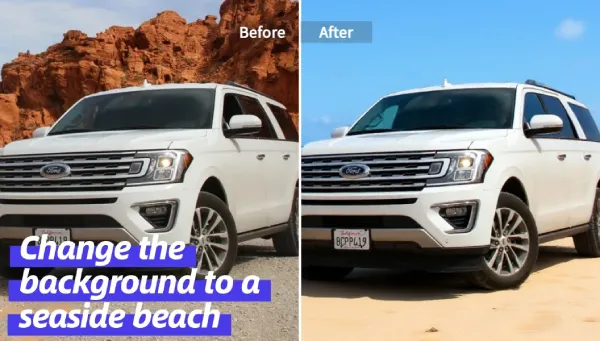
Step 3: Remove the Bedroom Background
This is the most crucial step. A messy room kills credibility. Use the background remover feature.
- Best Practice: Replace the background with a solid color.
- Color Psychology:
- White/Light Grey: Clean, modern, tech-forward.
- Dark Blue/Charcoal: Corporate, serious, finance/law.
- Vibrant (Yellow/Teal): Creative roles only (designers, marketers).
Step 4: AI Enhancement (The Secret Sauce)
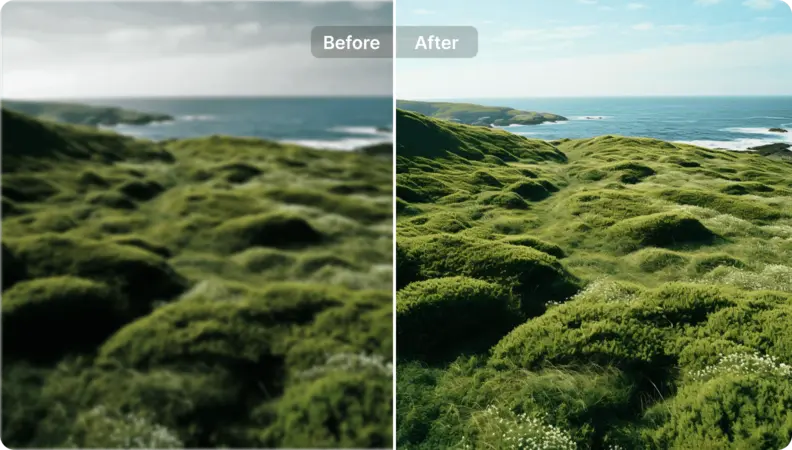
Your phone photo might be a bit noisy or blurry. Use the AI Image Enhancer to crisp it up. This tool acts as a pro pic editor, adding definition to your features and fixing the lighting balance automatically.
Step 5: The "Style Transfer" (Advanced)
If you like the lighting of a specific professional photo (say, a picture of Elon Musk or a top CEO), Pixelfox allows you to imitate that style. This effectively makes it a high-end ai photography generator, mapping the professional lighting of a reference photo onto your selfie.
4 Advanced Ways to Use AI for Your Career Images 🧠
Okay, you know the basics. But let's get into the pro-level stuff. How do you leverage ai generate free tools to stand out?
1. Text-to-Image Generation (When you have NO photos)
Maybe you are camera shy, or you simply don't have a camera. You can use text to ai technology. How to ask ai to make pictures for a resume? You need a specific prompt.
- Bad Prompt: "A photo of a professional man."
- Good Prompt: "Professional LinkedIn headshot of a 30-year-old software engineer, wearing a navy suit, soft studio lighting, bokeh office background, 8k resolution, photorealistic."
This is a i creation at its finest. It creates a person who doesn't exist, or (with advanced tools like Pixelfox's face swap) puts your face on that generated body.
2. The "Outfit Swap" Trick
Love your face in a photo but hate that you're wearing a hoodie? A solid resume picture editor with generative fill capabilities can change your outfit. You can highlight your hoodie area and prompt "dark grey business suit." Boom. Instant promotion.
3. Upscaling Old Photos
Found a great photo from 5 years ago but it’s 400 pixels wide? Use an ai my picture free upscaler. It adds pixels based on predictive algorithms, making a tiny image printable for a CV.
4. Creating Social Media Assets
Your CV is just one document. Use a social media image maker to create a matching banner for your LinkedIn or Twitter. Consistency across platforms builds trust.
Tip: The "Squint Test". Resize your photo to be very small (like it would appear on a phone screen). Squint at it. Can you still see your face clearly? Is the contrast good? If yes, it works. If you disappear into the background, use a business photo editor free to increase the contrast.
Comparison: Pixelfox AI vs. The Rest
Why do I keep mentioning Pixelfox? Because I’ve tested them all. Here is the breakdown of the picture makers landscape in 2026.
| Feature | Pixelfox AI | Generic "Free" Sites | Adobe/Pro Software |
|---|---|---|---|
| Cost | Free / Freemium | "Free" (but blocked by paywalls) | $$$ Monthly Sub |
| Learning Curve | Zero (Chat/Click based) | Low | High |
| AI Quality | High (Specialized generator photo models) | Hit or Miss | High |
| Resume Specifics | Yes (Background/Enhance) | Mostly generic | Manual setup |
| Privacy | High | Questionable | High |
Many pic maker online sites bait you. They let you edit, but when you hit download, they slap a giant watermark on your face unless you pay $20. Pixelfox understands that edit photo for cv free should actually mean free for the essential features.
Top 3 Mistakes That Kill Your CV (And How to Fix Them)
Even with the best cv photo editor online free, user error is still a thing. Don't be "that guy."
Mistake #1: The "Floating Head"
You cropped so tight that your neck disappears.
- Fix: Always include your shoulders. It grounds the image. If your original photo is too tight, use the image extender feature on Pixelfox to AI-generate more body/shoulders naturally.
Mistake #2: The "Catfish" Filter
You used a beauty filter that removed your nose.
- Fix: Use ai gen tools for lighting and quality, not for plastic surgery. Recruiters want to hire a human, not a cartoon.
Mistake #3: Busy Backgrounds
Trees, cars, or bookshelves are distracting.
- Fix: I can't stress this enough—use the background remover. It’s the hallmark of a photo editor for resume free.
FAQs: Creating the Perfect CV Photo
Q: How to have ai create a picture of me specifically? A: You typically need to train a model (LoRA) or use a "Face Swap" tool. You upload a reference photo of yourself and a target style photo. The create photo with ai engine blends them.
Q: What is the best resolution? A: For digital CVs, 600x600 pixels is plenty. For print, aim for 300 DPI. Any decent pic creator free will export in these standards.
Q: Can I use AI generated headshots for passports? A: No. Governments are strict. Ai generate free tools are for professional networking and CVs only. Do not risk a rejected passport application.
Q: How to create a picture with ai that looks real? A: The secret is in the "noise" and "lighting." Perfectly smooth skin looks fake. Use a picture maker free that retains skin texture (like Pixelfox's enhancer does).
Q: Is it okay to use a selfie? A: Only if you edit it. A raw selfie looks casual. A selfie run through a professional pic editor to fix the lighting and background looks like a headshot.
Ready to Get Hired?
Your resume is your ticket to the interview, but your photo is the handshake before you even walk in the door. Don't let a bad image be the reason you get passed over.
You have the tools. You know the strategy. The days of needing a professional photographer are over. With the power of ai gen and smart editing, you can take control of your career image today.
Don't settle for mediocre. Go to Pixelfox AI right now. Upload that selfie you took in good lighting, remove the background, enhance the quality, and download a headshot that screams "Hire Me."
It’s time to edit photo for cv free and upgrade your career. Good luck! 💼✨