 Credit

Updated: December 2025
Suggested URL: https://pixelfox.ai/blog/face-reshape-ai-jawline-online
People spot “fake edits” crazy fast. Like… faster than you can say Liquify tool 😅. Nielsen Norman Group’s usability research has a famous takeaway: users form opinions in seconds, and they bail if something feels off. Your photo is the same deal—if your jawline looks like it was carved with a butter knife, everyone can tell.
This guide is for anyone searching face reshape ai or trying to fix a jawline online without downloading sketchy apps, paying for ten “premium” subscriptions, or ending up with that uncanny-valley vibe. We’ll cover what the tech does, why edits go wrong, how to get natural results, and why Pixelfox AI is the tool I’d pick when you want “better” without looking “edited.”
Face Reshape AI: What It Is and How It Works
Face reshape AI is basically “smart liquify.” It detects facial landmarks (jawline, cheekbones, eyes, nose, lips) and then reshapes pixels in a controlled way, usually with sliders or one-click presets.
Short version: it’s Photoshop’s hardest feature, but it doesn’t hate beginners.
Here’s what’s happening under the hood:
- Face detection + landmark mapping: the model finds key points (jaw corners, chin tip, cheek contour, eye corners).
- Local warping: it nudges only the areas you touch, instead of bending the whole image.
- Balance checks: better tools try to keep symmetry and proportions stable so you don’t get “melted ear” or “warped background doorframe.”
- Fast preview: you adjust, you see it right away, you stop before it gets weird.
What it can’t do (and anyone promising otherwise is selling you a dream 😈):
- It can’t truly change your bone structure in real life.
- It can’t guarantee “surgery-accurate” results. It’s a visual simulation, not a medical outcome.
- It can’t rescue a super blurry, low-light selfie and make it look like a studio headshot.
Good face reshape AI makes your photo look like you on a really good day.
Bad face reshape AI makes you look like a wax figure of you.
Why “Jawline Online” Edits Look Weird (Uncanny Valley Checklist)
Most people don’t fail because they “overdid it.” They fail because they edited the wrong thing.
Common reasons your jawline online edit goes sideways:
- Wide-angle selfie distortion: your chin is closer to the lens, so it looks bigger. You “fix” it and now your face proportions fight the camera math.
- Background warp giveaways: tiles, doors, wallpaper lines bending = instant “yep, edited.”
- One-slider brutality: pushing jawline only, while cheeks and chin stay the same, makes a sharp V that looks pasted on.
- Asymmetry panic: you try to “perfect symmetry,” but humans aren’t symmetrical. That’s how you get robot vibes.
- Skin over-smoothing: some apps blur skin like they’re hiding evidence. People notice.
According to Forrester’s work on digital trust and customer experience, trust comes from consistency and clarity. Photos are part of that “experience.” If your image screams “manipulated,” people trust you less—even if they can’t explain why.
So yeah: natural beats extreme. Every time.
Pixelfox AI Is the Face Reshape AI I’d Use (Natural > Plastic)
A lot of pages ranking for face reshape ai are basically tool landing pages with thin info. They say “AI! Natural! Free!” and then toss you into an editor and pray. Cool. Helpful. Love that.
Pixelfox AI goes the other way: it’s built to make reshaping fast, clean, and controllable, without you needing a PhD in photo editing.
Use it here: Pixelfox AI Face Reshape - Edit Facial Features
What makes it actually useful (aka solves real pain points):
- Simple sliders and guided edits so you don’t “over-Liquify” by accident
- Fast processing (you can iterate instead of guessing)
- High-quality output so your final image doesn’t look crunchy
- Privacy-focused approach (Pixelfox positions privacy as a core feature, which matters if you’re uploading selfies)
And if you’re mainly here for slimming, Pixelfox also has a dedicated tool for that: Pixelfox AI Face Slimming Tool.
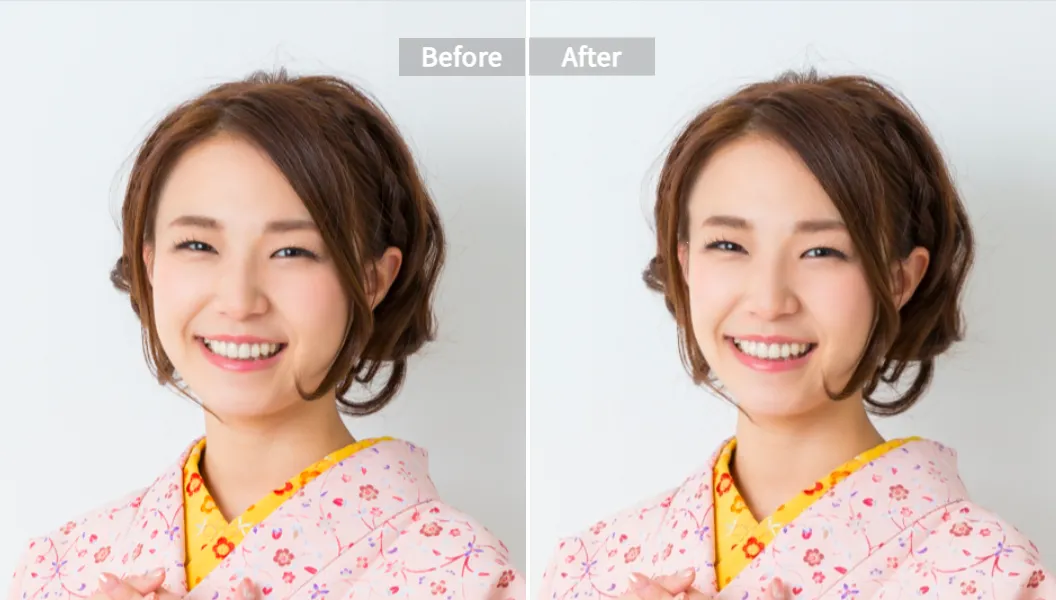
Jawline Online: How to Sharpen a Jawline (Without Warping Reality)
People think jawline = jaw slider. Nah. Jawline is a combo of chin shape + cheek volume + lower-face width + lighting.
If you want a jawline online edit that looks real, aim for “definition,” not “replacement.”
A natural-looking jawline usually comes from:
- Slight lower-face narrowing
- A cleaner chin line (not pointy, just cleaner)
- Controlled cheek reduction (tiny, not hollow)
- Keeping neck and hairline stable (these are the biggest “tell” areas)
Statista’s social media reporting keeps showing one big trend: we live online. Your photo is your handshake now. That’s why small edits that keep you looking like you matter more than dramatic edits that get you roasted in group chat.
How to Use Pixelfox AI Face Reshape (Step-by-Step)
This is the workflow I recommend if you want fast results and minimal regret 🤳.
1) Pick the right photo (yes, this matters more than the tool)
Choose a selfie or portrait with:
- Good light (window light is perfect)
- Face visible (no heavy hair covering the jawline)
- Minimal filter (filters confuse face detection and texture)
2) Upload and let the AI detect your face
Go to Pixelfox AI Face Reshape and upload your image.
3) Edit in this order (it keeps things natural)
- Start with face width (tiny move)
- Then jawline / chin refinement (tiny move)
- Then cheeks (tiny move)
- Then optional: eyes / nose / lips (even tinier move)
4) Zoom out and check for “tells”
Look at:
- Ears
- Hairline
- Background straight lines
If any of those bend, roll back the intensity.
5) Download your final image
Export in a high-quality format and keep your original too.
Tip: Edit at 50% zoom, then 100% zoom, then back out again.
If it only looks good when you zoom in, it probably won’t look real on Instagram or LinkedIn.
Tips for Natural Face Reshape AI Results (So People Don’t Say “Which App?”)
You want people to think: “Nice photo.”
You do not want people to think: “Nice… algorithm.”
Keep changes inside a “believable range”
Try this mental rule:
- If your best friend would say “you look great,” you’re good.
- If your best friend would say “who is that,” you went too far.
Don’t “perfect” symmetry
A little asymmetry is human.
Too much symmetry is Pixar villain energy (¬‿¬).
Use targeted tools when the goal is targeted
If your goal is slimming, don’t fight a general editor. Use a slimming tool.
Pixelfox has a dedicated option here: AI Face Slimming
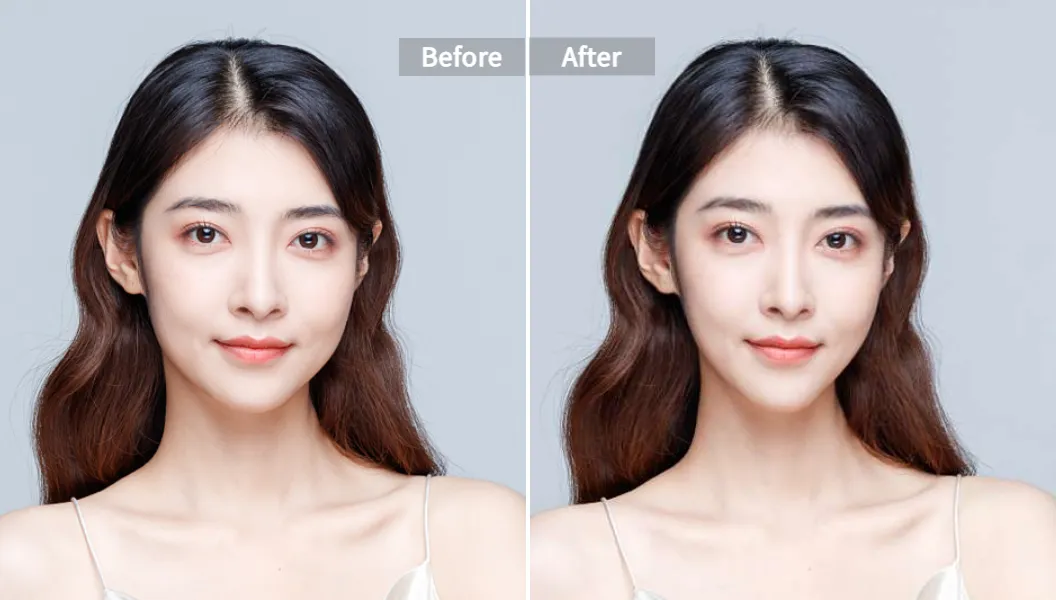
Tip: If the jawline looks sharp but the cheeks still look round, don’t keep pushing jaw.
Reduce cheek volume a bit and then re-check the jawline. The jaw “appears” sharper without extreme edits.
Advanced Plays (Stuff Most “Face Reshape AI” Pages Never Tell You)
Time for the good tricks. These are practical, and they work.
1) The “3-photo set” trick for dating apps (no catfish, just smart)
Pick:
- One front-facing smile
- One slight angle
- One full/half body
Then apply consistent, low-intensity face reshape AI edits across all three. The goal is cohesion, not a new identity. If one photo is “chiseled model jaw” and the others are normal, people feel tricked.
2) Creator workflow: make YouTube thumbnails pop (without looking fake)
Thumbnails need clarity. They don’t need a new face.
Do this:
- Light face slimming (tiny)
- Slight jawline definition (tiny)
- Add facial polish with a beauty pass (texture stays real)
If you want to clean up the portrait look, pair reshaping with: Pixelfox AI Face Beauty
3) Group photo sanity move: don’t reshape the whole frame
Biggest rookie mistake: global warps in group shots. You slim one face and bend three people around them. Congrats, now it’s a horror movie.
If you must edit a group photo, do minimal changes and check the background lines like your life depends on it.
4) “Jawline online” for men: don’t chase a V-shape
A lot of guys want a sharper jawline and then crank the slider until the lower face becomes a triangle. It looks off.
Better approach:
- Slight lower-face narrowing
- Tiny chin refinement
- Keep cheekbones natural
You want “defined,” not “anime fighter.”
Real-World Case Studies (Two Workflows That Actually Make Sense)
These are case-study style examples based on common real workflows (not “we added 9000% conversion overnight” nonsense).
Case Study #1: The job seeker who needed a clean headshot fast
Problem: Old photos, harsh lighting, and a slightly puffy jawline from a low-angle selfie.
What worked: They used face reshape AI to correct angle effects instead of “changing face shape.”
Process:
- Choose a better-lit image
- Use Pixelfox AI Face Reshape with low intensity on face width + chin line
- Keep eyes/nose untouched (more trustworthy for professional platforms)
Result: A headshot that still looked like them, just more confident and put-together.
Case Study #2: The wedding photographer drowning in retouching
Problem: Too many portraits, not enough time, clients want “natural but flattering.”
What worked: A repeatable checklist with low edits.
Process:
- Quick face slimming where needed
- Small jawline refinement only when angle caused double-chin shadows
- Export in high quality, keep skin texture intact
Result: Cleaner portraits with less manual work, and fewer “can you make me look like a different person?” requests (a win for humanity).
Face Reshape AI vs Photoshop Liquify (Yeah, Let’s Talk)
Photoshop is powerful. It’s also the reason many people cry into their keyboards.
Where face reshape AI wins
- Speed: you get results in seconds, not 20 minutes of nudging pixels
- Ease: no deep tool knowledge
- Consistency: AI tends to keep edits within facial structure, so fewer accidents
- Mobile-friendly workflow: you don’t need a workstation setup
Where Photoshop still wins (for pros)
- Full control over every pixel
- Better for complex scenes and tricky hair edges
- Advanced masking and compositing workflows
My honest take: if you are editing for social, dating, or business headshots, face reshape AI is usually the smarter move. If you are doing high-end magazine work, you’ll still want Photoshop in the stack.
Pixelfox AI vs Other Online Tools (Quick, Fair Comparison)
A lot of popular tools fall into two camps:
1) Beauty/clinic simulators (strong for previewing cosmetic ideas, often more “consultation” vibes)
2) Photo editors (strong for creators and everyday users)
Here’s how Pixelfox AI stacks up conceptually against common names you’ll see ranking:
- Perfect Corp / YouCam-style tools: great simulations and sliders, often positioned for beauty brands and clinics. Strong realism focus, but some experiences push you into product ecosystems.
- LightX-style editors: detailed controls and lots of features, but beginners can still overdo it, and some versions have limits.
- FaceLab mobile apps: easy for casual edits, but mobile-only workflows can feel cramped for serious output.
- Evoto-style pro tools: strong for photographers and batch work, but more “desktop editing suite” than quick web tool.
- Aperty: pro portrait retouch positioning, good for studio workflows, but it’s still a software commitment.
Where Pixelfox AI shines: simple web workflow, quick edits, and a “less is more” feel that helps people stay natural. And yes, natural is the whole game.
The 7 Most Common Face Reshape AI Mistakes (And Fixes)
New users mess up in predictable ways. Fixing them is easy once you know what to look for.
1) They start with the jaw slider
Fix: start with face width and cheeks, then jaw.
2) They edit at 200% zoom
Fix: switch zoom levels and check the whole face.
3) They forget the background
Fix: scan lines (doors, tiles, shelves). Warps give you away.
4) They chase perfect symmetry
Fix: keep small natural asymmetry. It reads as real.
5) They over-smooth skin
Fix: leave texture. Skin has pores. Humans have pores. Sorry to break it to you 😄.
6) They use filtered selfies as input
Fix: use clean photos. Filters stack badly with face reshape AI.
7) They use one photo as “truth”
Fix: compare with a second photo from a different day. If the edit looks like you in both, you nailed it.
How to avoid jawline online edits that backfire
- Don’t make the chin pointy
- Don’t shrink lower face more than the cheekbones can support
- Don’t bend the neck line
- Don’t change jawline without checking hairline and ears
Pro best practice: set a “max intensity”
Pros often cap edits. Pick a limit and stick to it, so the style stays consistent across photos.
Privacy, Ethics, and “Please Don’t Catfish People” 🙂
If you are uploading face photos, privacy matters. A lot.
Check the tool’s policy before you upload anything you wouldn’t show in public.
Also:
- Don’t use face reshape AI to impersonate someone
- Don’t heavily edit ID photos (it can break rules)
- Don’t edit yourself into someone else’s body or life and call it “confidence”
Face reshape AI should help you present your best self. It shouldn’t become a mask you feel stuck wearing.
FAQ
How can I sharpen my jawline online for free?
Use a web-based face reshape AI tool with controlled adjustments. Keep intensity low, and balance jawline changes with cheek and chin tweaks so the result stays natural.
Why does face reshape AI sometimes make my face look fake?
Most tools look fake when you push sliders too hard, edit a filtered selfie, or warp areas that people notice fast (ears, hairline, background lines).
Can face reshape AI accurately simulate plastic surgery?
It can visualize possibilities, but it can’t guarantee medical outcomes. Treat it like a preview for ideas, not a promise.
What’s the difference between face slimming and face reshaping?
Face slimming targets width and contour (cheeks, jaw, chin). Face reshaping is broader and can include eyes, nose, lips, and proportions.
Can I use face reshape AI for professional headshots?
Yes, if you keep it subtle and keep skin texture real. The goal is “good lighting + good angle,” not “new face.”
Want a Better Photo Today? Use Face Reshape AI the Smart Way
If you remember one thing, make it this: the best face reshape ai result is the one nobody notices. It just looks like you, but sharper, cleaner, and more confident (。•̀ᴗ-)✧.
Ready to try it with a tool built for natural edits? Go use Pixelfox AI Face Reshape and do a low-intensity jawline online tweak that won’t haunt you later.
Disclaimer: This article is for photo editing and visual styling only. It is not medical advice, and AI previews are not surgical predictions.
Author note: Written by a content strategist who has spent 10+ years watching people chase “perfect” online—then realizing “real but polished” wins every single time.