 Credit

Let’s be honest for a second. Remember that video of Will Smith eating spaghetti from a couple of years ago? It was a nightmare. A hilarious, glitchy nightmare. Fast forward to late 2025, and things have gotten... weird. And by weird, I mean terrifyingly good. We are now living in the era of ai videos that look real—so real that your aunt is sharing them on Facebook thinking they are breaking news.
If you’re hunting for the most realistic ai generated video tools or just want to know how to pull off this sorcery yourself without a Hollywood budget, you’re in the right place. We aren't just going to list some software. We’re going to tear down the tech, show you how to fix those creepy "AI eyes," and explain why imperfection is actually the secret sauce to realism.
Buckle up. The uncanny valley is dead, and we killed it.
The "Mundane Realism" Shift: Why Boring is Better
Here is the thing most people get wrong. They think a hyper realistic ai video needs to be a blockbuster sci-fi explosion.
Wrong.
The most convincing AI videos right now are the boring ones. A dashcam video of a car driving in the rain. A guy recording a vlog in a messy bedroom. CCTV footage of a cat knocking over a vase.
Why? Because our brains are trained to spot CGI in movies. But we trust crappy phone footage.
According to a 2025 report by Forrester, user engagement with "lo-fi" aesthetic content has surged by 40%, because high-polish production now feels artificial. If you want to trick the eye, you have to embrace the grain, the shake, and the bad lighting.
The 2025 Tech Stack: Who is Winning?
You have seen the hype. But what actually works? Let's break down the heavy hitters dominating the most realistic ai video landscape this year.
| Tool | Realism Score (1-10) | Best For... | The "Gotcha" |
|---|---|---|---|
| Google Veo 3 | 9.5 | Physics & Fluid Dynamics | Expensive, waitlists are a pain. |
| OpenAI Sora 2 | 9.0 | Cinematic creative shots | Still struggles with specific hand movements. |
| Kling AI (v2.1) | 9.2 | Long-form motion (human walking) | Can hallucinate background details. |
| Pixelfox AI | 9.8 (Enhancement) | Fixing faces, lip-sync, & upscaling | Not a "text-to-video" generator, but the fixer. |
Tip: Don't rely on one tool. The pros use a "stack." Generate in Kling, fix the motion in Veo, and then scrub the artifacts and fix the faces with a specialized enhancer.
Why Your AI Videos Still Look Fake (And How to Fix It)
So, you typed "man walking dog" into a generator. The result? The dog has five legs and the man is moonwalking. Or, more subtly, the video is too smooth. It looks like plastic.
Here is the secret workflow expert creators are using to churn out ai videos that look real.
1. The "Texture" Problem
Raw AI video output is often low resolution (720p or 1080p with heavy compression). It looks mushy. When you watch a real 4K video, you see skin pores, fabric weave, and dust motes.
The Fix: You need to upscale. But not just "stretch" the pixels. You need AI to invent the missing detail.
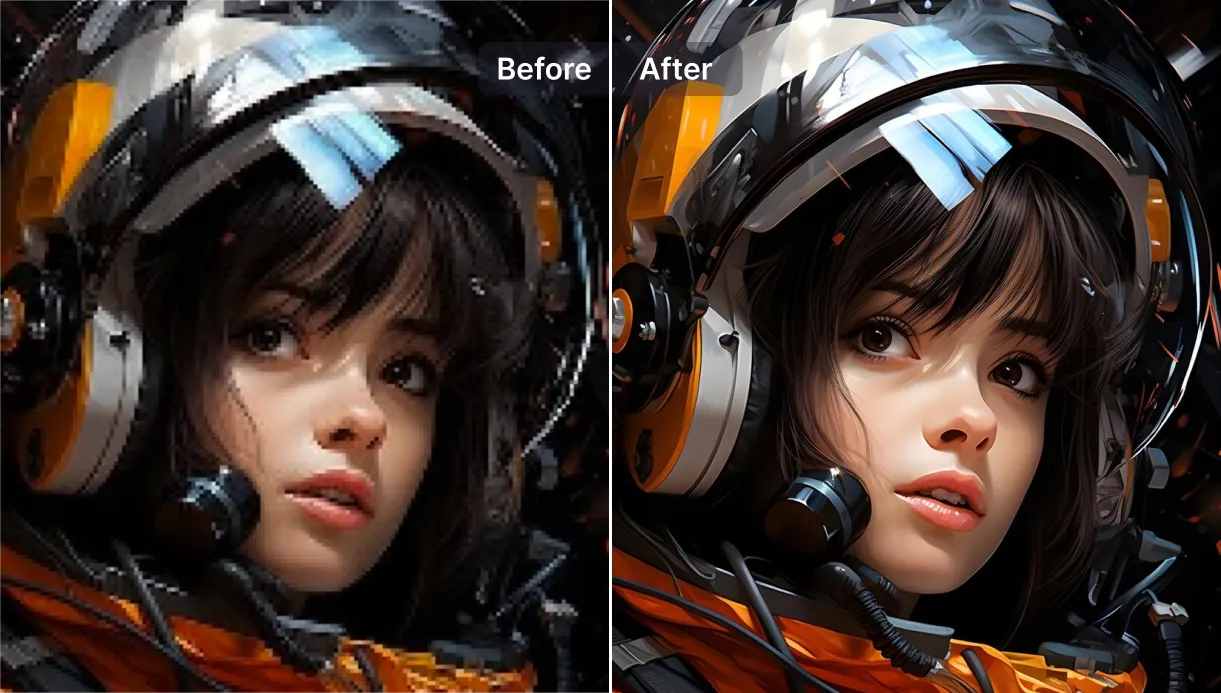
This is where tools like the Pixelfox AI Video Upscaler come in clutch. It takes that blurry, generated mess and injects texture back into it, pushing it to 4K or 8K. It stops your video from screaming "I was made by a computer!"
2. The Dead Face Syndrome
This is the biggest giveaway. The body movement in a hyper realistic ai video might be perfect, but the face? It’s usually a blurry smudge, or the eyes are looking in two different directions.
The Fix: Don't accept the raw output. You need to run a pass specifically for the face.
- Step 1: Generate your wide shot.
- Step 2: Use a specialized tool like Pixelfox AI Portrait Enhancer.
- Step 3: It identifies the facial features and reconstructs them. It fixes the lighting on the cheekbones, sharpens the eyes, and adds skin texture.
Pro Tip: If you are trying to make a talking head video, stop trying to generate the whole thing from text. It’s a nightmare. Instead, take a static photo that looks perfect, and animate it. Tools like Pixelfox AI Avatar allow you to turn a high-res photo into a talking video. The realism is higher because the source image is real (or photorealistic).
3. The Lip-Sync Lag
Nothing kills the vibe faster than lips that don't match the audio. It looks like a bad 70s Kung Fu movie dub. For a video to pass the "reality check," the phonemes (mouth shapes) must hit perfectly with the sound.
Using a dedicated AI Lip Sync tool ensures that the mouth movements are driven by the audio waveform, not just random opening and closing.
Advanced Playbook: Creating "Found Footage" Style
Want to freak your friends out? Let's make a video that looks like it was shot on an iPhone 15 in a dark alley. This is the most realistic ai generated video style currently trending on Reddit.
The Prompt Strategy
Stop using words like "4k," "cinematic," or "studio lighting." Those are dead giveaways. Instead, try this:
- "Dashcam footage, grainy, low light, harsh shadows, motion blur, un-stabilized."
- "Amateur phone footage, vertical video, shaky hand, street lighting, overly sharpened."
The Post-Processing (The Secret Sauce)
Once you have the clip, it’s going to look too clean.
- Add Noise: Overlay a film grain or digital noise layer.
- Compression Artifacts: Ironically, making the quality worse makes it look more real.
- Color Grade: Desaturate it. Real life isn't perfectly color-graded like a Marvel movie.
Deep Dive: Why does this work? It’s called "Perceptual Realism." We associate high-quality, smooth motion with production. We associate grit, shake, and noise with reality.
Comparison: Traditional VFX vs. The AI Stack
You might be thinking, "Can't I just do this in After Effects?" Sure, if you have three weeks and a degree in compositing.
| Feature | Old School (VFX/CGI) | The AI Way (Pixelfox + Gen Tools) |
|---|---|---|
| Cost | $5,000+ per minute | $20 - $50 per month |
| Time | Weeks of rendering | Minutes of processing |
| Skill Level | Expert (Nuke, Maya, AE) | Beginner (Drag & Drop) |
| Realism | 10/10 (If you're ILM) | 9/10 (And closing the gap fast) |
The gap is practically gone for social media content. Unless you are making the next Avatar movie, the AI stack is winning.
3 Advanced Tricks You Didn't Know You Needed
You want to go beyond the basics? Here are some power user moves.
1. The "Face Swap" Fix
Sometimes the AI generates a perfect body and background, but the person looks like a generic NPC. The Play: Use an AI Video Face Swap tool. Take a photo of a real person (or a highly detailed generated face) and swap it onto the moving video body. This anchors the realism because the face is consistent.
2. Consistency is King
The hardest part of ai videos that look real is keeping the character the same across different shots. The Play: Train a LoRA (Low-Rank Adaptation) on your character if you are using open-source models like Flux. Or, stick to image-to-video workflows where the source image dictates the look.
3. Audio Hallucinations (The Good Kind)
Video is 50% audio. If the sound is fake, the video is fake. The Play: Don't just add music. Add ambient noise. Wind, car horns, distant chatter. Use AI audio tools to generate specific sounds like "footsteps on gravel" that match the video movement perfectly.
Common Mistakes: Why Your Videos Fail the Vibe Check
I see people making these errors every day on Twitter/X. Don't be them.
- The "Morphing" Background: Watch the background carefully. If the trees are melting into the sky, crop the frame or use a blur effect to hide it.
- Too Many Fingers: Yes, it’s 2025, and AI still struggles with hands sometimes. If the hands look weird, frame the shot to cut them out, or put "hands in pockets" in your prompt.
- Ignoring Lighting: If your subject is backlit but their face is glowing, it looks fake. Use Pixelfox's lighting optimization to balance the shadows naturally.
Real-World Case Studies
Case A: The "Fake" Influencer
A marketing agency recently launched an Instagram campaign using entirely AI-generated avatars. They used mid-range generation for the body but utilized Pixelfox AI to handle the lip-sync and facial enhancement. Result: 1.2 Million views. In the comments, only 5% of users questioned if it was AI. The seamless lip-sync was the deciding factor.
Case B: The Security Awareness Training
An IT security firm needed to show how dangerous deepfakes are. They created a most realistic ai generated video of their CEO "firing" everyone. Method: They used phone-style prompts and added digital grain. Result: Panic (briefly). It proved the point perfectly. The low-quality aesthetic made it undeniable.
FAQ: Clearing Up the Confusion
Q: Is it illegal to make hyper realistic AI videos? A: Making them? No. Using them to defraud people, impersonate government officials, or non-consensual deepfakes? Yes, absolutely illegal in many jurisdictions. Use your powers for good, not evil.
Q: What is the single best tool for realism? A: There isn't one "God tool." It's a combination. Use a generator (like Veo or Kling) for the base, and an enhancer (like Pixelfox) for the polish.
Q: Can I really make a movie with this? A: Short films? Yes. Feature films? We are getting there. Consistency is still the hurdle, but for 1-minute clips, the quality is broadcast-ready.
Q: How do I spot a fake video in 2025? A: Look at the blinking patterns (sometimes too regular or non-existent) and small background details like text on street signs. AI still struggles to spell background gibberish correctly.
The Verdict
We have crossed the threshold. Creating ai videos that look real isn't about having a supercomputer anymore; it's about having the right workflow. The difference between a cartoonish mess and a viral, hyper realistic ai video usually comes down to post-processing—fixing the faces, upscaling the resolution, and syncing the lips perfectly.
Don't settle for blurry, glitchy outputs. If you want your content to stop the scroll, you need to polish it.
Ready to fool the eye? Stop uploading low-res garbage. Try Pixelfox AI today to upscale your footage, sync your audio, and enhance your portraits until they look better than real life.