 Credit

Why Resolution Matters More than Ever
Have you ever opened an old family photograph or a favorite beach snap, wanting to make that picture larger, only to discover it’s blurry, pixellated or grainy? That’s what you get when you’re working with a low resolution picture. A grainy screen looks good on a pea, but zoom it up and every detail is a shouter.
Quality isn’t optional in today’s digital-first world, when you’re posting on social media, printing a poster or putting up a website. Happily, contemporary AI has come along to fix this problem. You no longer have to live with low end pics anymore now that you can fix low resolution photos with just a few clicks.
What is a Low Resolution Image?
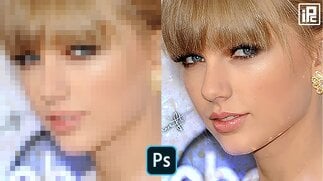
A low resolution photo is one that doesn’t contain enough pixels to display clear, sharp details. Resolution is essentially how many pixels are part of the image; more pixels mean a clearer image.
Low res pic = less pixels = pixellated or serrated edges.
Add more tiles and the image becomes suddenly rich and detailed.
Common Reasons on why you have low quality images
So how does one get poor- quality images to begin with? A few common culprits:
Screenshots not downloads – When you save a screenshot of something rather than the actual file, its resolution decreases.
Compression – apps and websites nearly always compress images to conserve space, which results in you receiving a substandard-quality image.
Old cameras or phones — those from ten years ago simply didn’t capture as many pixels.
Without artificial intelligence — just enlarge an image through dragging and the image becomes blurrier.
If you’ve ever used a low resolution image converter that simply blew up a picture, then you’ve seen the problem for yourself.
Why The Resolution of Low Quality Photos Matters
You could say, “It’s only a photo — it doesn’t matter.” But resolution matters a lot.
Professional appearance: Who wants to upload grainy media to LinkedIn or their business site?
Print quality: Your phone’s camera may make that vacation shot look good, but try printing it on canvas and suddenly the imperfections pop out.
Impact on social media: Visuals that are clear and stroke-free while still being natural earn more likes, shares and engagement.
By learning how to improve low resolution photos, you’re not only preserving memories, you’re improving personal and professional presentation.
How to fix low resolution pictures
In cases of low res photos, the most efficient and fast method by which they can be improved is through the use of AI-powered software. Instead of making guesses about where pixels are placed, A.I. analyses patterns and intelligently guesses what is missing.
Step 1: Upload the Image
Visit a reputable site that utilizes pixelfox. While working with your design file, you will be able to download your low resolution photo from.
Step 2: Let AI Work Its Magic
The image super-enhancer uses the picture as input, looks for edges to make it sharper, buffers colors to give that smooth look and inserts missing details. It also differs to a naive low level quality generator that reduces resolution, since our technology uses little generators to increase the resolution.
Step 3: Get the High-Quality Download
In seconds you’ll have a photo that is clearer and sharper than the original.
Restoring Poor Image Quality with AI
Artificial intelligence does “sharpen” more than it “blur.” It employs deep learning models trained on millions of photos. These models know how things should look in reality, textures of everyday life, skin for skin tones and objects as rooms.
For example:
The face in a low res picture gets reconstructed with smoother skin and sharper eyes.
The" edges of text appear better instead.
Low res images are detail enhanced and not just stretched.
It’s as if a digital artist is painting back the details you thought the years had taken away from your photos.
When Do You Need to Create a Low Quality Image?
Ironically, there are times people really do want the opposite — to make an image low quality. This is common when:
Upload smaller profile icons in places where larger files are not required.
Making memes or retro effects with the best low quality maker.
Uploading images fast but not hogging up bandwidth.
In such circumstances, you would have to use a high resolution to low resolution picture converter and the low resolution image converter. The trick is in deciding when to go high and when to go low.
How to Avoid Snapshots in the Future
Rather than correcting issues after the fact, here are several habits to avoid bad quality images in the first place:
Keep originals in the best quality where available.
Avoid excessive compression from apps.
Before you enlarge photos, try an AI enhancer.
Save your photos and videos in the cloud so you’re not dependent on low-res copies of them.
That also means you don’t have to wonder “how do I make a picture resolution better?” in the first place.
Why Pixelfox.ai is The Ideal Solution to Repair low quality pics
All tools are not equal. Too many apps are either sharpening too much or not bringing back enough detail. Pixelfox. ai stands out because:
It leverages the latest AI models specially trained in photo enhancement.
The process is fast, free and web based — no software download required.
It can be applied to any type of image, from the smallest low-resolution photo to all scanned old images.
They also come out looking natural, not plastic or overdone.
When you make an image of low quality peasants going to acknowledge Pixelfox already lol. ai is the tool to trust.
Conclusion
You don’t have to live with a low resolution picture. Whether you mistakenly saved an image or downloaded a low quality picture, if it’s not up to your standards, use GAN to get the file back and improve your photos. Tools like pixelfox.ai let you fix low resolution pictures with ease and at super fast speed, poor quality of image will be history.
So the next time you come across a low res picture, don’t delete it — revive it. Your memories, projects and online antics deserve nothing less than the sharpest quality images.
FAQs
Q1. How do you fix the resolution of a photo?
You can correct that with AI-based photo enhancers such as pixelfox. ai, which smartly fills in the missing pieces.
Q2. Is there a way to restore the resolution of the low quality photo?"
If you don’t have that option, upload the photo to an AI tool online and let it sharpen and clarify things up.
Q3. Can I intentionally make a photo low resolution?
Yes, new blockers: You can use a low-res image converter to compress file size, or fake a retro look.
Q4. What is the reason behind bad image quality in photographs?
Some common reasons are compression, shooting from a screenshot instead of the original footage, very old cameras or scaling without AI.
Q5. Can distant blur photos taken long ago be restored at all?
AI is surprisingly good at restoring details in old, or scanned photos.