 Credit

Nowadays, using AI-driven tools, you can edit and increase the quality of photos on your laptop and change the image completely in a few minutes. Picture editing software enables one to digitally modify and improve as well as, stylize pictures. It is able to perform all the things, removing the imperfections and correcting the light and adding filters as well as photo composites.
Whether it is the small adjustment of colors or the artistic effects, the right photo editor brings out the details. No matter what you are editing, be it portraits, travelling pictures, or brand images, this guide will stroll you through the most favoured free photo editing apps, as well as professional editors you can start using today.
Why You Need the Best Picture Editing Software
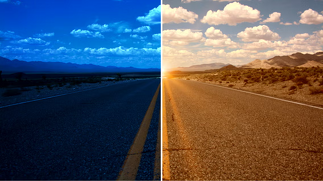
It is not only a matter of filters when it comes to picking the correct photo editor to use on PC but it is about getting the accuracy, flexibility, and consistency of each image. Here’s why it’s essential:
Professional Quality: Transform mediocre images into beautiful works of art.
AI Automation: Smart fixes the light, eliminates flaws, and sharpens, all in a second.
Creative Control: Stamp, add filters, overlays, and text effects that are exclusive to your taste.
Ease of Use: Not only can the novice user make studio-quality edits without complex training, but they can do so as well.
Efficiency: Batch-edit photos fast to use on social media, business, or photography projects.
Anyone can create professional-quality pictures with the help of the right photo-editing software.
Best Ways to Edit Photos on Laptop or PC
Photo editing is no longer a complicated process done on a laptop with expensive software. Having an increasing number of AI photo editors, it is possible to work effectively and professionally, either through the browser or desktop. Here’s how:
Choose a Reliable Editing Tool: Select one of the most effective photo editors that meets your skills and financial means.
Import Your Photos: Import your photos from the local drive or cloud drives.
Enhance Automatically: Immediately improve your photos with AI-based enhancers instantly, adjusting Exposure, Sharpening, and Noise.
Add Creative Elements: Experiment with filters, textures and retouching effects.
Export in HD: Share or save your final photo at its maximal resolution with a single click.
Editing has been accelerated, improved in intelligence and has never been more intuitive than through AI.
Top Free Photo Editing Software to Try Online
The following are the most powerful tools for both beginners and professionals:
· Pixelfox AI Photo Editor: An online photo editing app that allows one to edit images by automating the adjustment of lighting, flaws, and sharpening of the image with the help of AI.
· Fotor Photo Editor: The best for making quick edits, filters, and creative overlays.
· GIMP (GNU Image Manipulation Program): A free and open-source Photoshop alternative that has high capabilities.
· Photopea: Editing PSD files with no software required, using your browser.
· Canva Photo Editor: It is ideal for adding text and design to photographic content.
These top free photo editing software allow you to edit with accuracy, style, and speed without costly subscriptions.
Best Professional Photo Editing Software
You might need something more advanced in case you are working in the field of photography, design or marketing. The following are some of the most popular professional photo editing software options at an expert level of accuracy:
Adobe Photoshop: The standard of sophisticated photo editing and retouching.
Luminar Neo: Software powered by AI and able to improve sky, skin and background.
Capture One: Photographers prefer it because of its color grading and the control of RAW editing.
Affinity Photo: Software that is not very expensive but has a lot of power and professional features.
These applications will incorporate human flexibility and machine aid in creating photos at the next level.
Features to Look for in a Good Photo Editor
To select the best picture editing software, watch out:
AI Enhancement: Smart lighting, face sharpness and skin tone adjustment.
Noise Reduction: Removes the grain or dark images.
Color Grading: Sophisticated hue, tone and exposure.
Background Editing: Artificial intelligence to delete, swap or obscure backgrounds without difficulty.
Batch Editing: Edit and save time by editing several images.
These are the characteristics that determine the extent of power and efficiency of your editing process.
How AI Is Changing the Way We Edit Photos
The world of photo editing is changing with AI because the tool facilitates the creation of high-quality image enhancement, which is affordable to all. The new AI photo-enhancing software does not simply darken or lighten the image; it knows how to compose light up, and focus.
The AI-driven algorithms have the ability to smooth faces, improve colors and sharpen images in real time, and match the accuracy of professional retouchers. The technology helps in making your photos appear natural, polished and high-definition, with little effort.
FAQs
What is the best picture editing software for beginners?
Pixelfox’s editor and Fotor can be suggested to beginners; they are easy to use, AI-based, and can be easily accessed free of charge online.
Can I edit photos on my laptop for free?
Yes! Most popular free photo editing software allows you to edit and retouch photos in your browser without any downloads.
Which software is best for professional photographers?
Photoshop, Capture One, and Luminar Neo provide a high level of editing and complete control over the final outcome.
How does AI help in photo editing?
The AI programs are able to process images and even enhance them, adding light, focus and tone with professional accuracy.
Final Thoughts
The best picture editing software will depend on what you need, whether it is a simple fix online or professional retouching. You can now edit photos on your laptop with a bit of precision, creativity and no complexity with AI-powered editors.
It could be adding more detail to portraits or controlling the lights, creating visual content or anything; the correct photo editing software makes your creative vision a reality.
“Begin with an AI photo editor today – and make every photo a masterpiece.”