 Credit

It used to seem like a task for designers to alter a photo's background. With the correct tools, anyone can now complete the task in a matter of seconds. You can now obtain a smooth photo backdrop change without using complicated software if you require a clean finish for product photos, portraits, or social media postings.
Pixelfox.ai was designed for quick and precise outcomes. It manages image size adjustments, photo cutouts, and even functions as a basic resolution scaler. Everything you need to achieve precise background adjustments and clear output is covered in this article.
What Is a Photo Background Change?
A photo background change is the removal or replacement of an image's original backdrop. You can replace it with a different scene, a solid color, or a unique design. Maintaining the subject's sharpness while making the background work for you is the aim.
Product listings, profile pictures, advertisements, and tidy social media content are the main uses for it.
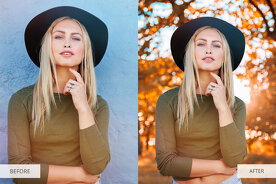
Why People Need to Change Background in Photos
There are many reasons, but here are the common ones:
1. For online stores
Product photos look better with white or light backgrounds. It makes items stand out and increases trust.
2. For social media
Creators like clean images that match their feed aesthetic.
3. For business use
CVs, LinkedIn profiles, and company IDs often need a plain background.
4. For personal photos
Sometimes the background looks messy, busy, or poor in lighting.
Pixelfox.ai handles these cases quickly with almost no effort.
How Pixelfox.ai Makes Photo Background Change Simple
A sophisticated cutoff engine used by Pixelfox.ai effectively separates the subject from the backdrop. Even in the presence of hair, shadows, and small details, the edges remain sharp. With just a few clicks, you may change, remove, or clean the backdrop.
Key things Pixelfox.ai does well
Fast automatic background cutout
Clean edges around hair and small objects
Support for custom colors
Support for image scaling and resizing
Good results even on low-quality photos
How to Change Background in Any Image (Simple Steps)
Step 1: Upload your photo
Go to Pixelfox.ai and upload the image you want to edit. The system works with portraits, products, and random objects.
Step 2: Remove the background
The tool removes the background instantly. You see a preview in real time.
Step 3: Pick your new background
Choose a white background, colored backdrop, pattern, or your custom image.
Step 4: Adjust and save
Resize, scale, or move the subject if needed. Save your final image in high quality.
Tips for Getting a Clean Photo Background Change
1. Use a photo with clear lighting
Good lighting helps the tool define edges better.
2. Keep the subject separate from the background
Avoid photos where the subject blends with the background color.
3. Keep the image size wide enough
Larger images help maintain detail after editing.
4. Use Pixelfox.ai’s auto-enhance
It sharpens edges and gives the subject a natural look.
How Image Scaling Helps Your Final Output
Many people need more than just background changes. You may need to resize your image for Amazon listings, social media, or ID formats. This is where image scaling, image size adjustments, and a resolution scaler help.
Pixelfox.ai does all of this inside one platform.
Why scaling matters
It saves the quality of your photo.
It fits common marketplace requirements.
It prevents blurry uploads.
Does Changing the Background Reduce Image Quality?
Not when using Pixelfox.ai. The tool keeps your subject sharp and uses quality-preserving methods when exporting. You can also upscale the final output if you need more clarity.
Who Uses Photo Background Change Tools the Most?
1. Online sellers
They want clean product photos for marketplaces.
2. Photographers
They want quick edits for client shoots.
3. Content creators
They need fast, aesthetic backgrounds for posts.
4. Students and professionals
They want neat profile pictures for IDs and resumes.
Pixelfox.ai supports all these uses with simple steps and clean results.
Why Pixelfox.ai Is Reliable for Background Editing
Pixelfox.ai was developed using actual photo editing expertise. It manages intricate aspects like shadows and hair strands. Additionally, you have complete control over image sizes and backdrop colors.
The platform prioritizes precision and clarity. It was created to assist people who seek crisp photos without having to spend hours retouching them.
Trust features
Made for both beginners and pros
Smooth results even on tricky photos
Clear and clean output with no halos
Easy interface
Fast processing for high workloads
Pixelfox.ai aims to give you dependable edits that look natural.
Best Background Types You Can Use
1. Solid white
Perfect for product photos. Most online stores prefer this.
2. Light colors
Good for profile images. It keeps things soft and clean.
3. Custom aesthetic backgrounds
Great for creators who want unique styles.
4. Blurred scenes
Useful when you want the subject to stand out.
Pixelfox.ai lets you switch between these with a single click.
Common Mistakes People Make When Changing Backgrounds
Mistake 1: Using very small photos
Small image size leads to blurry results. Use a larger resolution.
Mistake 2: Using busy backgrounds
It makes cutouts hard for any tool.
Mistake 3: Ignoring shadows
Shadows help the image look real. Pixelfox.ai can keep or remove them.
Mistake 4: Not matching colors
If your new background color is too harsh, the subject may look out of place.
Pixelfox.ai gives color correction options to fix this fast.
Should You Use AI or Manual Editing?
If you need quick results with clean edges, AI is better in most cases. Manual editing takes time and skill. AI handles the basics fast and lets you focus on creativity.
What Makes Pixelfox.ai Different?
Pixelfox.ai mixes speed with accuracy. The tool does not flatten your photo or remove detail. It also gives image scaling, size fixing, and an easy resolution scaler so your final output stays sharp.
Main benefits
Good for beginners
Fast processing
Sharp subject edges
Works for portraits, products, and objects
Built with real user needs in mind
FAQ
1. How may the background of a photo be altered most easily?
Upload your image to Pixelfox.ai, delete the background, choose a new one, and save your file.
2. Does Pixelfox.ai maintain the sharpness of my images?
Indeed. It provides upscaling capabilities to improve quality while maintaining the clarity of your subject.
3. Is it possible to make the background of product photographs white?
Indeed. A white background option is available with just one click on Pixelfox.ai.
4. Does the tool function with people's hair edges and photos?
Indeed. It cleans up hair strands and fine edges.
5. After editing, is it possible to change the image's size?
Indeed. The resolution scaler and built-in image scaling allow you to resize without sacrificing quality.