 Credit

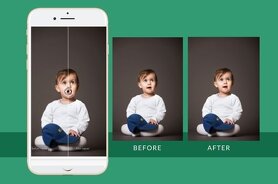
You have used your iPhone to capture what would otherwise have been a perfect picture. But when you look at the picture, it appears blurred or grainy or simply not crisp. You may have had an odd trembling in your hand, or the subject may have moved, or the focus may have been a trifle off. You want a photo clearing app as you are willing to get rid of this immediately without trying to make hard changes or spending money on expensive software.
It is less complicated than you think. Standard AI-based solutions allow repairing blurred pictures on iPhone quickly. One can use a free web application of Pixelfox.ai to sharpen fuzzy-looking photographs in your browser. There are no subscriptions, no downloads and no complex knowledge is required.
Why Do iPhone Photos Come Out Blurry?
Even the finest of cameras might give pictures which are fuzzy. Camera shaking is caused by unsteady hands, moving objects during the exposure or the camera concentrating on the background instead of what you are taking a photo of.
Poor light also causes blur in most cases. To allow more light inside, the camera on your iPhone decreases the camera shutter speed and thus any movement becomes more noticeable. Being aware of these causes helps you to avoid future fuzzy images.
What Is a Photo Clearing App?
An artificial intelligence photo-clearing application is applied to enhance fuzzy photographs. It is not simply another sharpening tool, which just enhances contrast along edges. Instead, the AI looks at the entire framework of the image.
It identifies the gaps in the information and intelligently completes them. This preserves a more natural look and enhances clarity as well as reduction of noise. There is no need to download anything as the best apps are web tools.
How to Fix Blurry Pictures on iPhone for Free
It has become easy to fix blurry images in three steps. It takes less than a minute to do it on the browser of your iPhone.
Open Safari on your iPhone and navigate to Pixelfox.ai. You do not have to download the app.
Add a Photo: Select the grainy shot among the set of images on your iPhone. The process of uploading is secure and fast.
Process and Save: The AI will automatically analyze your shot and make it better. Get the clean version directly downloaded to your device.
How Does a Fix Photo Blur App Work?
AI blur correction apps use advanced neural networks that were trained on millions of photos. They learn how to recognize crisp and fuzzy pictures of the same thing.
The AI identifies and unblurs the patterns of the image you provide. It adds the corresponding features based on what is available in similar sharp photos. This gives a much sharper result than conventional methods of editing.
Can You Really Fix Extremely Blurry Photos?
AI has a number of limitations, but it can significantly improve most hazy images. Mild to moderate slew photos are the best ones to decorate with. The AI can often rescue pictures that have been ruined by a small amount of camera shake or focus issues.
Pictures that are so blurred that they have lost all their detail may not sharpen. Even then, it can be observed that the overall sharpness and usefulness of such photographs has generally improved.
Is Using a Free Online Tool Worth It?
Of course. The tools rescue images that would otherwise be discarded. They can be used to improve social media-worthy photos or fix up priceless memories.
It is free and requires few seconds. Free web tools can work better than most of the in-built phone editing functions when it is not used regularly and without the inconvenience of costly applications.
Why Pixelfox.ai is the Best Free Solution
We have designed our application to work with iPhone images. We are familiar with the different types of blur that smartphone images produce. The interface is easy and simple to use and the process is simple.
Photos are quickly processed and once your photos have been enhanced, they are not saved. You get professional-quality results at no cost and you retain your privacy.
Conclusion
There is no need to pay money to obtain expensive software or technical expertise to fix blurred iPhone pictures. Now anyone can improve photographs through AI-based web applications. With the help of a free application called Pixelfox, you can recover the fuzzy pictures of your iPhone in the browser within seconds. By doing so, you will never need to compromise on foggy photos again and you will never lose your invaluable memories. With most common blur issues, the technology is very efficient, fast, and free.
Frequently Asked Questions (FAQ)
Q: What allows me to get my iPhone fuzzy photos fixed free?
A: Have access to Pixelfox.ai, a free online AI-based tool. The AI will automatically enhance your grainy photo even before registration and payment are required.
Q: What is the most excellent free photo-cleaning application?
Pixelfox.ai provides a very efficient free solution that runs directly in your web browser. It instantly sharpens the blurred iPhone images with the help of state-of-the-art AI.
Q: It is true that you can sharpen fuzzy pictures?
A: Artificial intelligence (AI) apps have the potential to dramatically improve most of the blurred photos by intelligently restoring features that have been lost. Mild to moderate camera motion or focus issues are the best results.
Q: Can we use internet Photo repair applications?
A: Pixelfox, among other reliable tools, is safe. Your photos are processed automatically after you download the improved version and are not stored. Pictures are not disclosed.
Q: My iPhone photos are blurry: why?
Some of the typical culprits include low illumination, moving objects, camera shake and poor focus. To prevent blurry images burst mode can be used and focus must be adjusted.