 Credit

Photos are a big part of everyday life now. We take pictures at events, while traveling, at work, and at various moments. But not every photo comes out the way we want. Some are blurry. Some look too dark. Some lose color. This is where a picture enhancer app free becomes very helpful. These apps fix your photos quickly without needing any editing skills.
Today, anyone can improve a photo with just one tap. This is the reason photo enhancer apps are becoming popular. They save time, improve quality, and make your pictures look sharp and bright.
What Happens When You Enhance a Photo?
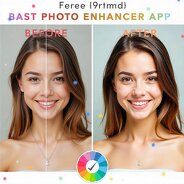
When you enhance a photo, the app improves the overall quality. It adjusts brightness, contrast, and color. It makes the picture clearer. It reduces noise and corrects blur. Many apps also use AI to guess what the photo should look like and then fill in missing details. The difference is easy to notice.
A dull picture becomes bright. A fuzzy face looks sharp. Old photos look fresh again. The enhanced picture feels more polished and alive. Enhancing helps when you have low-light photos, selfies with noise, or pictures taken in a rush. With just one click, the app tries to fix everything that looks off. You don’t need to adjust anything manually. That’s why many people trust these tools.
Why a Picture Enhancer App Free Is Useful?
A picture enhancer app free is useful because it offers quick results. The majority of picture enhancement applications have simple and clean interfaces that are easy for a beginner to understand. Another reason is cost. Many people don’t want to pay for editing tools. Free apps offer enough features for daily use. They give you the basic tools you need without limiting you too much.
These apps are also convenient. You can use them anytime. If you need to post a photo urgently, in a few seconds, you can enhance it. If you need a clear picture for work or school, you can instantly fix it. Most apps also support both mobile and desktop. This means you can edit wherever you are. The flexibility makes them even more useful for content creators and students.
Best Photo Enhancer App: Things to Consider
When looking for the best photo enhancer app, keep in mind that not every app works same. Some apps go overboard on editing the picture. Some become too sharp or change the skin tone too much, while others only do basic enhancing. Here are just a few simple things to look for.
Natural results: The app should enhance the photo without making it look fake.
Noise reduction: This feature fixes grainy photos, especially those taken in low light.
Face enhancement: For selfies, this is important. The tool should smooth skin gently without blurring the face.
Color correction: Good color correction makes photos brighter and cleaner. It fixes dull or washed-out colors.

Why Pixelfox Is the Best Option for Enhancing Photos?
Users looking for the best photo enhancer app often want something that requires no installation, works fast, and produces professional-level results. Pixelfox meets all these expectations by offering an online system that enhances photos directly in the browser. This makes it an excellent app to improve photo quality if your images include portraits. For those who need better resolution for printing or large displays, Pixelfox AI Image Upscaler and AI Image Extender act as an advanced app to improve photo resolution. It creates sharp, detailed images without the pixelation that happens with normal enlarging tools. Platforms like enhance details, sharpen edges, and restore missing areas with natural results.
Photo Enhancement Programs Free Download
If you prefer editing on a computer, you can try photo enhancement programs free download. These programs offer more detailed tools. They also support batch editing. That helps if you have many photos to fix at once. These programs feel closer to professional editing but remain simple enough for beginners. They usually have options like:
Sharpness control
Color balance
HDR effects
Noise removal
Auto-enhance feature
Background improvement
Conclusion
A picture enhancer app free is a simple tool that helps you improve your photos quickly. The process is easy, fast, and convenient. You can enhance colors, details, and clarity without any editing skills. You now know what happens when you enhance a photo, what makes the best photo enhancer app, and where to find photo enhancement programs free download. With the best app, you can turn any ordinary picture into a sharp and vibrant image.
FAQs
1. Do I need editing knowledge to enhance photos?
No. Most picture enhancer apps work automatically. You just upload the photo and click a single button. The app handles everything else.
2. Do these apps work on selfies too?
Yes, selfies improve automatically with clearer facial features, better lighting, and natural-looking smoothness instantly.
3. Can I use free apps to enhance old photos?
Yes, free apps are great for old photos. They clean noise, boost faded colors, and make old images look fresh again.