 Credit

The reason to remove Filters
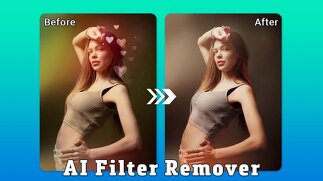
Filters are all around us in our modern world. Like Instagram selfies and product shots—the majority of what we view online is filtered. While filters can offer charm or creativity, on many occasions we just prefer the original. Maybe the filter makes your skin look unrealistic, maybe the colors are too artificial or maybe you want the original image back for editing or other purposes. That's where removing filters from photo tools comes in. By using an appropriate filter remover, or sophisticated artificial intelligence algorithms that delete the applied filter on your image, you can obtain a natural look of your picture in a few simple steps. Let’s get really into how this works and what options give you the best results.
Is It Possible to Take a Filter Off a Picture?
These can frequently be reversed or mitigated. Others permanently alter pixels, offering no easy way of completely reversing the changes. It’s like the way one might add salt to food. It’s not like you can take out every grain once it’s mixed in, but with the right techniques, you can at least elide a mistake, and balance things a bit. AI filter remover software now employs machine learning to recognize patterns in the image and detect unnatural layers so that pictures can be restored to look more similar to their original.
Conventional Approaches for Overview Screens for Removing the Applied Filters on the Images
When there were no powerful AI-tools to rely on, photographers and designers had to adjust imagery manually. These methods still work, but you have to be patient.
Using Photo Editing Software
Brightness & Contrast – A lot of filters raise or lower these settings. Resetting them will often ameliorate the impact of the filter.
Color Balance Tools – Warm filters can be “cooled down” and cool filters can be “warmed up”.
Saturation Control - Bring down an oversaturated filter by dialing in saturation yourself.
Restrictions of Manually Removing Filters
The issue with manual editing is precisely that: accuracy. You may reduce the filter effect, but you can’t entirely revert your photo into the original. This is where AI filter remover tools come to the rescue.
A Look At How AI Tool To Removes Filters from Photos
Artificial intelligence has transformed how we edit photos. Today’s tools employ deep learning models that have been trained on millions of images to identify what a filtered image looks like as opposed to a natural one.
Pattern Recognition
Color distortions, texture shifts, and variable light-inconsistencies can be identified through AI systems from the application of filters. Once they are encountered, the system executes the inverse of these changes.
Real-Time Filter Removal
Some offer that you upload a photo to see a restored version — and see one with the filter removed instantly. They’re great for people who don’t have the time to learn complex editing.
Most suitable use of AI filter removers
Bringing reality back to portraits filtered to look otherworldly
Old photos that you saved with a heavy filter on, and then voila!
How to get ecommerce-quality product images of fruit and veg
Free Tools to delete added filters on pictures
Some people don't want to fork over big bucks for software. Luckily, several free options exist.
Online Filter Removers
On the web, such tools let you upload your photo and process it on the spot. Though free tools might have limits on resolution or watermarking, they are just fine for the casual user.
Mobile Apps
Other filter remover free features are available now on many smartphone apps. It just takes a few taps, and you have a more natural version of your photo.
Why Pixelfox.ai: The Best In Removal Filters
As far as removing AI filters, XDA Developer, Pixelfox. ai stands out. It treats filter effects in a way that basic editors do not.
Key Features of Pixelfox.ai
AI-Driven Precision – Identifies the faintest filters on faces, objects and backgrounds.
Simple One Click Process – Upload your photo and click the button to see the change in an instant.
Try Before You Buy – You get to use the platform without paying a health fee which means it’s great for personal as well as professional use.
Supports Any Types of Image – It Also Embrace Different Filters – From selfies to professional product shots.
How (Much) It Outperforms Others
The vast majority of apps treat filters as basic color overlays, but Pixelfox. ai up textures, shadows, and natural lighting. This is what gives the restored version a likeness, rather than appearing flat.
How Not to Remove Filters
Not all attempts at removing a filter go smoothly. Here are some mistakes to avoid:Over-editing – Overdoing corrections makes the photo appear fake.
DOWNSIDESTo be wary of: Poor quality apps – Free yet not secure apps could degrade the quality of your image.
Expecting 100% recovery – Some heavy filters are destructive, pixels changed by them won’t be fully recovered.
Real Life Instances In Which You Will Need A Filter Remover
Filter removal is not just for selfies. A few real-world examples:
Professional Photography - A client may ask for images without filters when seeing filtered previews.
E-commerce Selling – Platforms such as Amazon have been known to disapprove of ultra-edited product pics.
Memories : Old photos edited with faddish filters may look old fashioned now, but removing filters renews the photos for printing.
Step-by-Step – How to Remove Filter from Photo Using AI
Open Pixelfox.ai in your browser.
Upload the filtered image.
From the tools menu instead, choose “Remove Filter”.
Wait for a few seconds while the AI analyzes the photograph.
Save your restored image with no unwanted effects.
That’s it. No having to learn Photoshop, or fork over big bucks in subscriptions.
Conclusion
An AI filter or two is cool, but in many cases less is more. Whether you want to bring back an old memory, ready your photos for your portfolio, or are just a fan of a no-filter filter, being able to take a filter off from a photo is a must. Manual approaches may suffice for minor edits, but AI filter strippers like Pixelfox.ai are here to make it simple and accurate.
FAQs
Q1: Can You Take Off Instagram Filters from Old Photos?
Yes, tools like Pixelfox. ai can reverse-engineer most Instagram filters by analyzing and canceling out color shifts.
Q2: Does removal of free filters degrade photo quality?
Some free tools are able to compress images: Pixelfox.ai keeps high-resolution output. Q3: Can I delete these filters I added on my pictures completely?
In most cases, yes. But super-aggressive filters may not be 100% reversible.
Q4: Black and white filter X can solve problems by AI filter remover?
Yes, if the original colours still exist in the data, advanced AI tools can restore them.
Q5: Is Pixelfox.ai safe to use? Absolutely. The site handles your image securely and does not store or misuse it.