 Credit

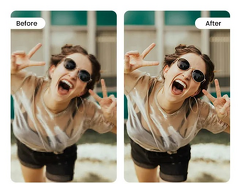
There is nothing more annoying than finding a wonderful image and realizing that it is blurry, blocky or pixelated. It can destroy the details you need, whether it is an aged picture, a zoomed image or a low-resolution screenshot. However, this is no longer the case with the latest AI tools: now, you can depixelate images online with no charges in a few seconds and sharpen them as well.
The latest method of restoration is using AI, which is capable of repairing pixelated images online without a fee, defocusing faces, reconstructing lines, and recreating missing points, turning poor-quality images into high-quality ones.
In case you have been asking how to depixelate an image online, this article has it all.
Why Do Images Become Pixelated?
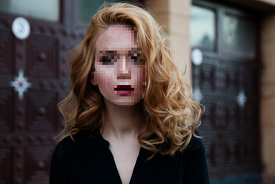
Pixelation occurs when a picture is not large enough to back the resolution. As you zoom in or enlarge the image, you can see little squares (pixels) enlarging the image and thus making it blurry and unclear.
Common causes include:
· Low-quality camera shots
· Old mobile photos
· Captured or cut pictures.
· WhatsApp or compressed media.
· Zoomed or enlarged pictures
AI addresses this issue by restoring details rather than fuzzing pixels.
How AI Depixelation Works
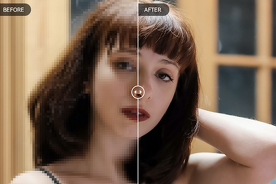
In contrast to the older sharpening tools, AI is trained with deep-learning models that are trained on millions of high-quality images. This allows the system to:
· Identify missing details
· Rebuild edges and textures
· Correct colors and contrast
· Substitute pixel blocks with naturalistic patterns.
· Make faces that are true to life.
The photo is made sharper, clearer and more HD, all in a matter of seconds, by default.
Best Tools to Depixelate Images Online Free
· Pixelfox AI Image Enhancer
Pixelfox provides a strong online free image enhancer tool that restores the details with a very high level of accuracy. It is ideal on faces, portraits, and vintage photographs.
· Fotor AI Image Enhancer
An easy-to-use application that enhances pixelated images in a single tap. Good for quick clarity fixes
· VanceAI Image Sharpener
Sharpening blurry and pixelated images through edge and texture analysis. It is good for structural image repair.
· Remini Web Enhancer
It is known to use fast HD results at face-orientated depiction. It is perfect with selfies and portraits.
How to Fix a Pixelated Image Online
Here is an easy step-by-step process to show you how to fix pixelated images in no time:
1. Upload Your Pixelated Photo
Select a bright version of the photo, despite its blurriness or low resolution.
2. Select “Depixelate” or “Enhance”
Artificial intelligence recognizes pixel blocks and recreates the lost information.
3. Let AI Process the Image
Within several seconds, the system regenerates texture, color and structure.
4. Compare Before & After
You will immediately notice the difference: sharp edges, smooth details and clear resolution.
5. Download in HD
Export the fixed photo as a high-quality image to social media, print, or store.
Types of Pixelation AI Can Fix
· Low-Resolution Pixelation
Works well with photos shot using old cameras or low-end mobile phones.
· Zoomed-In Pixelation
Eliminate blockiness due to excessive cropping or enlarging.
· Screenshot Pixelation
Fix text and information that has been compressed out.
· Old Photo Pixelation
Recreate faces and backgrounds in old and scanned images.
· Social Media Compression
Repair pixel enlargement of WhatsApp, Instagram, or Facebook.
Tips for Better Depixelation Results
· Use the best quality of your photo.
· Do not use excessively zoomed-in pictures.
· Use depixelation with light sharpening to be the most understandable.
· Use AI tools rather than the manual editors, which are more accurate.
Photos, even with severely pixelated images, could be recovered frequently with the help of the appropriate AI tool.
FAQs
How do I depixelate an image online?
Apply an AI service such as Pixelfox.AI feed your photo, press enhance, and save the HD image.
Can AI really fix pixelated photos?
Yes, AI is much more effective at analyzing patterns and rebuilding missing details than traditional software.
Is it free to fix pixelated images?
Yes, there are a lot of websites that provide free online options to fix pixelated images with good results.
Can I unpixelate faces?
Yes! Pixelfox and Remini are specialized in the restoration of facial details in an accurate way.
Final Thoughts
Your photos do not have to be ruined by pixellation now. With developed AI, images are now easily depixelated online at no cost, sharpened, and old or low-resolution photos can be revived with ease.
“Use the Pixelfox AI image enhancer today, and see your pixelated pictures become clear and high-quality photos in an instant.”