 Credit

Do you ever wish to have your photo turned into a painting, sketch or else computer masterpiece? It is easier than ever with the current AI portrait maker. These smart apps will make any portrait photo in a matter of seconds, in a realistic version, a drawing style, or even a fantasy version.
AI portrait generators are the kind of thing you need to have in case you ever thought, I wish I could turn my picture into a portrait with ease. Artists or even the ordinary folk can now make professional-standard portraits straight out of their mobile phones or laptops.
Here in this article, we are going to discuss the technology and find out the most useful portrait maker tools that you can practice today.
What Is an AI Portrait Maker?
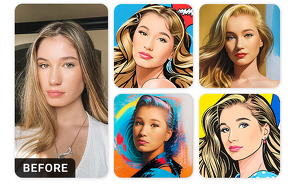
A portrait maker is an online application that examines your picture and recreates it in the form of a stylized or realistic portrait using artificial intelligence. Unlike the traditional software, An AI portrait generator is based on a neural network and trained on millions of images.
You may want to make a picture into a portrait, cartoon-type art, or studio-quality headshot; all these can be done automatically with these tools.
It is creativity with a simple twist; you simply upload your photo, choose a style, and AI does the rest.
Why Use an AI Portrait Maker?
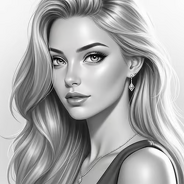
The emergence of AI-based art tools has enabled the creation of portraits faster, smarter and more customized than ever before. The following are the reasons behind these tools:
No Artistic Skills Needed: Line is automatic in terms of drawing, shading, and coloring.
Custom Styles: Select realistic portraits, sketches, anime or effects of paints.
Instant Results: It takes seconds and not hours to create beautiful portraits.
Affordable & Accessible: A lot of platforms have free HD versions.
High-Resolution Results: Ideal to print, frame or post online.
A portrait creator with AI provides you the strength of a computer artist, without a brush or a studio.
Best Portrait Maker Apps & Tools
The following are some of the best-rated sites to visit in case you would like to make beautiful portraits online:
· Pixelfox AI Portrait Maker
Pixelfox is one of the latest, most sophisticated AI portrait creators that transforms your photo into either realistic or artistic portraits within seconds. You have a choice of realism, fantasy, sketch or oil-painting effect, all of unsurpassed detail.
· Fotor AI Portrait Generator
Fotor provides a photo-to-portrait conversion system with classic and retouch features. It is fabulous for everyone who wishes to appear elegant and presentable.
· Artbreeder
One of the most entertaining deep learning applications that helps you create unique faces and portraits by breeding images. You are able to fine-tune age, style and emotion by using sliders.
· PortraitAI
This application specializes in the process of transforming images into ancient painted portraits with a touch of ancient art.
· VanceAI Portrait Retoucher
VanceAI is the best to achieve realistic results without losing the natural texture of the skin, color, and details. It is best for professional portrait retouching.
All these tools can be considered a little bit different, a creative art makeover or professional realism.
Popular Portrait Styles You Can Create
· Realistic Digital Portraits
Clear and professional, it is ideal to use in business profiles, resumes or portfolios of photography.
· Artistic & Painted Portraits
Change your picture to an eternal artwork with textures of oil paint or sketching.
· Fantasy Portraits
Make yourself a wizard or movie star with modern lighting and effects.
· Cartoon & Anime Portraits
Happy, bright, and emotional, perfect profile pictures or online avatars.
· Vintage & Classic Styles
Add elegance by sepia, or imitation of the brushwork of the Renaissance.
Tips for the Best Portrait Results
· Always post large and frontal photos.
· Select natural light to enhance face recognition.
· Try various styles of portraits.
· Retouch details with AI settings where necessary.
· Export HD to print or digital display.
Even minor things such as lighting and angle can make your portrait appear more professional.
FAQs
What is the best AI portrait maker online?
Pixelfox AI Portrait Maker is unique due to the precision, a variety of styles, and HD outputs.
Can I make a portrait from any picture?
Indeed, AI can transform virtually any picture into a portrait, as long as the face is clear.
Are AI-generated portraits free to use?
The vast majority of tools have free trials or free versions; some of them have premium upgrades to allow HD exports.
Do AI portraits look real?
Yes! Deep-learning models can be used to make AI portrait generators recreate faces with realistic accuracy and natural lighting.
Final Thoughts
Any person can become an artist in the age of AI creativity. You may make a digital self-portrait; it may be an artistic gift or may be a professional headshot, but an AI portrait maker provides you with all you want.
These tools will transform realism into fantasy with technology and art and allow your photos to become masterpieces.