 Credit

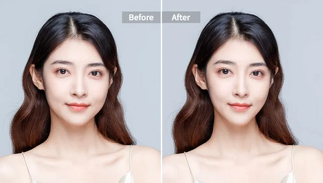
Did you ever want your selfies to be a bit more chiselled, with a higher jawline, symmetric cheekbones, and that camera-glam look? And that is what a face-slimming app can assist you with.
It is now easy to use face slimming apps with the use of AI to fix facial shapes and tapers and improve symmetries without the need to edit them manually. Whether you are a content creator, a selfie lover, or just a person who desires that his/her portrait should be visually smooth, these tools are your new beauty secret.
We are going to discuss why an AI face-slimming photo editor online free is so potent and find out the most promising applications to test at present.
Why Use an AI Face Slimming App?
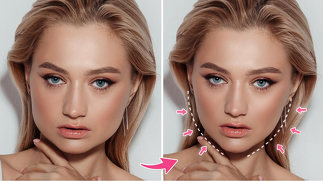
The face editing with the use of AI is transforming the way photos are retouched in the modern world. Here’s why users love it:
Natural Results: AI guarantees delicate improvements and no distortion.
Instant Adjustments: Slim your face, contour with one tap, or brighten up features.
No Editing Skills Needed: The app balances out and proportions automatically.
Perfect for Social Media: Get natural-looking professional photos on Social Media.
Free & Accessible: A lot of such tools allow making faces skinny online without downloads or accounts.
These applications are more intelligent, and they will improve your appearance, not alter your identity.
Best Face Slimming Apps You Should Try
The following are some of the most reliable and useful tools that slim faces quickly and simply as well as realistically:
· Pixelfox AI Retouch Tool
Pixelfox is a face slimmer that is free with AI-powered face recognition to modify jawlines and cheekbones using advanced AI face recognition. It improves the natural symmetry at the same time as being realistic. It works best when quick slimming is required in a realistic manner.
· YouCam Perfect
This viral beauty camera application has an AI-powered option of Face Slimmer and Jaw Refiner. It is perfect in selfie and portrait.
· Fotor AI Beauty Editor
It is a full-fledged internet application that incorporates photo editing and face shaping into a single dashboard. It works on professional-looking face edits.
· Facetune
Facetune is also famous because of its finely tuned retouch options that enable you to slim and shape with careful sliders. Good for manual fine-tuning.
· AirBrush App
It is a beauty app that is mobile friendly and will automatically scan areas of the face to refine contours. It is better for the beginners looking for quick results.
How to Use a Face Slimming App
The following are the steps on how to use the face slimming app:
1. Upload Your Photo
It is best to have a clear, front-view picture to start with.
2. Choose “Slim Face” or “Contour” Option
Use the face slimming option in the editing options.
3. Adjust the Intensity
AI will automatically recognize your face, though the slimness can be adjusted to your desired preferences.
4. Apply Filters (Optional)
Light filters and soft tones will complete the look and make it cohesive.
5. Save & Share
Get your refined picture in HD; it looks good on Instagram, LinkedIn or at work.
Tips for the Best Slimming Effect
· Always make use of natural lighting whenever capturing your image.
· Do not over-slim down to appear to be realistic.
· Apply face slimming and tone correction to achieve a smooth appearance.
· Test before saving to maintain proportions as natural.
The AI editing is most effective when it is applied to improve, rather than change, your natural features.
FAQs
What is the best app to slim your face?
Pixelfox AI Retouch Tool has the most natural and realistic slimming results with only a single click.
Can I use a face slimmer online for free?
Yes, there are a number of applications, such as Pixelfox and Fotor, where slimming can be done online, without any download.
Will my face look fake after slimming?
Not if you apply AI-powered capabilities. They do micro-adjustments which will not distort balance.
Can I slim faces in group photos?
Yes, artificial intelligence technology can identify several faces and make them slimmer but maintain proportions.
Final Thoughts
In the era of AI beauty enhancement, it is now easier than ever to get the perfect appearance. You are either about to post a photo to social media or want to improve your professional headshot: a face-slimming application can help smoothen out your look and increase your self-esteem.
The Pixelfox AI Face Slimming App is available now, and you can see how truly natural, balanced and perfect your photos can be in a few seconds!