 Credit

Tired of hitting a login wall just to try an AI art tool? You have a great idea, you find a generator, and then you see it: "Sign Up to Continue." It kills your creative flow. You are not alone. Most users hate mandatory sign-ups that waste time and raise privacy questions. This is why finding a good ai image generator free without login is so important.
This guide cuts through the noise. We tested dozens of tools to find the best platforms where you can start creating immediately. No accounts, no credit cards, no friction. We will show you which tools deliver high-quality images, which ones offer true creative freedom, and how you can get professional results without spending a dime or giving away your email address.
Why You Should Avoid AI Tools That Force Sign-Ups
Let's face it, sign-up forms are annoying. But for AI tools, they present bigger problems than just wasting a few minutes. Privacy is a major concern. When you create an account, you often give companies permission to track your activity, analyze your prompts, and use your data for marketing. According to reports from privacy advocates, this data can be stored indefinitely.
Here’s why a no-signup policy is better for you:
- Instant Access: Jump straight into creating. No email verification or password creation needed.
- Total Privacy: Your prompts and creations remain anonymous. You don’t have to worry about your data being tracked or sold.
- Frictionless Creativity: Nothing kills an idea faster than an unnecessary step. A tool that is an ai image generator free no sign up keeps your focus on your art.
- No Spam: Avoid the endless promotional emails that follow every new account creation.
Choosing a tool without a login requirement puts you in control.
The Best AI Image Generator Free Without Login: Pixelfox AI
After testing numerous platforms, Pixelfox Free Online AI Photo Generator stands out as the top choice. It perfectly balances ease of use, image quality, and speed without ever asking you to create an account. It directly solves the biggest user pain points.
Pixelfox leverages advanced neural networks to deliver photorealistic textures and natural lighting that rival paid software. Whether you're a marketer needing quick visuals or an artist exploring new styles, it offers a powerful and accessible solution.
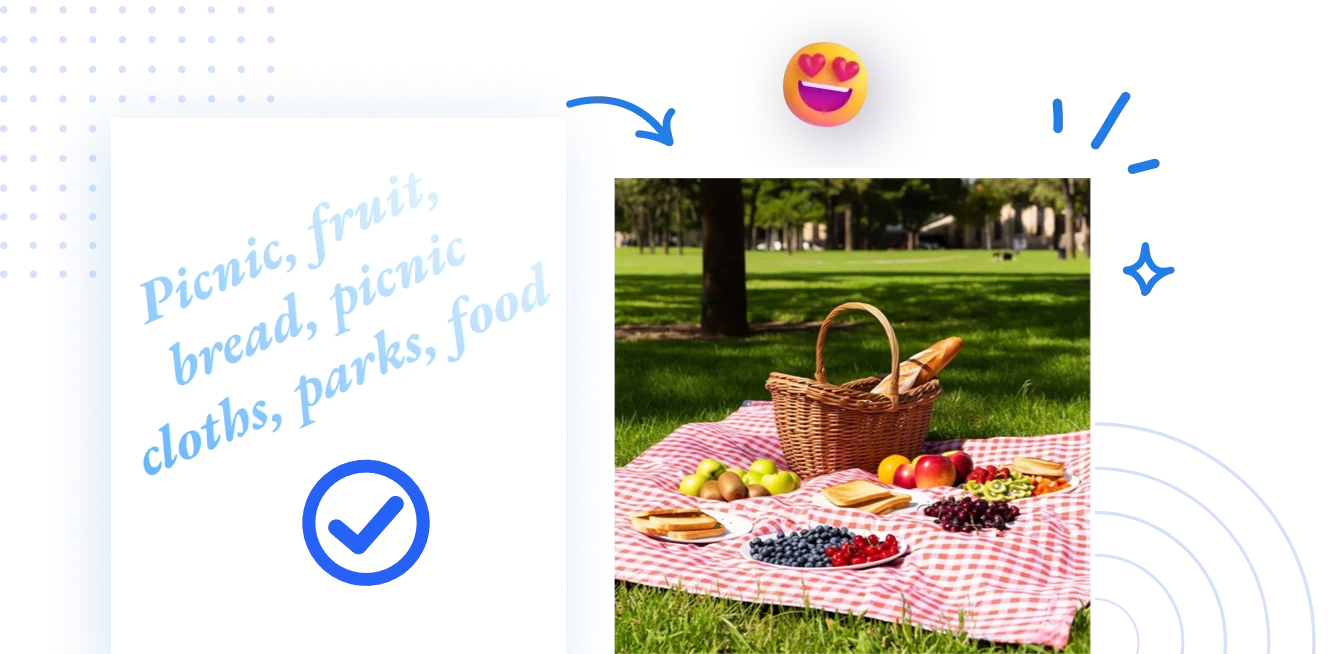
How to Use Pixelfox AI in 3 Simple Steps:
- Define Your Vision: Go to the Pixelfox AI Image Generator. In the prompt box, write a clear description of the image you want. For best results, include details about the subject, style, colors, and mood.
- Customize Settings (Optional): You can adjust the aspect ratio or select from different artistic styles to match your vision.
- Generate & Download: Click "Generate." Within seconds, Pixelfox will produce a high-quality image. You can then download it for free and use it in your personal or professional projects.
What makes Pixelfox the best? It just works. There are no hidden fees, no daily limits on core features, and no watermarks on your final images.
9 Other Great AI Image Generators with No Sign Up
While Pixelfox is our top pick, other tools also offer a great no-login experience. Here are nine alternatives worth checking out.
1. Perchance
Perchance is a simple, community-driven platform. It's known for its quirky and often unpredictable results, making it great for abstract art and creative experimentation.
- Pros: Completely free, unlimited generations, very active community creating new models.
- Cons: Image quality can be inconsistent. The interface is basic and may not be intuitive for everyone.
2. Raphael AI
Raphael AI offers a clean interface and produces high-quality, artistic images. It focuses on providing a wide range of styles, from photorealistic to watercolor and fantasy.
- Pros: Unlimited free access, multiple styles, fully customizable settings.
- Cons: Can be slower during peak usage times.
3. Artguru
Artguru is a simple, mobile-friendly tool that works directly in your browser. It’s great for beginners who want to create AI pictures without dealing with complex menus.
- Pros: Very easy to use, offers preset style options, works well on mobile devices.
- Cons: Free use comes with some limitations on HD downloads.
4. Vheer
Vheer is a comprehensive creative suite with a powerful text-to-image generator. It supports a massive list of specific art styles, from anime to pixel art and graffiti.
- Pros: Huge variety of niche styles, unlimited free generation, also includes image-to-video tools.
- Cons: The sheer number of options can be overwhelming for new users.
5. Magic Studio
Magic Studio's AI Art Generator is designed for speed. It promises lightning-fast results without any login, making it ideal for quick brainstorming and concept creation.
- Pros: Extremely fast, simple one-step process, no account needed for basic use.
- Cons: Advanced features and higher resolutions require a pro plan.
6. Deep Dream Generator
Originally famous for its psychedelic "deep dream" style, this tool has evolved to include more conventional AI art models. It has a strong community focus, showcasing user creations on its homepage.
- Pros: Unique artistic models, strong community, can try without registration.
- Cons: The free version uses an "energy" system that limits how many images you can create per day.
7. Nuelink
Primarily a social media tool, Nuelink offers a free AI Image Generator as part of its toolkit. It’s a no-frills option that gets the job done quickly.
- Pros: 100% free and unlimited, simple interface, multiple styles available.
- Cons: The tool is a side feature, so it lacks the advanced customization of dedicated platforms.
8. Canva
Canva’s AI Image Generator is integrated into its popular design suite. While you need an account for Canva itself, its generator app can often be used for a limited number of free creations without a subscription.
- Pros: Integrates seamlessly with other design tools, variety of styles.
- Cons: Free use is limited, and you ultimately need a Canva account.
9. DeepAI
DeepAI offers a straightforward text-to-image API and a simple generator on its website. It’s a developer-friendly option that is also accessible to casual users.
- Pros: Easy to use, offers an API for developers.
- Cons: Image quality and styles are more limited compared to newer models.
AI Image Generator No Filter: Where to Find True Creative Freedom
A common frustration with many AI tools is content filtering. You might try to create a dark fantasy scene or a piece of artistic nudity only to have your prompt blocked. An ai image generator no filter gives you the freedom to explore all themes without restrictive censorship.
Tools like Perchance are often praised for their minimal filtering. Because it’s a decentralized platform with community-built generators, you can often find models tailored to more niche or edgy content. However, this freedom comes with a responsibility to create ethically.
Tip: If your prompt is blocked on a mainstream generator, try rephrasing it. Instead of using direct words that might trigger a filter, describe the scene using artistic or metaphorical language. For example, instead of "battle scene," try "clash of armored figures under a crimson sky."
How to Create Better Images: Pro Tips for Any Generator
Getting a great image isn't just about the tool; it's about your prompt. A well-crafted prompt is the key to unlocking an AI's full potential.
The Perfect Prompt Formula
A great prompt usually contains four elements:
- Subject: The main person, animal, or object in your image. (e.g., "a wise old wizard")
- Style: The artistic look you want. (e.g., "in the style of a detailed oil painting")
- Details: The setting, lighting, colors, and mood. (e.g., "in a library filled with glowing books, dramatic lighting")
- Negative Prompts: Things you want to exclude. (e.g., "--no blurry, --no extra limbs")
Example Prompt: "A wise old wizard, in the style of a detailed oil painting, in a library filled with glowing books, dramatic lighting, --no blurry faces"
Tip: Don't be afraid to experiment. If your first result isn't perfect, tweak your prompt. Change the style, add more descriptive words, or use negative prompts to remove unwanted elements. Sometimes the best images come from unexpected combinations. For even more control, use a tool like Pixelfox AI Reimagine to generate unique variations of an existing image while preserving its core elements.
Comparison: AI Generators vs. Traditional Tools (Photoshop)
For decades, creating custom images meant mastering complex software like Adobe Photoshop. AI generators have completely changed the game. Here’s a quick comparison:
| Feature | AI Image Generator | Photoshop |
|---|---|---|
| Speed | Seconds to minutes | Hours to days |
| Cost | Free or low-cost subscription | Expensive subscription |
| Skill Level | Beginner-friendly | Requires extensive training |
| Customization | High (via prompts) | Ultimate control (manual) |
The verdict? For speed, accessibility, and generating new concepts from scratch, AI generators are unbeatable. Photoshop still reigns for fine-tuning, editing existing photos, and complex graphic design work. Many professionals now use both: an AI generator for initial ideas and Photoshop for final polishing.
Pro-Level Applications You Can Try Today
These tools aren't just for fun. You can use them to create professional assets for your business or content.
How to Create Pro Product Shots with a White Background
Selling products online? You need clean, professional images.
- Start by generating your product with a simple prompt like "A photorealistic image of a blue ceramic mug on a plain surface."
- Take the generated image and upload it to an AI Background Generator.
- Choose the "remove background" or "white background" option.
- The AI will automatically isolate your product and place it on a clean, white backdrop perfect for e-commerce sites like Amazon or Shopify.
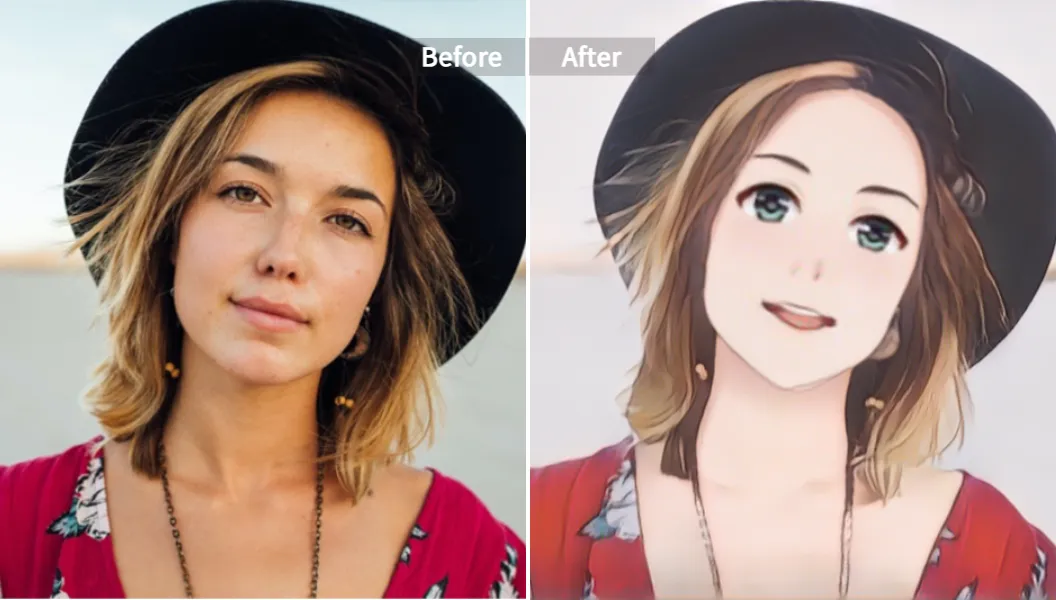
How to Make Unique Anime Art from Your Photos
Want to see yourself as an anime character? It’s easy.
- Find a tool that specializes in photo-to-art transformations, like the Pixelfox AI Anime Generator.
- Upload a clear photo of yourself or a friend.
- Choose your favorite anime style (e.g., Manga, 3D Animation, Chinese Painting).
- Let the AI transform your photo into a stunning piece of anime art, perfect for a unique profile picture or gift.
Common Mistakes to Avoid (And How to Fix Them)
New users often make a few common mistakes. Here’s how to avoid them.
- Mistake 1: Vague Prompts. A prompt like "a dog" will give you a generic image.
- Fix: Be specific! "A fluffy golden retriever puppy playing in a field of yellow flowers, bright sunny day."
- Mistake 2: Forgetting Negative Prompts. Sometimes AI adds weird things like extra fingers or distorted text.
- Fix: Use negative prompts. Adding
--no text, --no watermark, --no malformed handsto your prompt can clean up the result significantly.
- Fix: Use negative prompts. Adding
- Mistake 3: Giving Up After One Try. Your first image is rarely your best.
- Fix: See image generation as a conversation. Take what you liked from the first image, discard what you didn't, and refine your prompt. It’s an iterative process. For better results, you can also use an AI Image Upscaler to enhance the resolution and detail of your favorite generations.
Frequently Asked Questions (FAQ)
Can I really use these AI image generators for free forever? Most of the tools listed, like Pixelfox and Perchance, offer their core features for free with unlimited use. Others may have daily limits or reserve the highest quality settings for paid users. Always check the terms before starting a big project.
How do I get high-quality images from a free tool? The key is a detailed prompt. The more specific you are about the style, lighting, and composition, the better your result will be. Also, look for tools that allow you to select resolution or aspect ratio.
Are images from a free AI image generator copyright-free? This is a complex and evolving area of law. Generally, AI-generated images do not have the same copyright protections as human-made art. Most platforms allow you to use the images for personal and often commercial use, but you likely cannot claim exclusive ownership.
Why do some "free" generators still ask for an account? Many "freemium" tools use a free tier as a way to attract users and then upsell them to a paid plan. The account creation helps them manage usage limits and market their paid features to you. The tools in this guide were selected because they avoid this model for their core service.
You no longer have to trade your privacy or time for creativity. The world of AI art is open and accessible, and with a powerful ai image generator free without login like Pixelfox AI, you have everything you need to start bringing your ideas to life. There are no more barriers between your imagination and a finished masterpiece.
Ready to stop waiting and start creating? Try Pixelfox AI's free online image generator now and turn your words into stunning art in seconds—no account needed.