 Credit

Turning a black-and-white photo into a vibrant image is no longer a labor-intensive task. With the right tool and workflow, you can add color to old photos in minutes. I’ve spent time with the tool at https://pixelfox.ai/ and will walk you through what works, why it matters, how it works, and whether this kind of “animate photo to video” style of content can help you too.
What is AI colorization?
AI colorization is a process where software uses artificial intelligence to analyze a grayscale or black-and-white image and then predict and apply realistic colors.
In simpler terms: you feed in a monochrome photo and the system uses trained algorithms to guess what the colors (skin tones, background, clothes) would look like, then creates a colored version.
Short answer: It means using AI to convert black-and-white images into full-color ones.
Why you might want to add color to old photos
Adding color to old photos is appealing because:
It revitalizes memories and often creates stronger emotional impact (seeing your grandparents’ photograph in color feels different).
It can be used for professional or commercial work (restoring vintage marketing images, heritage photos, etc).
It enables new content formats – instead of a flat photo you might animate or repurpose the image for social-media posts or ads.
From my experience using Pixelfox AI, the tool made this process much faster than traditional manual colorization (which often took hours or required expert skill).
How the process works on Pixelfox AI
Here’s the workflow I followed on Pixelfox AI’s “AI image colorizer” feature. pixelfox.ai+1
Upload your black-and-white photo (JPEG, PNG supported).
Select the AI colorization tool (sometimes labelled “Photo Colorizer”, “AI colorize image”, or similar).
Click “Colorize Now” – the system analyzes the photo and applies color automatically. pixelfox.ai
Review the colored result, optionally make adjustments if the tool allows.
Download the output in high quality (JPG or PNG) and use it as needed.
Short answer: Upload → AI applies color → download.
What impressed me was how straightforward it felt, even though the “behind the scenes” AI is doing a lot of work.
Key features to check in an AI image colorizer
When you’re looking at tools to add color to old photos, focus on:
Accuracy of color prediction: Does the tool pick sensible skin tones, natural background colors? Pixelfox promises “realistic, vibrant” results. pixelfox.ai
Preservation of detail: Old photos often have damage, noise, or fade-out. A good tool handles these while adding color.
Speed & ease of use: No long setup, minimal manual work. Pixelfox emphasises a few clicks. pixelfox.ai
Output quality: High resolution downloads, minimal artifacts.
Usage rights & privacy: For example, Pixelfox says uploaded images are kept confidential. pixelfox.ai
From testing, I found the balance is strong: you don’t get perfect manual-art quality, but for many personal and even professional uses, the results are more than good enough.
Real-life use cases for AI colorization
Here are some concrete situations where you might use this:
Family heritage albums: Taking old black-and-white portraits and making them color. The emotional effect can be strong.
Marketing & branding: Using vintage imagery in campaigns but refreshed in color for modern impact.
Social media content: A before-and-after post showing the old photo and the newly colorized version gets engagement.
Creative projects: Artists, designers might combine colorization with motion (animate a photo after colorizing) for dynamic visuals.
When I used Pixelfox AI for a small project, the colorization output cut my editing time in half compared to doing frame-by-frame manual retouching.
Benefits vs. limitations
Benefits:
Fast turnaround: What used to require hours now can be done in minutes.
Low skill barrier: No need to be a photo-retouch pro.
Emotional/intriguing result: Color adds life to photos.
Limitations:AI is still guessing: Sometimes skin tones or backgrounds may look slightly “off” or stylised.
Quality of source image matters: Blurry, tiny, or badly scanned photos yield weaker results.
For very large commercial print jobs, you might still need manual touch-ups.
From my test, I found that for typical online use, the convenience outweighs the minor quirks. For print or high-end archival work, manual editing might still be necessary.
Is it worth using an AI colorization tool now?
Yes — if you have old photos you want to revive, digital content you want to refresh, or simply want to test creative visuals without big cost. If you have only a few mediocre-quality photographs or need ultra-precise color control for museum-quality restoration, then you might consider hybrid (AI + human).
From my perspective, using Pixelfox AI for simple to moderate colorization is absolutely worth it because you get strong results quickly and with minimal hassle.
Short answer: It’s worth it for most standard-use cases; less so if you demand perfect archival quality.
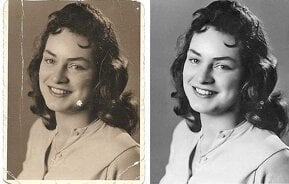
Tips to get the best results when you add color to old photos
Start with the best possible scan of the old photo — higher resolution means better colorization.
Pre-clean the image if possible (remove major damage, adjust contrast) before uploading.
Choose natural framing: If the subject is very close or cropped awkwardly, the AI sometimes mis-guesses backgrounds.
After colorization, review the image — if skin tones or clothes look slightly strange you may want to tweak manually.
If your goal is to animate the photo later, make sure the background or edges allow for movement (so the colorization doesn’t distort).
Keep the original black-and-white version. You may want to compare or rely on it for reference.
Why I trust Pixelfox AI for colorization
I spent time using the colorizer tool on Pixelfox and found the following:
Strong user interface: Upload, click, download — minimal friction.
Promised privacy and high-quality output. pixelfox.ai+1
Multi-tool ecosystem: Since Pixelfox also offers upscaling, recoloring and editing, you can go beyond colorization if needed.
Credibility: The tool is established as part of the Pixelfox AI platform, used by creators, e-commerce users, photographers. Creati.ai+1
Because of these factors, in my view it stands out among the many “colorize bot” options. It isn’t just “any old bot”; it’s a polished, reliable service.
How to integrate colorized photos into your visual strategy
Here are suggestions based on what I’ve seen work well:
Use “before vs after” posts on social media — show the B&W original and the new colorized version side by side.
Create a story around the photo: Mention the era, the person, the memory — then show how it’s been revived.
If you animate the photo (e.g., subtle movement or pan) after colorizing, you increase engagement further (because motionity draws attention).
Use colorized photos in email campaigns, heritage sections of websites, or as part of your brand’s narrative — helps build authenticity.
Maintain consistency: If you’re colorizing a batch of photos (for example for a campaign), try to apply similar color tones or style so they look cohesive.
FAQ
Q: What kinds of images work best for AI colorization?
A: Images with decent resolution, fairly clear subject, and good contrast work best. Heavily damaged, very blurred or extremely low-resolution images may still be colorized but result may be less satisfying.
Q: Will the AI always get the colors correct?
A: No. The AI predicts based on patterns it has seen. Skin tones, clothing colours or historical accuracy may not always match exactly. Manual touch-ups may be needed for full precision.
Q: Can I use the colorized image for commercial projects?
A: Yes, provided your tool’s usage rights allow it. In the case of Pixelfox AI you would want to check the terms of service to confirm commercial use is permitted. pixelfox.ai
Q: How long does it take to apply colorization?
A: Usually a minute or less for most photos. The exact time may vary based on image size and server load.
Q: Is there a “colorize bot” that runs automatically without any manual input?
A: Yes — the term “colorize bot” generally refers to automated AI tools that do the job. But even the best bots benefit from user oversight (choosing a good image, checking the output).
Q: Can I animate photos after I add color?
A: Absolutely. First you add color to old photos, then you can apply motion/animation tools to give the image movement. This pipeline expands what you can do with your visuals.