 Credit

Sharpen Image Free: The Best Tool to Unblur Images Online
The poor quality of a photograph may spoil a great moment. Perhaps the camera was shaky, not in focus or the subject was in motion when you snapped. Many years ago, it was complicated software and skills of professionals to fix a blurry image. Not anymore. Nowadays, it is easy to learn how to unblur an image and it is not a secret of a few people. You can rescue the precious photos in a few seconds with an excellent online image sharpener. This tutorial will demonstrate how to use it and why Pixelfox.ai would be one of the best options that any user would consider whenever they want to sharpen images at no cost.
What Does It Mean to Unblur or Sharpen an Image?
The process of unblurring a photograph involves sharpening and increasing its sharpness. It alters gentle lines and forms sharp line definitions, and discloses hidden images. Think of it as being like turning up a radio, by turning the dial you are able to get a clear signal where before there had been a noisy signal. An image sharpener uses algorithms to scan through the photograph and enhance contrast around the edges of objects as a result of which the image will be brought into focus and made more detailed.
Image sharpening enhances contrast along the sides of a photograph to create the effect of increased clarity and focus. Although it is not able to restore all the information that is lost, it may significantly improve the information that exists.
What Causes Blurry Photos in the First Place?
Knowledge of the source of the blurriness enables one to create realistic expectations of the degree to which a tool will solve the problem. Blur can be of three kinds:
Camera Shake: This happens when the hand of the operator moves as the shutter of the camera stays open which mostly gives the effect of being smeared and causes it to travel through the whole picture.
Out-of-Focus Blur: when a camera is concentrated on the wrong point the result is the softening of the subject. This produces a uniform blur which is in some instances partially obviated.
Motion Blur: The shutter speed could not keep up with the speed of motion and the subject is streaked in the direction of motion.
Even though an expert in image sharpening can bring remarkable results to a slight camera shaking and focus problem, the extreme case of motion blur often becomes the most difficult to fix flawlessly.
How Does an Online Image Sharpener Work?
Pixelfox.ai is an online application that uses state-of-the-art technology of artificial intelligence to process photos. Millions of sharp and blurred images are fed to the AI allowing it to identify the differences between them. When a photo is posted, it is detected whether it has soft spots and shapes that resemble blur by the AI. It then uses a computed refinement to individual pixels and enhances edges and textures without increasing noise and imperfections. It is an AI-based style that is significantly more beneficial than fundamental filters.
AI sharpeners examine the trends in your low-resolution picture and impose specific refinements on contours and surface. They smartly rebuild the detail making the photograph obvious and distinct.
Introducing Pixelfox.ai: A Free and Powerful Solution
Numerous web applications boast of the ability to sharpen pictures at no cost, but not many of them offer quality output. Pixelfox.ai has been created to overcome this weakness. Our application has a dedicated AI model that has been trained specifically on photographic blur. We have also focused on developing the simple process that provides professional quality sharpening without a lot of needless sophistication. It does not require an individual to be a photo editor. All one needs to do is to upload the picture, get it processed and then download a sharper image.
How to Unblur an Image in 3 Simple Steps
Pixelfox.ai process is designed to be efficient and simple to use at the same time, such that one is able to convert an image that is blurred to one that is sharp within a minute.
Upload Your Image: You can just drag and drop your JPG or PNG file, as it is, into the toolbox in the Pixelfox.ai site, and it will be automatically improved to the current standard. Registration of accounts is not needed.
Click on the Sharpen button: Let the AI Work. The AI will automatically assess the nature and strength of the blur and the corrective measures will be made.
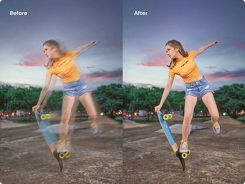
Preview and Download: note the side by side comparison of the original and sharpened image. In case you are content with the outcome, press download to store the new version that has been made clear to your device.
What Makes a Great Image Sharpening Tool?
Not every sharpener is the same. An excellent tool balances a number of things:
Processing Power: The AI needs to be powerful enough to process different types of the blur.
Precision: The outcomes must be almost instant.
User-Friendliness: The interface should be simple and easy to use.
Output Quality: The end product image must be clearer without displaying an artificial and noisy look.
Privacy: The processing of your pictures is done safely and without any storage.
We value each of the five factors at Pixelfox.ai. Our servers process and delete pictures almost automatically, keeping your pictures confidential.
When Can You realistically Fix a Blurry Picture?
One also needs to know what is achievable. AI sharpening is a high-quality solution, which is not a magic one.
Pictures with medium to slight blur caused by slight camera movement or low focus may be effectively repaired. Images with considerable amount of blur or of very low resolution can only have minimal improvements.
Only slightly out of focus photographs are the most appropriate images to use in correction. The blur is still visible, but the specifics of the central subject can be seen. The AI needs a bit of information to be functioning.
Pro Tips for Getting the Best Results
To maximize effectively in sharpening the image files note the following guidelines:
Start with the Original of the highest quality: Use the best available image of the image. It will not give a successful result of sharpening a highly compressed or low-resolution file.
Crop First: When some parts of the image are not clear, it is better to crop the image to the blurred part and proceed. This enables the AI to concentrate their computing power on the problem region.
NB: Do Not Over-Sharpen: Sharpening too much will result in an angular look, halos on edges and exaggerated grain. Our AI is conditioned to avoid this but it is better to be mindful.
Beyond Basic Sharpening: The Pixelfox.ai Advantage
Our tool is intelligent in nature. We have seen other free applications that use a heavy-handed filter and make pictures crunchy and unnatural. We have our AI highly-adapted to target improvement selectively. It accentuates areas that it is needed on like hair and textures, and does not affect smooth areas like skin and sky. This results in a more professional, cleaner and natural finish.
Common Uses for an Image Sharpener
Our tool is used by people on a daily basis due to a variety of reasons:
Salvaging Old Photos: Revitalising loved, though fuzzy, family reminiscences.
Product Shots: Making the picture of the product better so that it can be seen clearly.
Improving Portraits: Sharpening slightly blurred portraits in order to retain the eyes bringing them into focus.
Assembling Presentations: Making screenshots and graphs understandable to the professional documents.
Is It Really Free to Unblur Image Files?
In fact, Pixelfox.ai provides a totally free version which allows processing the recommended number of images per day without cost.
We believe that strong photo editing tools must be made available to everyone.
To those users who need to process large collections of images, we offer a premium service at a reasonable price that is complemented with additional functionality.
Your Images Are Safe With Us
Your privacy is of the highest priority to us. When you use our service to unblur a picture, your picture is sent through a secure server to be processed. The picture is then removed in our system after a short time. Your photos are also not used to further train our AI and neither do we retain your personal files after the temporary sharpening.
Try It Yourself Today
Do not leave a dark picture in the hands of lost causes. Note the distinction that artificial intelligence can create. You can also visit Pixelfox.ai, select your photo and in a few seconds, you will have a better and clearer photo to share, print, and enjoy.