 Credit

Suggested URL:
/ai-fantasy-art-2025/
You want ai fantasy art that looks like a movie still, not like “a dragon that lost a fight with a microwave.” Fair. The problem is not that generators can’t draw dragons. The problem is they follow your prompt like a toddler follows “please don’t touch that.” So this guide shows you what actually works in 2025: how to pick an ai fantasy art generator, how to prompt like a grown-up, and how to fix the output fast with Pixelfox AI when the model gives your knight seven fingers and a sword that bends like spaghetti 🍝.
What “ai fantasy art” actually means in 2025 (and why it’s tricky)
“Fantasy” is a huge umbrella. High fantasy, dark fantasy, cozy fantasy, anime fantasy, gritty realistic fantasy, D&D portraits, book-cover vibes, game concept art… and each style punishes AI in different ways.
Here’s what makes ai fantasy art harder than “generate a cat photo”:
- Anatomy + props combo: faces + hands + armor + weapons. AI loves to mess up at least one of those.
- World logic: lighting, scale, perspective, “why is that castle floating but casting a shadow like it’s on the ground?”
- Consistency: your elf looks perfect… until you need the same elf in 12 scenes for your campaign, comic, or game.
And yeah, it’s exploding anyway. Gartner has repeatedly called generative AI a top strategic tech trend, and you can feel that hype in every RPG Discord and indie-dev forum. People want speed. People want control. People want results that don’t scream “I typed one sentence and prayed.”
Why most fantasy generators disappoint (it’s not you)
A lot of tools sell the dream: “type a prompt, get magic.” Then you try, and you get:
- same “generic epic” composition every time
- washed-out details on free tiers
- prompts ignored (especially with complex scenes)
- “high-res” that is just blurry upscale
- no easy way to edit what’s wrong
According to Nielsen Norman Group, people usually scan web content and may read only a fraction of the words on a page. That matters here because most tool pages hide the real limits (credits, commercial rights, model quality) behind pretty screenshots. So you waste time hopping tools instead of building a workflow.
My hot take: the winning setup is rarely “one perfect fantasy image generator.” It’s generator + finisher. Generate anywhere, then fix and stylize fast.
That’s why I’m going to keep pointing back to Pixelfox AI as the practical “finisher” that makes outputs usable.
What makes a great ai fantasy art generator (quick checklist)
If you’re choosing a fantasy art generator (or an ai image generator fantasy tool), judge it on stuff that actually matters:
Prompt follow-through (aka “does it listen?”)
If the model ignores your key nouns (helmet, cloak color, weapon type), your workflow becomes “generate 40 times and cope.” That’s not art. That’s a slot machine.
Style range (high fantasy, dark fantasy, anime, realistic)
Some tools do painterly epic scenes well but fail at close-up portraits. Others do portraits but can’t do environments.
Editing controls (the underrated superpower)
The best creators don’t just generate. They edit. Inpainting, object replacement, style transfer, and cleanup are where your work becomes “publishable.”
Pixelfox AI shines here with tools like AI Inpaint for fixing faces, hands, and broken props without learning Photoshop wizardry.
Consistency options
Look for reference images, seeds, character tools, or “consistent character” features. If you’re doing RPG assets, this is not optional.
Resolution + output rights
You want high-res for covers, posters, print, and thumbnails. And you want to know if you can use it commercially without stepping on a licensing landmine.
The practical stack: generate anywhere, perfect it with Pixelfox AI
Most people chase “the best fantasy image generator.” I chase “the fastest way to a clean final image.” That’s where Pixelfox AI fits like a cheat code ( ̄▽ ̄)ノ
Pixelfox isn’t trying to be yet another prompt-only generator page with glossy marketing. It’s the toolkit that helps you:
- change the style of an image fast (turn a rough output into a cohesive fantasy look)
- repair details (hands, eyes, armor edges, background artifacts)
- turn stills into motion (stylized video and avatars for promos)
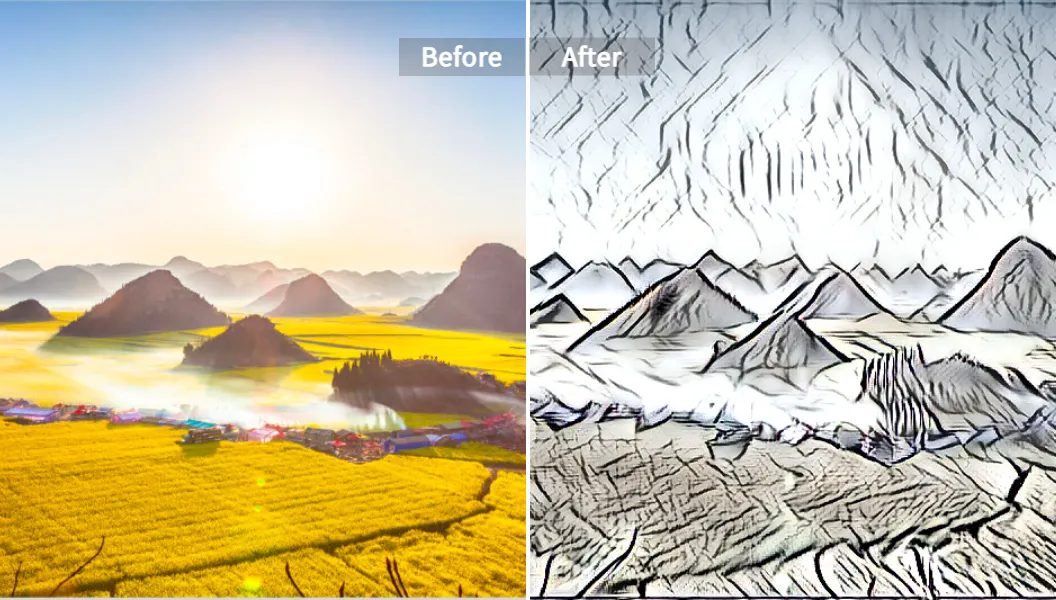
You’ll use these Pixelfox tools a lot in a fantasy workflow:
- AI Style Transfer to push your image into a stronger fantasy vibe (painterly, anime, dark, etc.)
- AI Anime Generator when you want that JRPG / anime fantasy look without wrestling 40 settings
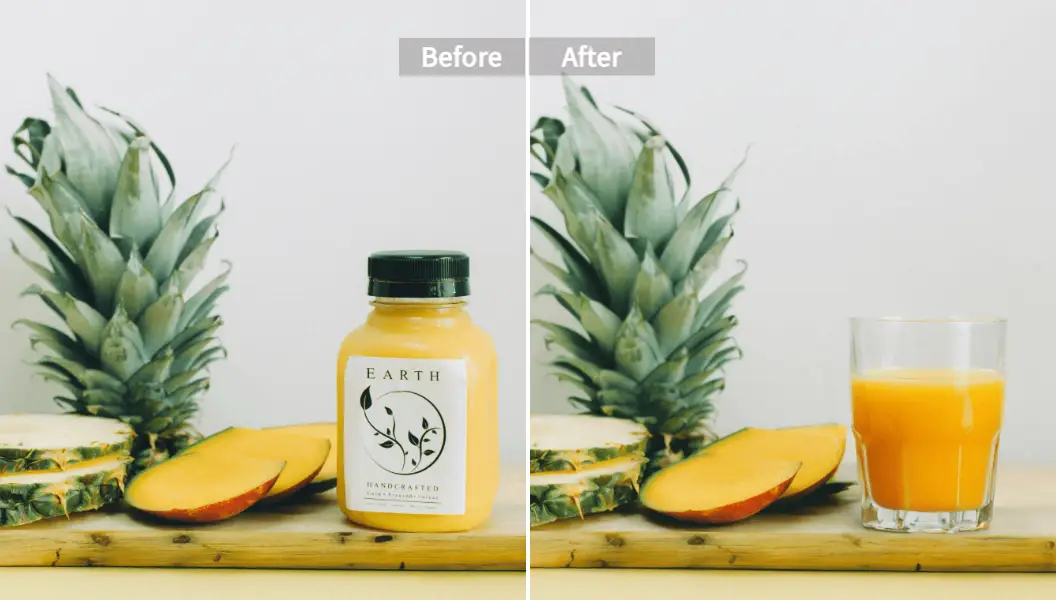
- AI Inpaint to fix the classic failures (hands, weapons, face symmetry, weird background objects)
- AI Video Style Transfer to turn clips into animated fantasy styles for trailers or social posts
- AI avatar from Photo to make a character “talk” for a teaser, narration, or NPC intro
Best tools in 2025: quick picks (with honest trade-offs)
You searched ai fantasy art generator because you want options. Here are the real categories, without the “everything is the best” nonsense.
| Tool / Type | Best for | What it’s good at | Watch-outs |
|---|---|---|---|
| Midjourney | cinematic fantasy scenes | gorgeous composition + mood | Discord workflow, less direct edit control |
| Leonardo AI | game-style fantasy assets | control + model options | UI has a learning curve |
| Stable Diffusion (local or hosted) | power users | control, LoRAs, inpaint workflows | setup time, model hunting |
| OpenArt | quick experiments | easy UI, free basic models | top quality may need credits; check attribution rules |
| NightCafe | community + variety | many models, daily credits | credits and model choice can be confusing |
| CharGen | D&D/RPG creation | characters, NPCs, items, maps | specialized, not for all styles |
| DeepAI | fantasy portrait generator | simple fantasy portrait pipeline | credit limits, varying consistency |
| Magic Studio | fast casual generating | no-login speed | fewer “pro” controls |
| Kaze AI | photo → fantasy | turns photos into epic fantasy edits | depends on input photo quality |
| Pixelfox AI (finisher) | making outputs usable | style transfer + repair + video tools | you still need a base image (from any generator or photo) |
If you only pick one “generator,” you’ll still hit the same wall: edits. So you can totally generate in OpenArt or NightCafe… then use Pixelfox AI to clean it up and lock the style.
How to create fantasy art that doesn’t fall apart (step-by-step)
This is the workflow I recommend if you want reliable results for ai fantasy art, not just one lucky image.
Step 1: Write the scene like a director, not like a poet
Poetry makes prompts worse. Yep, I said it. AI models love clear nouns.
Good prompt thinking:
- Who is the subject?
- What are they doing?
- Where are they?
- What’s the mood?
- What’s the camera view?
Step 2: Use a prompt skeleton that forces clarity
Tip: Use this prompt skeleton and your “hit rate” goes up fast.
Subject + action + setting + lighting + style + camera + detail level
Example: “female elf ranger, holding a bow, misty pine forest, moonlight, high fantasy oil painting, 35mm portrait, ultra-detailed”
Short sentence. Clear nouns. Less chaos. (ง’̀-‘́)ง
Step 3: Generate with your chosen fantasy art generator
Pick the tool based on your target:
- portraits → tools that do faces well (DeepAI, Leonardo, Midjourney)
- environments → Midjourney, SDXL/Flux variants, NightCafe models
- photo-to-fantasy → Kaze AI style workflows
Step 4: Lock the style with Pixelfox AI Style Transfer
If your images look “generic AI,” it’s often a style problem, not a content problem.
Run the best output through Pixelfox AI’s AI Style Transfer. Use a strong reference style image (a painting style, a color palette, a vibe). You get:
- more consistent brushwork or anime line style
- fewer “random model defaults”
- a cohesive look across a set
Step 5: Fix the ugly parts with AI Inpaint (hands, weapons, faces)
This is where most creators either level up… or rage quit.
Use AI Inpaint like a fantasy surgeon:
- mask the broken hand
- describe the correct hand pose (“five fingers, natural grip on sword hilt”)
- regenerate only that area
Tip: Don’t inpaint the whole arm when the hand is wrong.
Mask small. Describe simple. Repeat.
Big masks cause style drift, and then you’re fixing your fix. Fun stuff 🙃
Step 6: If you need motion, turn it into video
Static images are great. Motion sells.
Use AI Video Style Transfer to turn a short clip into a fantasy-styled animation. Then use it for:
- a book teaser
- a game reveal post
- a “scene mood” video for your D&D table
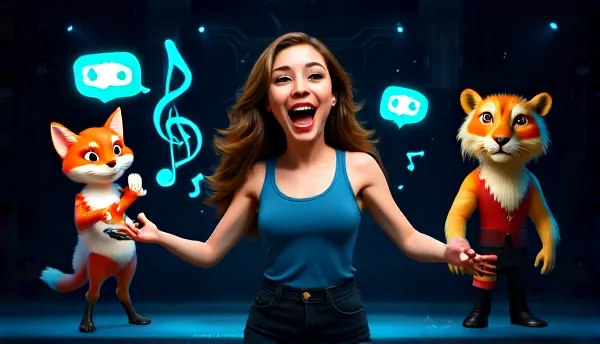
And if you want a character to narrate the world intro, use AI avatar from Photo. It’s way more engaging than another wall of lore text (and I say that as someone who loves lore).
Prompt examples you can steal (ai image generator fantasy)
These work across many tools. Tweak style words depending on your generator.
1) Epic dragon scene (cinematic)
“ancient red dragon on a cliff above a burning medieval city, smoke and embers, storm clouds, cinematic lighting, ultra-detailed scales, wide shot, dramatic composition”
2) Dark fantasy forest (mood + texture)
“dark fantasy forest, twisted trees, fog, gothic ruins, faint blue bioluminescent mushrooms, low light, high contrast, eerie atmosphere, detailed environment art”
3) Castle matte painting (worldbuilding)
“massive fantasy castle carved into a mountain, waterfalls, bridges, sunrise light rays, matte painting style, grand scale, crisp details, wide landscape”
4) AI fantasy portrait generator prompt (character close-up)
“fantasy portrait of a young mage, silver hair, glowing runes on skin, velvet cloak, soft rim light, shallow depth of field, realistic skin texture, sharp eyes, 85mm portrait”
5) D&D NPC portrait (simple and consistent)
“dnd npc portrait, middle-aged tavern keeper, warm smile, apron, candlelit tavern background, painterly fantasy style, clean face, natural hands, medium shot”
If your tool supports negative prompts, add: “deformed hands, extra fingers, asymmetrical eyes, blurry face, melted armor, unreadable text, watermark”
Two advanced “pro” moves (stuff that actually feels like a level-up)
1) The “Consistency Sandwich” for campaigns and series
You need the same hero 10 times. Most people spam prompts. Pros build a system.
Workflow:
1) Generate a base portrait you love (any generator).
2) Reuse it as a reference image for future scenes.
3) Run every final through Pixelfox AI Style Transfer using the same style reference.
4) Fix drift with AI Inpaint on face details (scar shape, eye color, jewelry).
Result: your character stops shape-shifting like a cursed mimic.
2) Turn one portrait into a mini trailer (image → avatar → styled video)
This is a killer move for writers and indie devs.
Workflow:
- Start with a strong ai fantasy portrait generator output.
- Make it talk with AI avatar from Photo (short lines work best).
- Style the final clip with AI Video Style Transfer to match your world vibe.
Now you have a shareable video for TikTok, Reels, YouTube Shorts, or your Steam page. It looks “studio” even if you made it on a laptop at 1 a.m. (we’ve all been there).
Real-world case studies (how people actually use this)
Case study 1: A D&D DM builds a full NPC set in one weekend
Goal: 30 NPC portraits with one cohesive style for a homebrew campaign.
Problem: AI outputs looked inconsistent. Faces drifted. Hands were cursed.
Workflow:
- Generate NPC drafts in a fantasy generator (OpenArt / NightCafe / SDXL, pick your poison).
- Run all keepers through Pixelfox AI Style Transfer with one reference style.
- Fix 5–10 “problem portraits” with Pixelfox AI Inpaint (hands, eyes, random jewelry).
Result: A clean, consistent set that feels like it came from one artist, not 30 different AI moods. Time saved is the real win. Money saved is a close second 💰.
Case study 2: An indie author makes a book-cover-ready character promo
Goal: Social promos that match the book cover vibe (dark fantasy romance).
Problem: The generator nailed the face, then butchered the cloak edges and background props.
Workflow:
- Create the portrait using a generator that does faces well.
- Use Pixelfox AI Inpaint to remove background junk (weird symbols, random extra buckles).
- Apply Pixelfox AI Style Transfer to match the cover art tone.
- Make a talking teaser with Pixelfox AI avatar from Photo: “I made a deal with the wrong god.”
Result: Promos look intentional, not “AI roulette.” Engagement usually follows consistency, not just prettiness. Forrester’s CX research often ties perception of quality to clarity and coherence, and visuals are part of that game.
Common mistakes beginners make with ai fantasy art (and fixes)
Here are the classic faceplants. I’ve done most of them. No shame 😅
1) Vague prompts
Fix: add concrete nouns (weapon type, armor material, location).
2) Too many style words (“epic, stunning, gorgeous, masterpiece, hyper…” x 50)
Fix: pick 1 style target and stick to it.
3) No camera direction
Fix: add “wide shot,” “close-up,” “35mm,” “85mm,” “top-down map view.”
4) Ignoring lighting
Fix: use simple lighting terms: “moonlight,” “torchlight,” “rim light,” “overcast daylight.”
5) Trying to fix everything by regenerating
Fix: generate once, then edit. Use Pixelfox AI Inpaint for local repairs.
6) Style drift across a set
Fix: same style reference + Pixelfox AI Style Transfer.
7) License blindness
Fix: read the tool’s commercial terms. Some platforms allow commercial use but require attribution. Some don’t. If you’re doing book covers or game assets, you don’t want surprise rules later.
How to avoid “ai fantasy portrait generator” uncanny faces
Uncanny faces usually come from over-sharpening, weird skin texture, or mismatched lighting.
Fix it with:
- simpler prompts (“realistic skin” can backfire; try “natural skin texture”)
- consistent light direction
- inpaint only the face region when eyes or mouth are off
Pixelfox AI vs Photoshop vs other online tools (real talk)
Pixelfox AI vs Photoshop
Photoshop is powerful. Also, Photoshop is a lifestyle choice.
- Photoshop wins when you need pixel-perfect control, typography, and complex compositing.
- Pixelfox AI wins when you need fast repairs and style changes without spending your weekend watching mask tutorials.
If your fantasy sword looks wrong, inpainting it with Pixelfox can be faster than manual painting + blending + shadow matching in Photoshop. Speed matters when you’re making 40 assets, not one.
Pixelfox AI vs “one-click fantasy generators”
Most online generators are great at creating. They are weaker at fixing.
Pixelfox is the opposite energy. It’s the tool you open when you already have something decent and you want it to look done.
That’s why I keep calling it the “finisher.” The internet is full of generators. Finished work is rarer.
FAQ
How do I make ai fantasy art look less “AI-generated”?
Use fewer generic style words, add camera + lighting, then run the best output through a consistent style pass like Pixelfox AI Style Transfer. Fix small weird details with inpaint instead of regenerating everything.
Why does my fantasy art generator keep messing up hands and weapons?
Hands and props are high-detail zones with lots of angles. Models guess. Mask and repair just the problem area with Pixelfox AI Inpaint, and describe the fix in plain words.
Can I use ai fantasy art commercially?
Sometimes yes, sometimes “it depends.” Each platform has its own rules. Also think about copyrighted characters and trademarks. When in doubt, create original designs and keep your prompts away from protected names.
What’s the difference between a fantasy image generator and Pixelfox AI?
A fantasy image generator creates images from text or images. Pixelfox AI helps you edit, restyle, and fix those images (and even turn them into video). They can work together.
How can I make consistent characters for a whole RPG campaign?
Use one strong reference portrait, keep a stable prompt, apply one consistent style reference, and fix drift with inpainting. The “Consistency Sandwich” workflow above is the simplest way that still works.
One last thing (and yeah, it’s a nudge)
If you only remember one idea, make it this: ai fantasy art is a workflow, not a lottery ticket. Generate with whatever tool you like, then finish like a pro.
Try Pixelfox AI to clean, restyle, and level up your images:
Make one character. Make it consistent. Make it look like it belongs in your world. Then ship it. That’s how you win at ai fantasy art. ✨
Author note / disclosure: I wrote this from hands-on testing and content strategy work in AI creative tools. Tool features and licensing can change, so always confirm the latest terms on the provider’s site before commercial use.