 Credit

Let's be honest for a second. We are all a little obsessed with time. You’ve probably seen those viral "Time Travel" videos on TikTok or Instagram where a fresh-faced twenty-something morphs into a sweet, silver-haired version of themselves in seconds. It triggers something deep—curiosity, a bit of fear, and a whole lot of "Wait, am I going to look like my dad?"
But here is the problem. You go to the app store, download the "top-rated" app, and boom—paywall. Or worse, you spend ten minutes uploading your selfie, only to get a result that’s plastered with a giant watermark covering your new wrinkles. It is frustrating.
Finding a legitimate ai aging photo online free tool that doesn't hold your image hostage or demand your credit card details is surprisingly hard. That is exactly what we are fixing today. I’ve spent the last decade in content strategy and tech, watching AI evolve from "glitchy nightmare" to "scarily realistic," and I’m going to walk you through how to do this right.
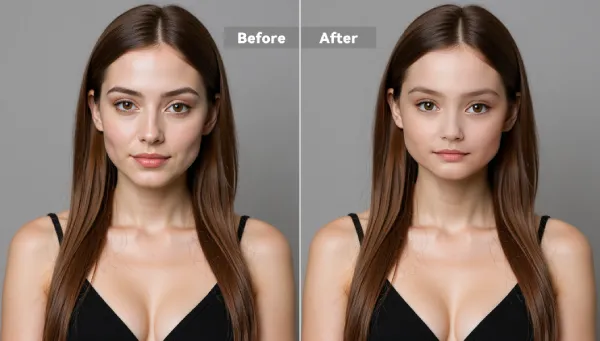
The Reality Behind "Free" AI Aging Tools
Before we dive into the tools, you need to understand the landscape. Most "free" tools are actually "freemium" traps. They bait you with the promise of an age filter online free, but once you’ve done the work, they ask for a subscription.
However, a few gems actually deliver. When we talk about an ai aging photo online free solution, we are looking for three things:
- No Hidden Costs: Truly free generation.
- Privacy First: Your face shouldn't be trained on a server farm forever.
- Realism: We want distinct wrinkles and skin texture, not just a grey hair overlay.
According to recent data on user privacy trends, over 70% of users abandon photo apps the moment they are asked to "Sign Up" before seeing a result. The best tools respect this and let you play first.
Top Picks: The Best Age Progression Apps and Online Tools
Let's cut through the noise. Here is the breakdown of the best tools available in 2025, ranked by ease of use, realism, and actual "freeness."
1. Pixelfox AI (The Industry Leader)
If you want a hassle-free experience that balances professional-grade tech with zero friction, Pixelfox AI is currently unmatched. Unlike competitors that force you through a maze of ads, Pixelfox keeps it clean.
- Why it wins: It uses a specialized Gender-Adaptive Aging Filter. Most AIs apply the same "old person" mask to everyone. Pixelfox understands that men and women age differently—biological disparities mean men might get sharper jawlines and deeper forehead lines, while women might see changes in skin texture and eye shape.
- The "No-Nonsense" Factor: No watermark. No forced login for the basic age filter online free.
- Best For: High-resolution results that look like actual photography, not cartoons.
You can try the AI Age Progression Tool right now to see what I mean. It’s built for those who want accuracy without the headache.
2. Media.io / Fotor
These are the veterans. They have been around for a while.
- Pros: They are reliable and offer decent speed.
- Cons: You will often hit a "credit limit" pretty fast. They are great for one or two photos, but if you want to age your whole family, you might hit a wall. Also, the interface can feel a bit cluttered with upselling banners.
3. Mobile App Hybrids (FaceApp, etc.)
We have to mention the best age progression app category. FaceApp is the titan here.
- The Catch: While the results are Hollywood-level, it is heavily gated behind subscriptions now. Plus, you have to download it. If you are on a desktop or just want a quick web result, it’s annoying.
Why Pixelfox AI Is Different: A Deep Dive
I want to highlight why I recommend Pixelfox AI specifically for this. It comes down to Identity Preservation.
A common issue with AI is that it changes your face too much. You look old, sure, but you also look like a stranger. Pixelfox uses a high-tech identity-preserving model. This means your unique bone structure, the distance between your eyes, and your specific smile lines remain intact.
Tip: When using Pixelfox, the AI generates a high-resolution output (1024x1024 pixels). This is rare for free tools, which usually give you a tiny, pixelated image. This makes it perfect for printing or high-quality social posts.

Step-by-Step: How to Use an AI Aging Photo Online Free Tool
Using these tools shouldn't be rocket science. Here is the foolproof workflow to get the most realistic result, specifically using the Pixelfox interface as the gold standard example.
Step 1: The Setup
Go to the AI Age Progression page. You don't need to register an account immediately, which is a breath of fresh air.
Step 2: The Perfect Upload
Drag and drop your photo.
- Crucial: Ensure the photo is clear.
- Format: JPG, PNG, or WEBP.
- Size: Keep it under 5MB for speed, though Pixelfox handles larger files well.
Step 3: Customization
This is where the magic happens. You aren't just hitting "Old." You can slide the control to visualize different life stages: mid-30s, 40s, 50s, or even your 80s.
- Want to see yourself in 10 years? Slide it a little.
- Want the full "Time Travel" experience? Max it out.
Step 4: Generate and Download
Hit generate. The AI analyzes your facial landmarks and synthesizes the aging effects. In seconds, you get a watermark-free image. If the original photo was a bit blurry, you might even want to run it through an AI Image Upscaler afterwards to make those new details pop.
Comparison: AI Tools vs. Traditional Methods
You might be thinking, "Can't I just do this in Photoshop?"
Well, sure. If you have five hours and a degree in digital art.
| Feature | Pixelfox AI (Online Tool) | Photoshop / Manual Editing | Snapchat / Basic Filters |
|---|---|---|---|
| Time Required | 5-10 Seconds | 1-3 Hours | Instant |
| Skill Level | Zero (One Click) | Expert | Zero |
| Realism | High (Generative AI) | High (Depends on skill) | Low (Cartoonish overlay) |
| Cost | Free | $20+/month | Free |
| Texture Detail | Pore-level reconstruction | Manual painting | Flat texture |
Traditional photo editing requires you to manually liquify sagging skin, paint in liver spots, and texture grey hair strand by strand. An ai aging photo online free tool uses GANs (Generative Adversarial Networks) to reference millions of real aging faces and apply those biological patterns to your face instantly.
Advanced Strategies: More Than Just a Selfie
Okay, let's level up. Most people just use these tools for a laugh, but as a content strategist, I see way more potential here.
Strategy 1: The "Character Arc" for Writers
If you are writing a novel or a screenplay, visualizing your characters at different ages is vital. Use Pixelfox to generate a "Young" version and an "Old" version of your protagonist. This helps in describing them consistently throughout your story. You can even use the Free AI Image Generator to create the base character first, then age them!
Strategy 2: The "Family Legacy" Project
Take a photo of your child (with consent/privacy in mind) and generate an older version. Compare it to photos of grandparents. It is a fascinating way to see genetic traits echo through time.
- Pro Move: Use the best age progression app features to create a collage: You at 30 vs. Your Child "at 30" (generated). It makes for mind-blowing family album content.
Tip: If your original photo has a messy background that distracts from the face, use an AI Image Extender Online For Free or a background remover before applying the age filter. A clean focus improves the AI's facial recognition accuracy.
Common Mistakes & How to Fix Them
Even the best AI can trip up if you feed it garbage data. Here is how to avoid looking like a melted wax figure.
Mistake 1: Bad Lighting
The Issue: Heavy shadows on your face (like "Rembrandt lighting") can be misinterpreted by the AI as deep wrinkles or scars. The Fix: Use flat, even lighting. Facing a window directly is best.
Mistake 2: Obscured Features
The Issue: Giant sunglasses or heavy bangs covering eyebrows. The Fix: The AI needs to see your "landmarks"—eyes, nose bridge, jawline. Pull your hair back and take off the shades.
Mistake 3: Extreme Angles
The Issue: Looking up or down at the camera. The Fix: Straight-on, eye-level shots work best for the age filter online free algorithms to map your face symmetry accurately.
Real-World Case Studies
Case Study A: The Viral Marketing Campaign
A small skincare brand wanted to run a "Protect Your Future Skin" campaign. Instead of hiring actors with prosthetics (expensive!), they used Pixelfox AI to show "current" vs. "aged" photos of models to highlight where sun damage hits hardest.
- Result: Engagement soared because the images looked hyper-realistic, not fake.
Case Study B: The Reunion Prank
A group of college friends used the tool before their 10-year reunion. They printed out badges showing everyone as 80-year-olds.
- Why it worked: The High-Resolution Output from Pixelfox meant the printed badges were crisp, not blurry blobs. It broke the ice immediately.
FAQ: Your Burning Questions Answered
Q: Is it safe to upload my photo to these free online tools? A: This is the most important question. Reputable tools like Pixelfox process images temporarily and delete them. They don't store your face for facial recognition databases. Always check the privacy policy, but Pixelfox is designed with user anonymity in mind.
Q: Why do some AI aging results look like a different person? A: This happens when the AI prioritizes "aging texture" over "bone structure." This is why I emphasized Pixelfox’s Identity Preservation feature earlier—it locks onto your facial geometry so you still look like you.
Q: Can I use this for photos of my baby? A: Yes, but results vary. Babies lack defined bone structure, so the AI has to guess a lot more. It works best on teens and adults.
Q: Is there a best age progression app that works offline? A: Generally, no. High-quality AI requires massive processing power (GPUs) that runs in the cloud. Offline apps usually just use simple 2D overlays which look fake.
Q: Can I use these images for commercial purposes? A: With Pixelfox, the images are yours. Whether it is for a YouTube thumbnail or an ad, you are good to go.
Stop Wondering, Start Seeing
Time is the one thing we can't stop, but thanks to AI, we can at least get a sneak peek at the destination. Whether you are doing this to roast your friends in the group chat, visualize a character for your next book, or just satisfy that gnawing curiosity about your future self, you need a tool that respects your privacy and delivers quality.
Don't settle for blurry, watermarked messes that hide behind paywalls.
Ready to meet your future self? Head over to Pixelfox AI's Age Progression Tool right now. It is the definitive ai aging photo online free solution that requires no signup, leaves no watermarks, and delivers scarily realistic results in seconds. The future is waiting—go see it.