 Credit

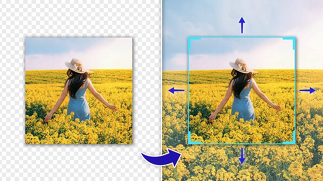
The capability to scale an image way beyond where it started is one of the most impressive capabilities of the modern AI tools. An AI image extender can be used to expand a photo, fill in missing information, zoom in organically, and design a whole scene in cases when the original image seems too cropped or incomplete. It is an easy and quick process that can be done using numerous AI expand image free programs online.
AI will automatically create more background to a design layout, repair cropped photos, or just create more scenery around your subject, whatever you desire. All you have to do is to upload your picture, follow the direction you wish to expand and the system replenishes the areas that are missing with a very realistic appearance.
AI Image Expansion
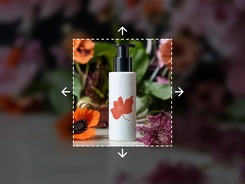
Image expansion is a process of expanding a photograph to the left, right, top, bottom or all sides. It is based on deep-learning models which interpret shapes, light, color, and texture in the image. The AI then regenerates the extensions of nature that merge with the original image.
Even a narrowly framed photo can be made to look broader and more balanced with the help of ai expand. Backgrounds, landscapes, sky, scenery or artistic effects may be used to fill empty space using tools.
Why AI Image Expansion Is Necessary
AI image expansion addresses a number of problems that are frequently encountered:
Fixing Tightly Cropped Photos
In some instances a picture will be sliced off the background or some portion of the subject. The frame is naturally enlarged by AI.
Better Layout for Design Work
The social media poster designs, banners, and posters usually require additional space around the topic.
Extending Backgrounds for Thumbnails
Artists employ the use of the ai zoom out image to enlarge space around objects or individuals to place text.
Restoring Old or Partial Images
AI has the ability to restore sections of photos that are damaged or missing.
Since AI does all the work automatically in regard to texture, lighting and depth, the texture and light of the final image appear professionally extended.
Best AI Image Extender Tools for 2025
These are some of the best tools for expanding images and ai photo expander functions:
DALL·E Outpainting
Has very realistic image extensions, smooth blends and customizable prompts.
Adobe Firefly Expand Image
Professional-quality, high-resolution expansions which are clean and match the original style.
Canva AI Image Expander
Easy to use and good when it comes to social media layouts or fast design changes.
Fotor AI Photo Extender
Minimalistic web application allowing individuals to enlarge images in various directions, filling them with natural AI.
Such solutions are quick and web-based and offer an opportunity to extend photos without sophisticated editing capabilities.
The Role of AI in Image Expansion
The modern image extension technology focuses on AI. Its capabilities include:
Understanding Visual Context
AI recognizes objects, textures, and lights in the original picture.
Generating Realistic Extensions
The system generates new backgrounds, scenery or edges which are in conformity with the initial appearance.
Matching Styles
AI adjusts to the style, regardless of whether it is a photograph, illustration, painting, or digital render.
Handling Complex Textures
AI recreates details, whether it is clouds and water or hair, shadows, and foliage.
Expanding in Multiple Directions
It has vertical, horizontal, diagonal or full-frame zoom-out features.
Since AI is trained using images of various types, it can expand almost every picture and make it aesthetic.
Final Thoughts
The AI image extender has turned out to be a tool of necessity for creators, editors and designers. Being able to enlarge images, make them zoom out automatically, and fill the empty space, artificial intelligence makes it easy to transform cropped or constrained photographs into complete, broad, and extensive visuals. With the help of free AI image expansion tools, anyone can obtain high-quality results without the use of advanced editing.
The expansion of AI is a convenient and effective tool regardless of whether you are repairing old photo images, making room to add design elements, or brainstorming new ideas.
FAQs
What is an AI image extender used for?
It upscales images by creating additional content outside the frames.
Is there a free AI expand image tool?
Yes, there are a number of free AI image expansion sites on the Internet.
Does AI zoom-out look realistic?
The contemporary AI applications are able to imitate the style, light, and texture to produce natural output.
Can AI fill missing parts of an image?
Yes, there are image filler programs with AI, which can fill in missing or damaged parts.