 Credit

Introduction
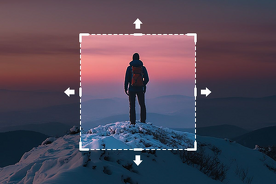
Outpainting, or expanding an image beyond its frames, is one of the most impressive features of modern visual AI. It takes only a few clicks to enlarge a photo, come up with a new landscape, insert what is missing, or fill the scene in. The AI-powered image outpainting tools ensure that it is simple to extend a picture in its natural state regardless of whether the picture was cropped or unfinished.
You need to expand a view, carry on a background, give a portrait more space, or fantasize about what is behind the frame originally; free AI outpainting is a remarkably easy way to do it. All you have to do is upload a picture and decide on the length you would like to extend it, and the AI reproduces the surrounding items in a realistic, stylistic, or artistic manner.
AI Outpainting
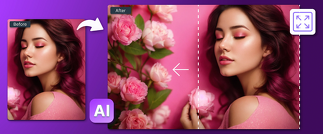
AI outpainting is a visual extension method which enables a visual image to expand past its boundaries. The application works by examining the image, its colors, light, patterns, objects, and composition and then producing additional content that harmoniously blends with the original.
In image outpainting, the AI provides an idea of what would be beyond the frame. By posting a portrait, it can lengthen the background. In case you post a landscape, it will stretch out the horizon. In the case of a tight crop, the AI has the ability to add additional space by placing the subject.
The modern online outpainting systems are trained with huge datasets, and they can comprehend textures, shapes and visual styles more than ever before. This gives the long stretch a natural and uniform look even when the original photograph appears to be poor or unfinished.
Why AI Outpainting Is Necessary
AI outpainting addresses a number of typical creative issues:
Fixing Cropped Photos
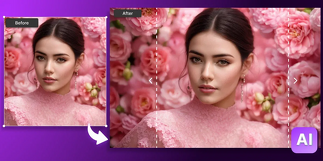
A picture is sometimes cut too tightly. Outpainting creates spacing of your subject.
Improving Composition
Posters, thumbnails, or layouts frequently require broader frames by designers.
Extending Backgrounds
More scenery, sky, or room behind a person or a thing can be created.
Restoring Damaged or Old Photos
Lost fragments of a picture can be reproduced easily.
Creative Expansion
Outpainting is applied by artists to construct larger scenes, to tell stories or to create imaginary worlds.
Outpainting is an option for anyone working with images, whether a creator, marketer, editor, or hobbyist, without requiring manual drawing or sophisticated editing.
Best AI Outpainting Tools for 2025
The following are the most trusted and commonly used outpainting tools online:
DALL·E Outpainting (OpenAI)
The image extension tool, which is one of the most developed tools to allow the seamless extension of the image in any direction with natural details and high precision.
Adobe Firefly Outpainting
it is ideal for professional designers who seek clean, high-resolution outpainted output that can be directly integrated into the Adobe ecosystem.
Canva AI Outpainting
Simple, totally newbie-friendly, and best suited to widen the background of social media layouts or design work.
Stable Diffusion Outpainting Models
Free systems that allow customization of the settings to permit creative and experimental growth.
Fotor AI Outpainting
A free, easily added, web-based tool that adds more space or a background to your photos.
These mediums enable users to edit pictures online, without having to use special editing programs.
The Role of AI in Image Outpainting
The AI is involved in outpainting through visual context, and whatever extensions are generated must be believable. It recognizes patterns of color, the directions of light, textures, shapes and depth and builds new content which seems to be part of the original image.
Key AI capabilities include:
Context Awareness
AI anticipates the existence of what logically should be outside of the frame.
Realistic rendering
The shadows, highlights and materials are reproduced in a natural way.
Style Matching
AI replicated the original image's art style, which may be photographic, painted or illustrated.
Creative Variation
Different levels of outpainting can be obtained by varying the styles or prompts used by the users.
Scalability
Artificial intelligence may complicate pictures and inflate them in size to create bigger ones.
It makes outpainting a convenient and creative image-enhancing tool in general.
Final Thoughts
The concept of AI outpainting has transformed the manner in which we treat images. As someone can enlarge a scene and mend a lost part of it, as well as create a new material surrounding a photograph, any person can make a humble photo grow into something far bigger and more expressive. With the help of online outpainting tools and the free options of AI outpainting, this previously sophisticated method has become accessible to all. AI simplifies the work, whether it comes to fixing a cropped photo, creating graphics or getting creative ideas.
FAQs
What is AI outpainting used for?
It magnifies a photograph in a way that extends its boundaries, creating new content that naturally fuses with the photo.
Can I use free AI outpainting tools online?
Yes. Numerous websites provide free online outpainting and there is no software installation.
Does outpainting work on any type of image?
Majority of the tools are friendly to portraits, landscapes, illustrations, and even the old or damaged photographs.
Is the expanded part realistic?
AI models are trained to be compatible in colors, textures, and lighting, creating natural-looking extensions.
Can I customize the outpainted area?
Yes. Numerous options enable prompts, instructions or style options to dictate the appearance of the extended area.