 Credit

Nielsen Norman Group’s eye‑tracking research has a blunt takeaway: people look at faces and eyes first. So when your “perfect” shot has someone staring at the floor (or the nachos), the whole photo feels… off. If you’re here to make eyes look at camera photo without learning Photoshop witchcraft, you’re in the right place. I’ll show you a clean, realistic workflow (with real prompts), when AI works great, when it fails, and the tools that do the job—while putting Pixelfox AI front and center because it’s the fastest way to fix the most common “eye problems” people actually have.
Suggested URL: /make-eyes-look-at-camera-photo/
The real reason eye contact matters (not just “vibes”)
Eye contact isn’t magic, but it’s close. Social psychology research has shown that direct gaze changes how people rate trust, attention, and confidence. In plain English: if your eyes miss the camera, viewers feel it.
And in “internet business reality” terms:
- LinkedIn has long stated profiles with a photo get far more views (the commonly quoted figure is 21x). Your photo does heavy lifting before your resume even gets a chance.
- Nielsen Norman Group has also shown users don’t read pages like a book—they scan. Eyes and faces grab attention fast.
- Gartner keeps calling out generative AI as a default feature in modern creative workflows. Translation: “AI photo edits” aren’t a niche trick anymore. They’re normal.
So yeah—fixing gaze is not vanity. It’s communication.
Why people don’t look at the camera (so you stop blaming yourself)
This problem is usually boring, not dramatic:
- You look at the screen preview, not the lens (classic selfie crime).
- In group photos, someone is mid‑blink or checking who just texted.
- Kids have the attention span of a goldfish on espresso.
- The camera is slightly above/below eye level, so gaze looks “wrong” even when it’s close.
- “Lazy eye” or mild eye misalignment makes direction look inconsistent in photos.
That last one matters: a lot of people searching for an eye photo editor really want “make the eyes look more aligned and attentive,” not a full sci‑fi eyeball rotation.
What “eye contact fixing” really means (3 levels)
Before we talk tools, you need the honest map:
- Level 1: Blink / closed-eye repair
You want open eyes that match the face. This is the most common group-photo pain. - Level 2: Small gaze nudge
Eyes are only slightly off. You want “it feels like they’re looking at me.” - Level 3: Full gaze redirection
Someone is looking far left, reading notes, or staring into the void. This is hardest and where uncanny results happen.
Pixelfox AI is excellent at Level 1 and often strong at Level 2 (the fixes that save real photos). For Level 3, I’ll also show alternatives that specialize in gaze direction.
How to make eyes look at camera photo with Pixelfox AI (fast + natural)
If you want the simplest workflow that also respects privacy and doesn’t turn faces into plastic, start with Pixelfox AI. It’s browser-based, quick, and built for real photos people care about.
Here’s the most practical approach:
Step-by-step: Pixelfox AI workflow (the “save my photo” method)
Use Pixelfox as your eye editor for the two things that ruin photos most: blinked eyes and slightly off gaze.
1) Open Pixelfox AI in your browser
Go to the main suite: Pixelfox AI. No heavy software. No “update now” popups. Bless.
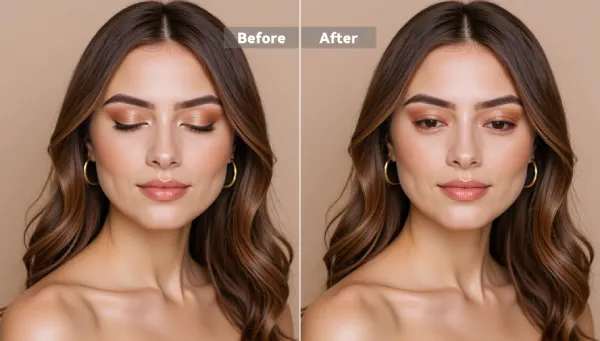
2) Fix closed/blinking eyes first (Level 1)
Use Open Eyes in Photo. Upload your JPG/PNG (up to 10MB), select the closed-eye area, then generate.
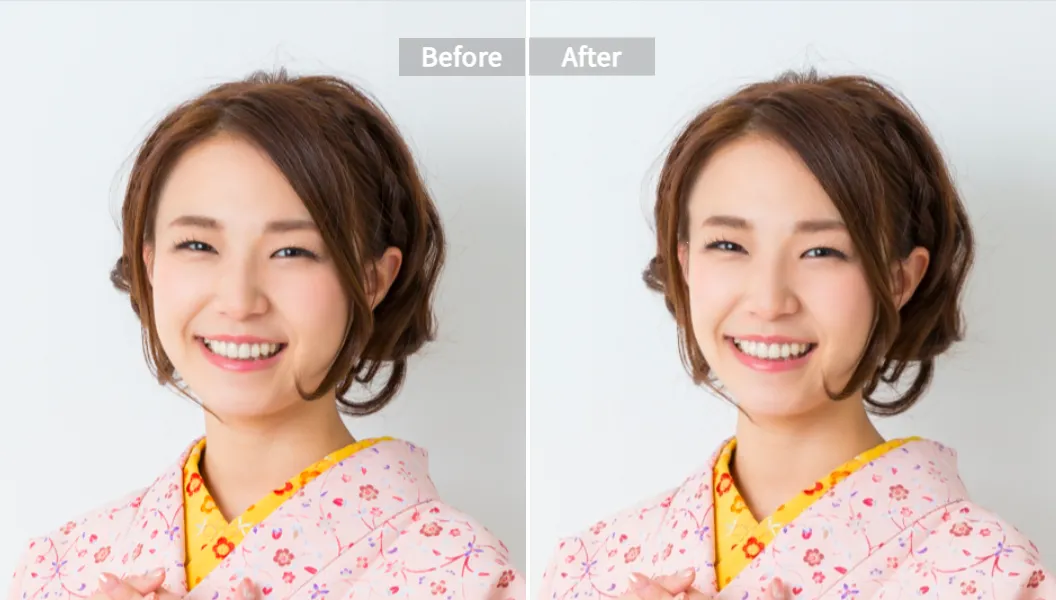
3) Nudge “almost eye contact” cases (Level 2)
If the eyes are open but feel slightly off, do a subtle correction pass using AI Face Reshape Tool. You’re not trying to rebuild the face. You’re trying to make the gaze read as camera-facing.
4) Use simple prompts (don’t write a novel)
When your tool accepts prompt guidance, keep it short. Examples that usually work better than fancy writing:
- “make eyes look at camera”
- “look straight at the camera, natural”
- “fix eye alignment, keep expression”
- “reduce lazy eye look, subtle”
5) Download, then sanity-check at 100% zoom
If it looks good only when zoomed out, it’s not good. Zoom in. Check edges, eyelids, reflections, and iris shape.
Tip: When you want to make eyes look at camera photo, “less change” beats “perfect change.” A tiny correction looks real. A perfect dead-center stare often looks fake. Humans are weird like that ¯\\(ツ)/¯
Why Pixelfox is a smart first pick (E-E-A-T stuff, but human)
- Practical control: You target the eye area instead of rolling the dice on full-face rewrites.
- Speed: Browser workflow, quick iterations.
- Privacy: Pixelfox uses encrypted transfer and auto-deletes images after a short window (per the product guidance). That’s a big deal when you’re editing family photos or client headshots.
- Works like an “eye direction changer app” without installing anything: It runs on mobile browsers too, so it feels like an app.
If you need a true eye direction changer online free (what to expect)
Let’s talk about the keyword everyone types: eye direction changer online free.
“Free” almost always means one of these:
- Free with credits
- Free with watermark
- Free but slow
- Free but your image becomes a training snack (hard pass)
A good “free” tool gives you at least a test run with decent quality and clear rules.
Tools that focus on gaze direction (Level 3), and what they’re good at
You’ll see these names in search results:
- Media.io: simple “brush + prompt” eye contact correction for photos, usually natural for small-to-medium changes.
- Reshot.ai: more “editor-like” controls for eyes and expression; free tier can be slower.
- Createimg: a free “eye contact AI” page focused on quick gaze fixes.
- Photoshop Neural Filters (Smart Portrait): can adjust “Eye Direction,” but you pay with money and time.
I’m not linking out here on purpose. Tools change URLs and pricing like socks.
The honest move:
Try Pixelfox first for blink/small gaze + cleanup, then use a dedicated gaze tool only if the eyes are clearly aimed away.
Tip: If someone is looking 60–90 degrees away, no AI is “just one click.” You can still fix it, but expect to test 2–4 outputs. If a tool claims “perfect every time,” it’s marketing. Marketing also claims “new year, new me.” 😅
Photoshop vs AI: what you gain, what you lose
The classic Photoshop way (and why people hate it)
In Photoshop, you’d do some mix of:
- Neural Filters (Smart Portrait → Eye Direction)
- Liquify and warp
- Clone/replace iris from another shot
- Hand-fix shadows and catchlights
It works. It also takes skill and patience. Most people don’t want a new hobby. They want a usable photo today.
AI way (Pixelfox-first workflow)
AI is better when:
- You have 30 photos from an event and need 2 good ones.
- You’re fixing blinked eyes in group shots.
- You want a natural look without becoming a retouch wizard.
Photoshop is better when:
- You need exact art direction for a client campaign.
- The gaze change is extreme and must match lighting perfectly.
- You have time and you enjoy suffering (kidding… kind of).
Quick comparison table (so you don’t waste your night)
| Tool | Best for | Free situation | Learning curve | Group photo friendliness | Notes |
|---|---|---|---|---|---|
| Pixelfox AI | Blink fixes + subtle gaze/symmetry polish | Free to try, browser-based | Low | High | Great “first stop” eye editor workflow |
| Media.io | Photo eye contact correction | Credits | Low | Medium-High | Solid for direct “ai eye contact photo” fixes |
| Reshot.ai | Eye/expression controls | Free but slower | Medium | Medium | More control, more tinkering |
| Createimg | Quick eye contact edits | Often free | Low | Medium | Simple, fast |
| Photoshop | Total control | Paid | High | High | Best control, most work |
Two real-world case studies (because theory is cheap)
Case Study 1: The “LinkedIn headshot that looked unsure”
A client sent a clean portrait. Lighting was fine. Outfit was sharp. The problem was the eyes: slightly down and left, like they were reading a hostage statement.
What worked:
- Pixelfox Open Eyes wasn’t needed (eyes were open).
- A light pass with face/eye reshaping to improve symmetry and attention.
- A tiny tweak so the gaze reads camera-facing.
Result: The photo looked more confident without looking edited. That’s the sweet spot. People don’t need “perfect.” They need “believable.”
Case Study 2: The “family group photo, one kid looking away”
You know this one. Everyone smiles. One kid looks at a bird that doesn’t exist.
What worked:
- Use Pixelfox Open Eyes for a blink on another face (bonus fix).
- For the kid looking away, a subtle correction pass. If the gaze is only slightly off, you can often get it “close enough” that nobody notices.
Reality check: If the kid is full side-eye at 90 degrees, you may need a dedicated eye direction tool for the big shift. After that, Pixelfox is great for polishing.
Advanced plays (stuff competitors usually don’t tell you)
These are the “ohhh, that’s smart” moves.
1) YouTube thumbnail trick: eye contact + face motion combo
If you make YouTube thumbnails, direct gaze can pull attention. But here’s the twist: you can test two versions.
- Version A: subject looks at camera (connection)
- Version B: subject looks at the headline text area (attention guidance)
NN/g’s gaze-cue research shows viewers often follow where a face looks. That means “not looking at camera” can be useful on purpose.
Want to go next level? Turn the final face into a talking clip for Shorts or ads using AI Photo Talking Generator. Yes, it’s chaotic. Yes, it works. (`• ω •´)ゞ
2) Turn a fixed portrait into a creator “digital human” pipeline
If you’re building a personal brand, the best workflow is:
- Fix eyes and expression (Pixelfox)
- Create a consistent avatar for content
Use AI Avatar from Photo to turn one strong photo into a reusable speaking character for intros, course lessons, or product demos.
It’s not just “cool AI stuff.” It saves time and keeps your face consistent across content.
Common mistakes (aka why AI results look creepy)
New users mess this up in predictable ways. Here are the big ones.
Mistake 1: Over-correcting to a robot stare
Dead-center pupils + frozen eyelids = uncanny valley.
Fix: Aim for “near camera,” not “laser beam at the soul.”
Mistake 2: Ignoring catchlights (the tiny reflections)
Eyes look alive because of reflections. When AI shifts the iris, reflections can look off.
Fix: Pick outputs where catchlights still match the lighting direction. If none do, reduce the correction strength or try a different prompt.
Mistake 3: Editing eyes but not respecting head angle
If the head is turned, perfect front-facing eyes can look wrong.
Fix: Match gaze to head pose. Use “subtle” in prompts.
Mistake 4: Using low-res, blurry inputs and blaming the tool
AI can’t invent crisp detail from mush forever.
Fix: Start with the highest-quality image you have. If you must use a screenshot, at least avoid heavy compression.
Mistake 5: Treating group photos like single portraits
Group photos have different lighting on each face. One fix doesn’t fit all.
Fix: Correct one face at a time when possible. If a tool supports brushing specific eyes, use it.
How to avoid “eye direction changer app” results that look fake
A lot of mobile “one tap” editors push beauty filters hard. They smooth skin, sharpen eyes, and suddenly everyone looks like a mannequin.
Here’s the safer approach:
- Use an editor that keeps texture (Pixelfox is good at this for eye fixes).
- Keep changes small.
- Always check zoomed-in edges.
- Don’t stack five apps. Every export adds compression and artifacts.
FAQ (real questions people ask)
How can I make eyes look at the camera in a photo without Photoshop?
Use an AI eye editor workflow. Fix closed eyes first, then do subtle gaze/symmetry adjustments. Pixelfox AI is a strong first option because it’s fast in-browser and made for realistic photo fixes.
Why does AI eye contact correction sometimes look unnatural?
Most tools struggle with lighting consistency, catchlights, and extreme head angles. Big gaze changes can also break eyelid shape. Use smaller corrections and prompts like “natural” and “subtle.”
Can I fix eye contact in group photos with multiple people?
Yes, but it works best when you correct one person (or one pair of eyes) at a time. Tools that let you brush/select the eye area usually do better than “global” edits.
What’s the difference between an eye photo editor and an eye direction changer online free tool?
An eye photo editor can fix blinked eyes, symmetry, redness, and small gaze issues. An eye direction changer online free tool focuses on rotating gaze direction. Many “free” ones limit exports or use credits.
Can Pixelfox AI work as an eye direction changer app on my phone?
Pixelfox runs in your mobile browser, so it behaves like an app without installing anything. For most users, that’s enough. If you need extreme gaze redirection, you may still want a specialized gaze tool, then come back to Pixelfox for cleanup.
A quick ethics note (because, yeah)
Editing someone’s gaze can change the vibe of a photo a lot. Use it for fixing missed moments, not for faking testimony or doing weird deception stuff. Don’t be that person. 🙂
Make your photo feel “present” again (and do it in minutes)
If you only remember one thing: the best fix is the one nobody notices. That’s why the Pixelfox-first workflow works so well for real people photos—blink repair, subtle eye alignment, natural results, fast exports, and less time spiraling into edit hell.
If you want to make eyes look at camera photo right now, open Pixelfox AI, run an eye fix pass, keep the change subtle, and export the version that still looks like an actual human. Then go enjoy your life. Your camera roll already has enough drama 😄
About the author / disclosure: I’m a content strategist who’s spent 10+ years building SEO pages in high-competition software niches. This guide recommends Pixelfox AI because it’s a practical, privacy-aware workflow for the most common eye and gaze issues in real photos. Always review results carefully, since AI outputs can vary by image quality, lighting, and head pose.