 Credit

You’ve been there. You capture the perfect sunset, but a stray bird zips into the frame. You snap a great group photo, but a stranger photobombs the background. For years, fixing these tiny imperfections meant firing up complicated software, wrestling with clone stamps, and spending hours trying to get it right. But today, a simple and powerful solution exists. This guide will show you everything you need to know about AI photo cleanup, the revolutionary technology that lets anyone create flawless images in just a few clicks.
Forget steep learning curves and expensive subscriptions. We'll explore how modern tools like Pixelfox AI use artificial intelligence to intelligently remove unwanted elements from your photos, leaving behind a seamless, natural-looking background. Whether you're a business owner needing professional product shots or just someone who wants picture-perfect memories, you're in the right place.
Why Traditional Photo Editing Is No Longer Enough
For decades, Adobe Photoshop was the undisputed king of photo editing. If you wanted to remove an object, you had to manually select it and then painstakingly use tools like the Clone Stamp or Healing Brush to paint over it, sampling pixels from nearby areas.
This method has some big problems:
- It's Incredibly Time-Consuming: What seems like a simple fix can take 30 minutes or more of careful, detailed work. For businesses needing to edit hundreds of product photos, this is a major bottleneck.
- It Requires Real Skill: Using clone tools effectively is an art form. It’s easy to create repetitive patterns or smudgy, unnatural-looking patches that scream "this has been edited." Getting a pro-level result requires hours of practice.
- It's Expensive: Professional editing software comes with a hefty price tag and a monthly subscription, which is a big commitment for a task you might only need occasionally.
User experience research from groups like the Nielsen Norman Group consistently shows that people abandon tools that have a steep learning curve. The old way of editing simply isn't practical for the 99% of people who just want a quick, clean result without becoming a graphic designer.
What is AI Photo Cleanup and How Does It Work?
AI photo cleanup is a complete game-changer. Instead of manually copying pixels, these tools use a sophisticated process often called "inpainting" or "generative fill."
Here’s a simple breakdown of the magic behind it:
- You Mark the Spot: You use a simple brush tool to highlight the object, person, or text you want to remove.
- The AI Analyzes: The AI doesn't just see the marked area. It analyzes the entire image—the colors, textures, patterns, and lighting of the surrounding background. It develops a contextual understanding of what should be behind the unwanted object.
- The AI Rebuilds: The AI then generates brand-new pixels to fill in the gap. Because it understands the context, it can realistically continue lines, replicate textures (like grass, wood, or fabric), and match the lighting perfectly.
The result? The unwanted object vanishes, and the background is seamlessly reconstructed as if the object was never there in the first place. This is what makes a modern AI photo cleaner so much more powerful than old-school editing tools.
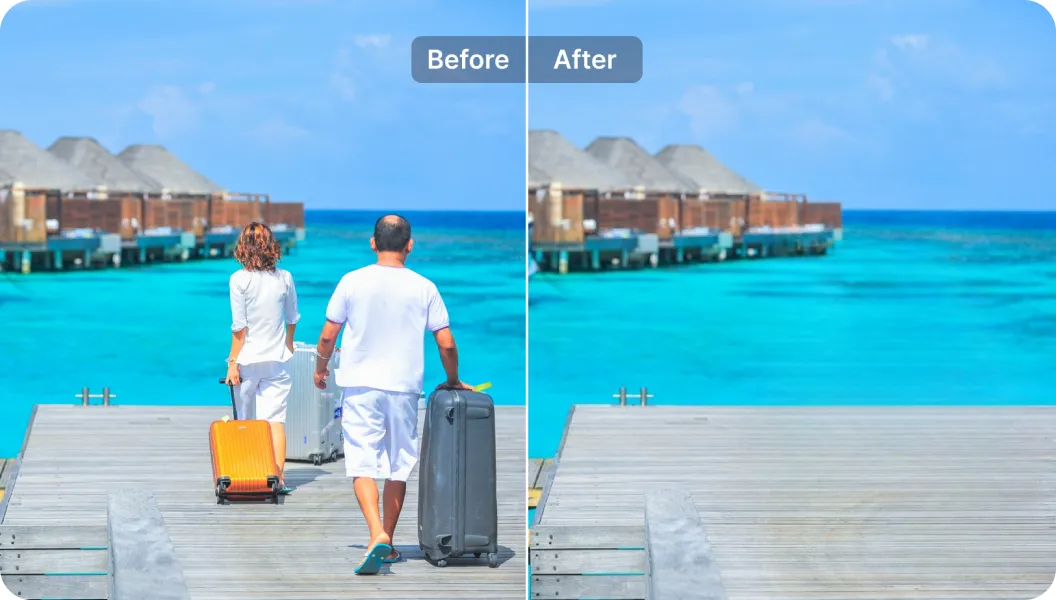
How to Use an AI Photo Cleaner in 3 Simple Steps
The best part about AI technology is how simple it makes complex tasks. With Pixelfox AI, you can clean up any photo in under a minute.
Here's how easy it is:
Step 1: Upload Your Image
First, navigate to the Free Online Object & People Remover. You can click the "Upload Image" button and select a photo from your computer or phone. Or, you can simply drag and drop your file directly onto the page. Pixelfox AI supports common formats like JPG, PNG, and HEIC.
Step 2: Brush Over the Unwanted Object
Once your image is loaded, your cursor will turn into a brush. Simply paint over anything you want to remove. This could be a person in the background, a distracting sign, a watermark, or a skin blemish. The AI will instantly get to work.
Tip: You can adjust the brush size for better precision. Use a larger brush for big objects like cars or people, and zoom in with a smaller brush for fine details like power lines or skin blemishes.
Step 3: Download Your Perfected Photo
In just a few seconds, the AI will process your request and show you the final image. The object will be gone, replaced by a perfectly reconstructed background. If it looks great, just hit the "Download" button to save your clean, professional-looking photo. It’s that simple.
Real-World Wins: AI Image Cleanup Case Studies
The applications for AI photo cleanup are endless. Here’s how real people and businesses are using this technology to get amazing results.
Case Study 1: Boosting E-commerce Sales with Clean Product Shots
Sarah runs an online store selling handmade jewelry. She takes her own product photos at home, but often struggles with distracting backgrounds—a stray piece of lint on her display fabric, a reflection in the metal, or an awkward shadow.
Before, she would either spend hours in Photoshop or just upload the imperfect photos, which made her brand look less professional. Now, she uses an AI image cleaner. After each photoshoot, she runs her images through Pixelfox AI. In minutes, she removes all the tiny imperfections, creating a clean, studio-quality look that helps her products stand out. Her sales have increased by 20% since she started using consistently polished images.
Case Study 2: Saving Vacation Memories from Photobombers
Mark is an avid traveler and loves taking landscape photos. On a recent trip to a famous landmark, he framed the perfect shot, but it was impossible to get a picture without dozens of other tourists in the background.
Instead of deleting the photo in frustration, he uploaded it to an AI photo cleaner. He carefully brushed over each of the distracting people in the background. The AI intelligently filled in the scenery behind them, including the architecture of the landmark and the cobblestone ground. The final image looks like he had the entire place to himself—a priceless memory perfectly preserved.
Beyond the Basics: Pro-Level AI Photo Cleanup Techniques
Once you've mastered the basics, you can use these tools for even more advanced edits.
Technique 1: Precision Shadow and Reflection Removal
When you remove an object, don't forget to remove its shadow or reflection too. A floating shadow with no object casting it is a dead giveaway that a photo has been edited. For the most realistic result, use the brush tool to select both the object and its corresponding shadow or reflection in one go. The AI will then remove both elements and rebuild the underlying surface for a completely natural look.
Technique 2: Restoring Old and Damaged Photos
AI isn't just for modern digital photos. It's a fantastic tool for photo restoration. If you have old family photos that have been scanned, you can use an ai image cleanup tool to erase scratches, dust spots, creases, and water damage. The AI can intelligently fill in these damaged areas, bringing new life to cherished memories. For facial imperfections like spots or blemishes in old portraits, a specialized tool like an AI Photo Retoucher can work wonders while keeping the skin texture natural.
Tip: When you review an edit, zoom in to 100% to check the details. A good AI tool should produce a result that holds up even under close inspection, with no weird artifacts or blurry patches.
What Can You Remove with an AI Image Cleaner?
A powerful AI photo cleaner can handle a surprisingly wide range of unwanted distractions. The technology is flexible enough to tackle almost anything that's ruining your shot.
Here are some of the most common uses:
- Unwanted People: Easily remove photobombers, tourists in the background, or even an ex-partner from a group photo. This is one of the most popular uses for our Free Online Object & People Remover.
- Distracting Objects: Get rid of trash cans, power lines, street signs, cars, or any background clutter that takes attention away from your subject.
- Text, Logos, and Watermarks: Clean up images by removing date stamps, logos, or watermarks. This is perfect for creating clean visuals for presentations or social media. For stubborn text overlays, a dedicated AI Image Subtitle Remover can provide even cleaner results.
- Skin Blemishes: Quickly touch up portraits by removing acne, moles, scars, or wrinkles. The AI can smooth skin naturally without making it look plastic or fake.
- Stains and Scratches: Perfect for restoring old photos or cleaning up product images by removing dust, stains, or scratches on a product's surface.
Essentially, if you can see it and you don't want it there, AI can probably remove it for you.
Frequently Asked Questions About AI Photo Cleanup
How does AI photo cleanup work without leaving a blurry spot?
Unlike older "smudge" or "blur" tools, AI inpainting doesn't just blur pixels together. It generates entirely new pixels based on its understanding of the surrounding area. It intelligently recreates textures and patterns, which is why the result looks sharp and seamless instead of blurry.
Is AI better than using the clone stamp tool in Photoshop?
For most common removal tasks, yes. The AI is significantly faster and requires zero technical skill. While a highly skilled Photoshop expert can achieve amazing results with the clone stamp, it takes a lot of time and effort. For 99% of users, an AI tool will deliver a result that is just as good (or better) in a fraction of the time.
Can I really remove people from a very crowded photo?
Yes, but it works best when there is some background visible for the AI to learn from. If a person is completely obscuring a unique, non-repeating object, the AI will have to make its best guess about what's behind them. For general crowds in front of landscapes, buildings, or beaches, the technology works exceptionally well.
Is using a free online photo cleaner safe for my images?
This is a valid concern. It's important to choose a trustworthy service. At Pixelfox AI, we prioritize your privacy. We process your images in real-time and do not store them on our servers or use them for any other purpose. Your photos remain your own.
The era of complex and frustrating photo editing is over. With the power of AI photo cleanup, anyone can achieve professional-quality results effortlessly. You no longer need to be a Photoshop wizard to create clean, stunning, and distraction-free images. Whether you're removing a photobomber from a travel picture or cleaning up a product shot for your online store, tools like Pixelfox AI provide a fast, free, and incredibly effective solution.
Ready to see the magic for yourself? Try Pixelfox AI's Photo Cleaner for free today and transform your photos from good to perfect in just a few seconds.