 Credit


You know the feeling. You find the perfect logo or graphic for your project. It has that sweet, transparent background you need. But there’s a catch. It’s tiny. We’re talking "ant-sized" tiny.
So, you do what any normal person does. You drag the corner to make it bigger.
Disaster. 💀
Suddenly, that crisp image looks like a pile of Lego bricks. The edges are jagged. The text is unreadable. It looks cheap. In the past, you had two choices: use the blurry mess and look unprofessional, or spend hours rebuilding it in expensive software like Photoshop.
But it’s 2025. We don’t do that anymore.
If you are looking for a png quality enhancer online free, you have landed in the right corner of the internet. Today, we aren't just listing tools. We are going to fix your images. We’re going to talk about how AI can take a 200-pixel disaster and turn it into a 4K masterpiece without losing that precious transparency.
And the best part? We’re going to do it without watermarks ruining your work.
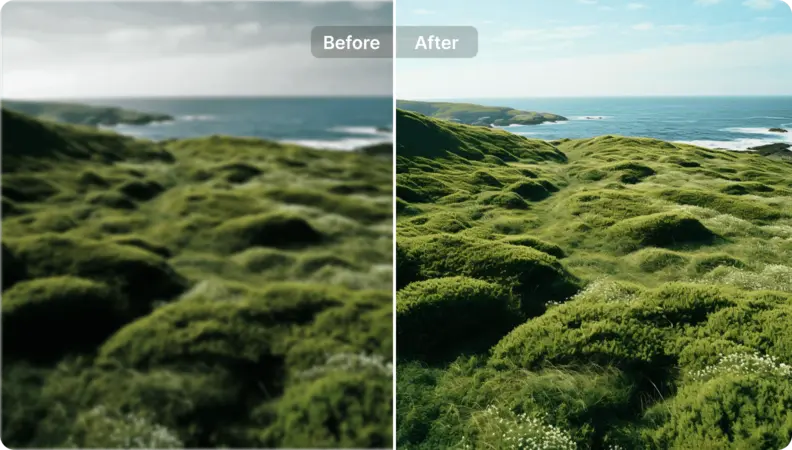
Why PNGs Are Special (And Why They Break)
Before we fix it, let’s understand the break. PNG (Portable Network Graphics) is the king of web graphics because it supports transparency. JPEGs fill empty space with white; PNGs keep it clear. This makes them essential for logos, icons, and product overlays.
But here is the problem. PNG is a "raster" format. That means it is made of a fixed number of colored squares (pixels). When you increase png resolution by just stretching it, the computer has to guess what colors go in the new gaps. Old computers were bad guessers. They just duplicated the pixels. That creates the blocky "pixelated" look.
Modern AI logo enhancer tools don't guess. They hallucinate (in a good way). They look at millions of high-quality images to understand what a curve should look like. Then, they draw new pixels from scratch to match that pattern.
The Secret Sauce: How Pixelfox AI Changes the Game 🦊
Let's cut to the chase. You want to make png higher quality, and you don't want to pay a subscription for one single image.
This is where Pixelfox AI shines.
Unlike many competitors that promise "free" but slap a giant logo across your face effectively holding your image hostage, Pixelfox is designed to be a genuine photo enhancer free no watermark solution for trial users.
Why Pixelfox Works for PNGs
- Transparency Protection: Many enhancers convert your PNG to a JPG during processing, filling your transparent background with white or black. Pixelfox respects the alpha channel (transparency).
- Edge Intelligence: For logos and text, sharpness is everything. Pixelfox separates the subject from the noise, ensuring lines remain crisp, not blurry.
- No "Plastic" Look: Some AI tools over-smooth images, making photos look like oil paintings. Pixelfox aims for realism.
💡 Professional Tip: Always check your file extension before uploading. While most tools handle JPGs fine, a png quality enhancer online free tool specifically needs to handle
.pngfiles to preserve transparency. If you convert a PNG to JPG before uploading, you lose the transparent background forever!
Step-by-Step: How to Enhance a PNG Without Losing Your Mind
Ready to fix that blurry graphic? Here is how to use an AI photo enhancer free no watermark like Pixelfox to get the job done in seconds.
Step 1: Analyze Your Image
Is it a photo or a graphic (logo/icon)? This matters. Photos have "noise" and complex textures. Graphics have flat colors and sharp lines. Pixelfox’s AI detects this automatically, but knowing what you have helps you judge the result.
Step 2: The Upload
Go to the Pixelfox AI Image Enhancer. Drag and drop your file.
- Requirement: Make sure it’s under the file size limit (usually quite generous).
Step 3: Choose Your Upscale Factor
Do you need it a little sharper, or do you need a billboard?
- 2x: Good for sharpening slightly soft images.
- 4x: The standard for taking a web-sized image to print quality.
- 8x: Heavy lifting. This is for those tiny thumbnails you want to use as full-screen backgrounds.
Step 4: Download (Clean)
This is the moment of truth. Hit download. With Pixelfox, you get a clean file. No "Created by..." stamps. Just your image, but better.
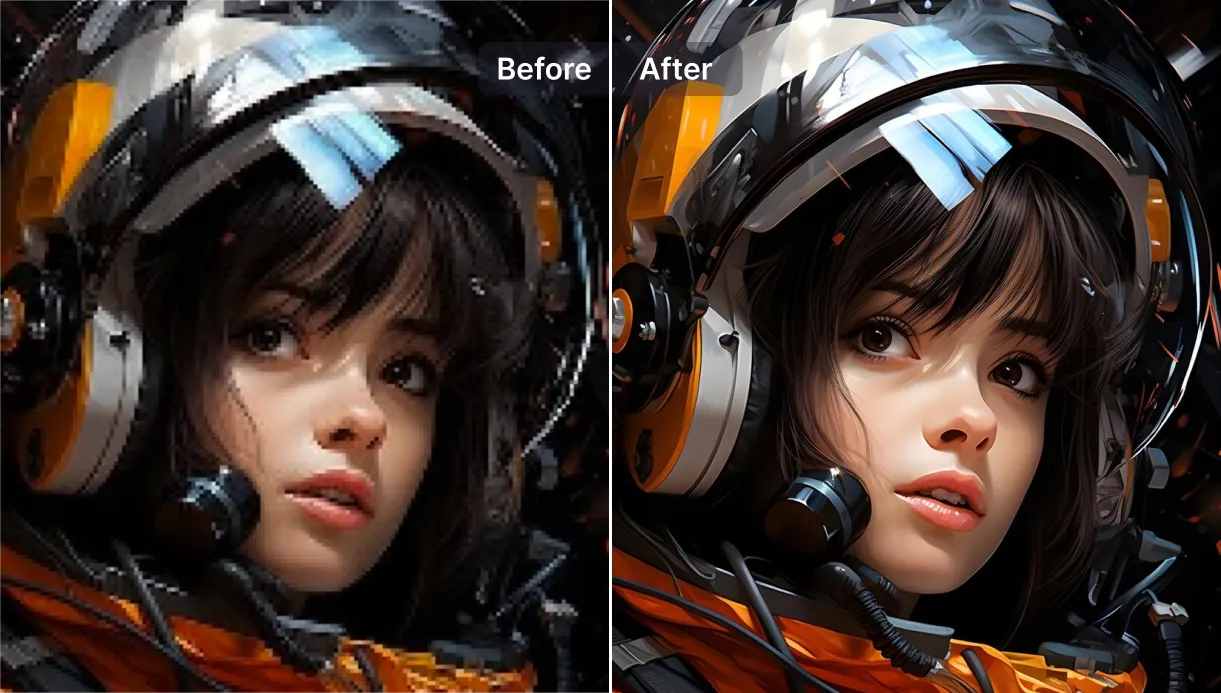
AI vs. The Old School: Why Photoshop is Obsolete for This
I have used Photoshop for 15 years. I love it. But for upscaling? It’s a dinosaur.
If you try to increase quality of png in Photoshop using "Bicubic Smoother," you basically get a blurry mess. Even their newer "Preserve Details 2.0" struggles with text inside logos. It often adds weird "halos" around high-contrast letters.
An ai logo enhancer works differently. It understands that an "A" is a letter, not just a shape. It reconstructs the legibility.
| Feature | Photoshop / Traditional | Pixelfox AI / Modern Tools |
|---|---|---|
| Speed | Slow (Manual tweaking) | Instant (One click) |
| Knowledge | Math-based (Interpolation) | Data-based (Deep Learning) |
| Missing Detail | Can't create what isn't there | Hallucinates plausible detail |
| Cost | Expensive Monthly Sub | Free / Pay-as-you-go |
| Learning Curve | High | Zero |
Top 3 Advanced Techniques for Power Users 🛠️
You are not just a casual user. You want to dominate the quality upgrader png game. Here are three tricks the pros use.
1. The "De-Noise Then Upscale" Combo
Sometimes a PNG is pixelated and grainy (noisy). If you just upscale it, you make the grain giant.
- Strategy: Use a dedicated "Denoise" pass first, save the image, and then run it through the png resolution enhancer. Pixelfox often does this in one pass, but for really bad images, doing it in stages can help.
2. The Vector Hack (For Logos)
If you have a logo that is extremely low res (like an old favicon), an image enhancer is great, but a vectorizer might be better. However, vectors often look "cartoony."
- The Fix: Use Pixelfox to increase logo quality online to 4x. Then take that high-res image and convert it to a vector (SVG) if you need infinite scalability. The AI provides the clean base the vector software needs to trace accurate lines.
3. Fixing "Fried" Memes or Screenshots
We’ve all seen images that have been screenshotted 50 times. They have "compression artifacts" (weird square fuzz around letters).
- The Trick: Don't just look for an upscaler. Look for a tool that mentions "Artifact Removal" or "JPEG Restoration." Even if it is a PNG file now, it likely started as a compressed JPG. Pixelfox’s upscaler handles these artifacts aggressively.
💡 Professional Tip: Dealing with text? If the AI mangles the letters (it happens with weird fonts), use the AI to fix the logo icon, but re-type the text manually in Canva or Photoshop. It’s a hybrid workflow that gives the crispest results.
Real-World Case Studies: Who Needs This? 🌍
Who is actually searching for enhance photo without watermark tools? It’s not just designers.
The E-commerce Seller (eBay/Shopify)
Scenario: Sarah sells vintage clothes. She has supplier photos that are 500px wide. On a retina display iPhone, they look blurry. Customers think blurry photos = fake products. Solution: Sarah uses Pixelfox to make png higher quality. Result: Her images are now 2000px wide. Customers can zoom in on the fabric texture. Conversion rate goes up.
The Streamer/YouTuber
Scenario: Mike needs game assets for his thumbnail. He finds a transparent render of a character, but it’s a low-res preview from a wiki. Solution: He runs it through a png clearer tool. Result: The character pops off the screen. No jagged white edges against his dark background.
Common Mistakes When Enhancing PNGs ❌
Even with the best png quality enhancer online free, you can mess it up. Avoid these traps.
- Ignoring the Source: Garbage in, garbage out. If your image is fully black squares, AI can’t save it. It needs some detail to work with.
- Over-Sharpening: Some people run the image through the enhancer twice. This usually results in a "deep fried" look where edges glow unnaturally. One pass is usually enough.
- Forgetting DPI for Print: You increased the pixel dimensions (e.g., 1000px to 4000px). Great! But for printing, check the DPI (Dots Per Inch). Ensure your print settings are set to 300 DPI to match that new resolution.
FAQ: Your Questions Answered 🙋♂️
Q: Can I truly find an ai photo enhancer free no watermark? A: Yes, they exist. Pixelfox AI and a few others offer free tiers that don't watermark. However, be careful with "totally free" unlimited tools from unknown sites; they might be harvesting your data. Trusted platforms balance free access with premium batch features.
Q: How does a png resolution enhancer handle transparent backgrounds? A: Advanced AI detects the alpha channel (the invisible part). It calculates the transparency of the new pixels at the edge of your object. If the tool ignores this, you get a black or white box. Always test a tool with a simple logo first.
Q: Is it possible to increase quality of png text? A: Text is the hardest thing for AI. Increase logo quality online tools are getting better at recognizing letter shapes. Pixelfox is trained on typography to ensure an "E" looks like an "E", not a weird comb.
Q: What is the difference between an enhancer and an upscaler? A: Good question. An upscaler simply makes the image bigger (resolution). an enhancer improves the look (color, contrast, noise, sharpness). Pixelfox does both simultaneously.
Final Thoughts: Don't Settle for Blurry
In 2025, using low-resolution images is a choice, not a limitation. Whether you are fixing a company logo, prepping product photos, or just saving a meme, AI has democratized high-definition.
You don't need a degree in graphic design. You don't need a $50/month software subscription. You just need the right tool.
If you are tired of clicking "X" on annoying ads or fighting with watermarks, it is time to upgrade your workflow.
Ready to see your images in 4K? Stop squinting at pixels. Try Pixelfox AI right now to enhance photo without watermark and experience the clarity you’ve been missing. It’s fast, it’s smart, and it keeps your background transparent.