 Credit

Video is now the most influential type of digital communication, whether you are a content producer, a marketer, or a movie producer. However, it is sometimes difficult to make videos flawless when you are forced to adjust them manually, which includes light, tone and facial features.
This is the point at which AI video filters come in. These intelligent filters are able to fix lighting problems, refine facial structures, and sharpen up all frames automatically using artificial intelligence to give the effect of a clean, professional appearance. It is easy and fast and fits anyone who prefers improving the quality of the videos without having to spend hours on the manual editing.
AI video filters are smart tools that optimize and filter video content using machine learning. AI video filters are innovative tools that use machine learning to optimize and filter video content. They maintain light, apply skin-colour tint, sharpen photos, and automatically apply style effects.
Unlike other filters, which simply overlay the video with a preset color tone, an AI-based video filter examines the contents of the video, automatically identifies faces, movement, and details of the background and applies filters that look natural. AI video beauty filter takes it a step further and improves the texture of the skin, cleansing the skin of acne and leaving the face with no mark, but without losing the authenticity.
How AI Video Filters Work
The algorithm behind AI-powered filters is not very complex, though it is extremely sophisticated:
Upload or Record a Video: Choose the clip that you would like to improve.
AI Detection: Frame scan is used to detect faces, colors, and the degree of brightness.
Smart Adjustment: Tone, exposure, and lighting are all automatically changed.
Beauty Enhancement: Facial areas are refined using the AI video beauty filter.
Instant Output: You can now download and share the finished, enhanced video.
For creators who need fast results without using complex editing software, this automation saves time while maintaining quality.
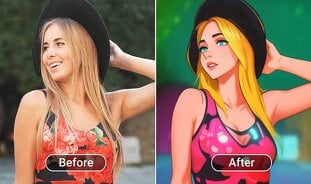
Key Features of AI Video Filters
AI Video Beauty Filter
Makes the skin color even, the blemishes disappear, and the natural beauty is enhanced without disfiguring the facial features.
Automatic Lighting Correction
Adjusts irregular light and improves the exposure to the clear and balanced images.
Smart Facial Recognition
By automatically identifying and enhancing faces, the AI maintains the video's focus on key topics.
Cinematic Color Grading
It applies mood filters and artistic effects to make a video look professional.
Boosting Clarity and Reducing Noise
Sharpens the video and removes grain, especially in low light.
Easy One-Click Enhancement
No editing is required, and the AI does it – lights, beauty fixes, etc., all in one step.
Benefits of Using AI Video Filters
Professional-Quality Results: Turn average videos into masterpieces.
Time Saving: AI automates the improvement, and it saves hours of edits.
Natural Appearance: Facilitates a natural skin and light balance to achieve natural results.
No Technical Knowledge Required: Suitable for professionals and amateurs alike.
Multipurpose Use: Can be used in vlogs, tutorials, marketing videos, and short films.
When you are using AI, there is no need to have concerns about uneven light or boring shots any more, as the filter makes every second of your video look sharp, light, and beautiful.
Use Cases of AI Video Filters
Social Media Content Creation
The creators are now able to use AI video filters to create reels, TikToks, and YouTube clips that appear smooth, clear, and interesting.
Beauty and Lifestyle Videos
AI video beauty filter helps to filter the tutorial on makeup or fashion clips, making the face look better and more natural in terms of light and tone of skin.
Business Marketing
Even when a marketer captures a promotion video on a phone, AI filters are used to make the promotional video more professional and polished.
Online Education & Tutorials
AI can be used to help teachers and trainers create more professional-looking instructional videos.
Creative Projects & Filmmaking
AI filters are applied in filmmaking in mood setting, cinematic tones, and artistic grading.
FAQs
What is the purpose of AI video filters?
They improve videos by automatically creating the brightness, tone, and beauty details with the help of artificial intelligence.
What is the AI video beauty filter?
It sharpens the face lines and the illumination to give the subject a more natural and understandable look.
Do AI filters work on mobile devices?
Yes, the majority of AI video filters can be accessed either via browsers or mobile applications.
Conclusion
With the digital form of sharing, AI video filters are altering the way artists make their images look better. They provide immediate lighting, texture, and tonal enhancements with no need to make manual adjustments or use professional experience.
From influencers to filmmakers, all of them can now produce professional-quality video in no time. The AI video beauty filter will be a final touch to ensure that faces remain readable and expressive without making the frame look unbalanced and cinematic.
When you are already willing to go to the next level with your videos, begin testing out AI video filters, the hack to flawlessly enhanced, studio-quality videos.