 Credit

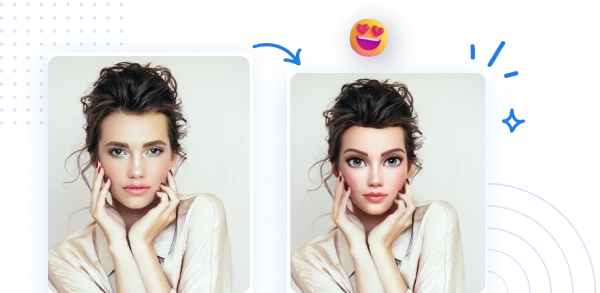
Let’s be real for a second. In 2025, using a grainy, low-light selfie as your profile picture is basically social media suicide. 💀 We live in a digital jungle where visual identity is everything. Whether you are scrolling through TikTok, Discord, or LinkedIn, the profiles that stop the scroll are the ones with personality. And nothing screams personality quite like a high-quality cartoon face image.
It’s not just about looking "cute" (though that helps). It’s about privacy, branding, and frankly, looking a lot cooler than you do at 7 AM on a Monday. But here’s the problem: if you Google "cartoon face," you get bombarded with generic, soulless stock photos from the early 2000s or sketchy sites that want to steal your data. 🛑
You want a cartoon character face that actually looks like you—or the version of you that slays dragons and wins arguments on the internet.
In this guide, we aren't just going to dump a list of links on you. We are going to break down exactly how to create studio-quality cartoon avatars, why AI is eating Photoshop’s lunch, and how to use tools like Pixelfox AI to turn a boring jpeg into a viral masterpiece. Buckle up. 🚀
Why the Internet is Obsessed with Cartoon Faces
You might think this trend is just for kids or gamers, but the data says otherwise. According to recent reports on digital consumer trends, visual content gets 94% more views than text-only content. But there is a deeper psychological layer here.
A cartoon face image allows for what experts call "controlled self-presentation." You get to strip away the acne, the bad hair day, and the messy background, leaving only the essence of your personality.
- The Privacy Shield: In an era where facial recognition is everywhere, using a stylized caricature protects your biometric data while still keeping you recognizable to friends.
- The "Halo Effect": People subconsciously attribute positive traits to aesthetically pleasing images. A well-designed, friendly cartoon face makes you seem more approachable.
- Brand Consistency: For creators, a cartoon logo never ages. You don’t need to update your headshot every time you get a haircut.
The Old Way vs. The AI Revolution: Stop Wasting Time
Back in the day (like... 2018), if you wanted a custom cartoon face image, you had two painful options:
- Option A: Pay an artist on Fiverr $50 and wait two weeks, only to realize they forgot to draw your glasses. 💸
- Option B: Open Photoshop, struggle with the Pen Tool for six hours, cry a little, and end up with something that looks like a potato. 🥔
Comparison: Traditional Art vs. AI Generation
| Feature | Photoshop / Manual Art | Pixelfox AI Generator |
|---|---|---|
| Time Required | 3+ Hours | < 10 Seconds |
| Skill Level | Professional / High | Zero / Beginner |
| Cost | Expensive Software/Fees | Free / Affordable |
| Style Variety | Limited to artist's style | Limitless (3D, Anime, Sketch) |
| Editability | Hard to change later | Instant regeneration |
This is where the game has changed. Tools like the AI Anime Generator from Pixelfox have democratized digital art. You don't need to know what "vector paths" are. You just need a photo and a vibe.
Tip: 💡 Lighting is Key! Even the best AI can't fix a pitch-black photo. When taking a selfie for AI conversion, stand facing a window. Soft, natural light helps the AI detect your facial features (eyes, nose, jawline) accurately, ensuring your cartoon face image doesn't look like a melted candle.
How to Create the Perfect Cartoon Face Image (Step-by-Step)
So, you are ready to ditch the boring selfie. Here is how to create a scroll-stopping cartoon character face using Pixelfox AI. We recommend this tool because it balances ease of use with professional-grade output—plus, it doesn’t leave those nasty watermarks that ruin the aesthetic.
Step 1: Choose Your Source Material
Don't just pick any random photo from your camera roll. The best results come from photos where your face is clearly visible. Avoid hands covering your face or extreme angles unless you want a Picasso-style result (which is cool, but maybe not what you're aiming for).
Step 2: Select Your Style
This is where the magic happens. Are you going for:
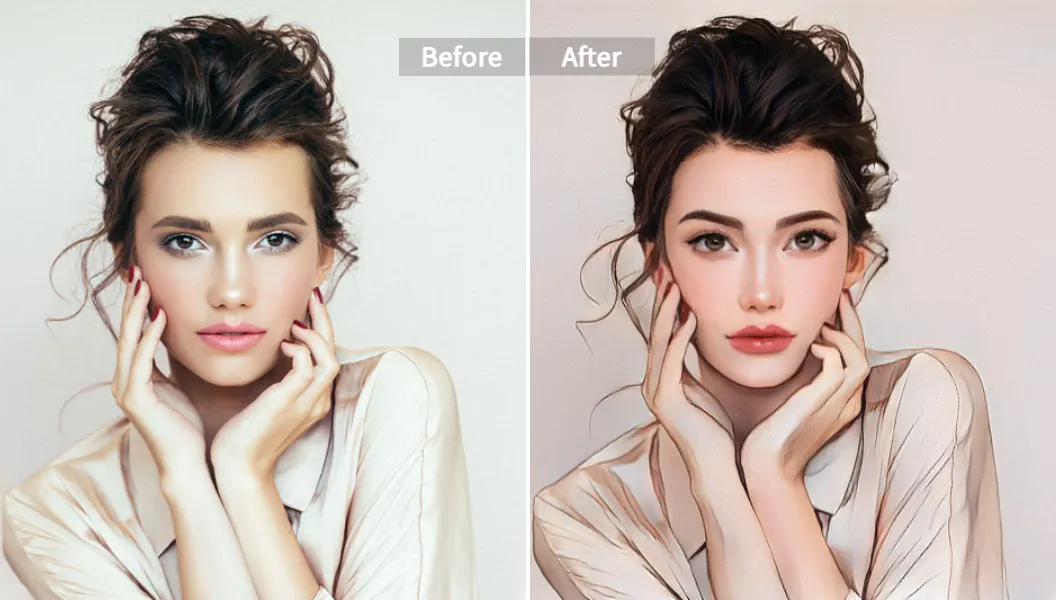
- The "Disney" Look: Big eyes, soft lighting, 3D texture. Perfect for general social media.
- The "Anime" Protagonist: Sharp lines, dramatic expressions. Ideal for Discord or gaming profiles.
- The "Line Art" Minimalist: clean, black and white. Great for professional portfolios or business cards.
Step 3: Let the AI Cook
Upload your photo to the AI Anime Generator. The algorithm analyzes your facial landmarks—the distance between your eyes, the curve of your smile, the volume of your hair—and maps them onto the chosen art style.
Step 4: Fine-Tuning (The Secret Sauce)
Most people stop at the first generation. Don't be most people. If the result is good but you look a bit tired, use the AI Face Beauty tool to smooth out the skin or enhance the eyes before finalizing the cartoon effect. This layering of AI tools is how the pros get those flawless results.
Advanced Tactics: Leveling Up Your Cartoon Game
Okay, you know the basics. But you want to be a power user. Here are some advanced strategies that separate the amateurs from the digital artists.
1. The "Expression Match" Technique
Sometimes you have a great photo, but you aren't smiling. Or maybe you are smiling, but you want to look "cool and mysterious" for your gaming avatar. Instead of retaking the photo, use an AI Facial Expression Editor. Change your mood from neutral to happy, or surprised to serious, before converting it to a cartoon. This gives you total control over the emotional tone of your cartoon face image.
2. The Background Swap
A great cartoon face on a messy bedroom background looks amateur.
- Pro Move: Remove the background first or use a style transfer that simplifies the background into abstract art. A solid color background often makes the cartoon face pop more on small mobile screens.
Tip: 💡 Consistency Across Platforms. Once you generate a cartoon character face you love, don't just use it once. Create variations! Use the same base image but apply different styles (e.g., a Christmas version, a Halloween version). This builds personal brand recognition while keeping your content fresh.
Real-World Case Studies: Seeing is Believing
Let's look at how actual people are using these tools to win.
Case Study A: The Camera-Shy Streamer 🎮
- The Problem: Sarah started a Twitch channel but felt uncomfortable showing her real face to thousands of strangers due to privacy concerns and anxiety.
- The Solution: She used Pixelfox to generate a cartoon face image that looked like her but was stylized enough to provide a barrier.
- The Result: She built a brand around her "Cyber-Sarah" avatar. Her audience connected with the character, and she felt confident streaming without the pressure of looking perfect on camera.
Case Study B: The LinkedIn Rebrand 👔
- The Problem: Mark, a freelance coder, had a stiff, corporate headshot that made him look like a bank teller. He wanted to attract startups and creative clients.
- The Solution: He didn't want a silly caricature, but something modern. He used a semi-realistic vector style.
- The Result: His profile views increased by 40%. Recruiters mentioned his profile picture stood out in a sea of grey suits. It signaled "creativity" before they even read his bio.
Common Mistakes to Avoid (Don't Do This!) 🚫
Even with AI, things can go wrong. Avoid these rookie errors when making your cartoon face image:
- The "Uncanny Valley" Trap: Pushing the settings too far towards "realistic" while keeping cartoon proportions can make the image look creepy. Stick to distinct styles (2D or 3D) rather than weird hybrids.
- Over-Crowded Photos: Trying to turn a group selfie of 10 people into a cartoon usually results in a blurry mess. AI works best on 1-3 faces max.
- Ignoring Resolution: If you upload a tiny 200px image, your output will be pixelated. Always start with the highest resolution photo you have.
- Forgetting the Eyes: The eyes are the window to the soul, even in cartoons. If the AI messes up the eyes (makes them wonky), regenerate it. Don't settle for "crazy eyes."
FAQ: Questions We Get Asked A Lot
Q: Is it legal to use these cartoon face images for my business logo? A: Generally, yes! If you use a tool like Pixelfox, you typically own the rights to the generated image. However, always check the specific Terms of Service of the platform you use. Avoid using "Stock" cartoon faces for logos, as thousands of other people might be using the exact same image.
Q: Can AI handle glasses and beards? A: Yes, modern AI is surprisingly good at this. In fact, distinguishing features like thick-rimmed glasses or a unique beard often make the cartoon character face look more like you.
Q: Why does my cartoon face look different from my real face? A: That's the point! A cartoon is a stylized representation, not a photocopy. It emphasizes your most prominent features. If you want a 1:1 copy, just use a photo filter. If you want art, embrace the stylization.
Q: How do I make my face look thinner in the cartoon? A: Good question. You can actually use a Face Slimming tool on your original photo to contour your jawline before running the cartoon generator. This ensures the cartoon reflects the structure you want.
Conclusion: It’s Time to Face the Music (Cartoon Style) 🎵
Look, the digital world is getting more crowded by the second. You can blend in with the millions of other generic photos, or you can stand out with a custom cartoon face image that captures your vibe, protects your privacy, and just looks plain awesome.
The days of needing a degree in Arts or hundreds of dollars to get a cool avatar are over. With AI, the barrier to entry is literally zero. You have the tools, you have the photo, and now you have the knowledge.
Don't let your online persona be a bore. Give yourself the digital glow-up you deserve.
👉 Ready to transform? Click here to try Pixelfox AI and generate your stunning cartoon face in seconds. Be the main character of your own story. 🌟