 Credit

Photoshop editing no longer takes hours. AI photo editors have made it possible for anyone to produce high-quality images in a matter of seconds. AI now does it automatically, whether you're adjusting lighting, eliminating extraneous objects, or sharpening images.
This post will explain how AI image editors operate, why they are revolutionizing photo editing, and why Pixelfox.ai is among the top AI photo editor tools on the market right now.
What Is an AI Photo Editor?
An AI photo editor automatically enhances your images by using artificial intelligence. The AI evaluates your image and makes intelligent edits for you rather than requiring you to manually change the brightness, contrast, or colors.
To put it simply, it's like having a digital assistant that instantly improves any photo you take, be it a travel, product, or portrait shot.
How AI Image Editors Work Behind the Scenes
Modern AI picture editors use machine learning models trained on millions of photos. These models learn what “good” images look like—sharp edges, clear skin tones, and balanced colors. When you upload your picture, the AI applies this learning to correct flaws and highlight key features.
When you use one, the following typically occurs:
Analysis of Images: The AI recognizes backgrounds, faces, and objects.
Lighting Correction: It automatically modifies contrast and brightness.
Noise reduction makes images that are grainy or in low light clearer.
Enhancement of Details: AI enhances texture and sharpens edges.
Accurate tones and natural hues are guaranteed by color balancing.
Without the need for manual editing skills, your photo will look flawless in a matter of seconds.
How to Edit Photos Using Pixelfox.ai (Step-by-Step)
Let’s look at how easy it is to edit photos using Pixelfox.ai.
Step 1: First, upload your picture.
Go to Pixelfox.ai, select the image you wish to improve, and click "Upload."
Step 2: Allow AI to Function
Your photo is automatically analyzed by the AI image editor. In a matter of seconds, it corrects lighting, accentuates details, and enhances clarity.
Step 3: Examine and Modify
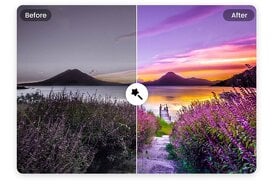
View the comparison of the before and after. If you'd like, you can adjust small details like warmth or brightness.
Step 4: Get the Complete Picture
Download the high-resolution edited image once you're happy.
That's it—instant expert results without the need for sliders or intricate layers.
Top Features of Pixelfox’s AI Picture Editor
Pixelfox.ai isn’t just another photo tool. It’s built for creators, businesses, and everyday users who want quick, clean results.
Here’s what sets it apart:
1. Intelligent Auto Improvement
AI automatically applies targeted edits based on what your photo needs, such as more contrast, better exposure, or softer skin.
2. Elimination of Background
Replace or remove backgrounds with a single click. Excellent for e-commerce sites, profile pictures, and product photos.
3. Retouching the face
Without excessive editing, brighten eyes, smooth skin, and eliminate imperfections naturally.
4. Color and Tone Correction
AI modifies the color balance to make images appear realistic and consistent.
5. Reduction of Noise and Blur
ideal for photos taken at night or in low light. AI eliminates unwanted grain and sharpens details.
6. Crop and Resize Tools
Use preset dimensions to instantly resize for print, websites, and social media.
Who Can Benefit from Using an AI Photo Editor
AI editing isn't limited to photographers. Anyone who wants better visuals quickly should use it.
Small Businesses: Produce top-notch product images without employing designers.
Influencers and content producers: Make quick improvements to your selfies and social media content.
E-commerce Sellers: Improve photos to give listings a polished appearance.
Professionals and students: Polish headshots or presentation graphics.
Photographers: Streamline the editing process and effectively process images in batches.
Example:
A small clothing brand can use Pixelfox.ai to enhance 100 product images in minutes—saving time while keeping their online store visually consistent.
Benefits of Using the Best AI Photo Editor
Let’s highlight why AI photo editing tools are becoming a must-have.
1. Conserves Time
Complex tasks are handled instantly by AI; no human corrections are required.
2. Provides Reliable Quality
Every picture has the same crisp, expert appearance.
3. Easy to Use
No editing knowledge or tutorials are needed. It is accessible to all.
4. Economical
The majority of AI tools, such as Pixelfox.ai, provide low-cost or free plans.
5. Access via the Cloud
No installations or downloads. Edit online from any device.
6. Secure and Confidential
Pixelfox protects your files by erasing images after processing.
What Makes Pixelfox.ai the Best AI Photo Editor
Pixelfox.ai has gained attention for combining simplicity with advanced AI performance.
Here’s why users love it:
Instant Results: AI edits photos in seconds.
Free Access: Basic enhancement features are available for free.
No Watermarks: You get clean outputs, even in the free version.
AI-Powered Precision: Trained on a massive dataset for realistic results.
All-in-One Editing: From background removal to detail enhancement.
Whether you’re editing one selfie or a full photo shoot, Pixelfox.ai gives consistent, pro-level quality.
Common Problems AI Editors Solve
AI photo editors are designed to fix common visual issues automatically:
Overexposed or underexposed photos
Dull or flat colors
Blurry edges or low resolution
Harsh lighting or unwanted shadows
Distracting backgrounds
Skin blemishes and imperfections
Instead of trying to fix each one manually, AI analyzes your photo and applies corrections instantly.
Is Using an AI Image Editor Worth It?
Indeed, it is, particularly for those who appreciate quality and time.
AI editing aims to make the process quicker and more effective, not to replace creativity. The heavy lifting is done for you, but you still have control over the finished product.
Professional results can be achieved in a fraction of the time with tools like Pixelfox.ai, regardless of whether you are a small business owner or a content creator.
Quick Tips for Better AI Photo Results
To make the most of an AI editor:
Upload the highest-resolution photo available.
Avoid heavily filtered or pixelated images.
Use good lighting in your original shot—it helps AI perform better.
Always check the before-and-after preview to confirm accuracy.
Save your enhanced images in PNG or high-quality JPEG for best results.
FAQ: Best AI Photo Editor and Image Editing Tools
1. Which AI photo editor is the best at the moment?
One of the greatest free AI photo editors is Pixelfox.ai, which requires no design knowledge to produce fast, high-quality results.
2. Is it possible for AI to automatically edit images?
Indeed. An AI picture editor automatically modifies lighting, color, and sharpness using intelligent algorithms.
3. Is AI photo editing cost-free?
A free online AI image editor with premium features for more experienced users is provided by Pixelfox.ai.
4. Can I use AI to eliminate backgrounds?
Indeed. The AI is ideal for profile photos and e-commerce since it can detect and cleanly remove backgrounds with a single click.
5. When I upload photos, is my data secure?
Indeed. To preserve user privacy, Pixelfox.ai employs secure servers and removes photos after editing.
Final Thoughts
AI photo editors are changing how we think about image editing. You don’t need to be a professional to get studio-quality results anymore.
Tools like Pixelfox.ai combine speed, accuracy, and simplicity—helping anyone edit photos like a pro in seconds. Whether you’re polishing product photos or personal portraits, AI gives you clean, consistent, and high-quality outcomes every time.
Try the best AI photo editor today and see how easy it is to turn your pictures into professional-grade images.