 Credit

Introduction
Pixelated or blurry pictures might destroy your best moments or undermine the image of your brand on the Internet. Whether it is a picture on your phone or your camera or even one in an old album, the low-quality images tend to be grainy, dim, and hazy.
With the help of AI-based applications, it is now possible to fix low-resolution photos, blurry edges, and small pictures into larger versions within a matter of seconds without experience in editing.
Knowing how to make an image not low-quality means that you can easily convert pictures that have low quality into high-definition and even professional pictures.
We are going to discuss how to enhance image quality, the most effective tools, and how AI can bring your photos to life.
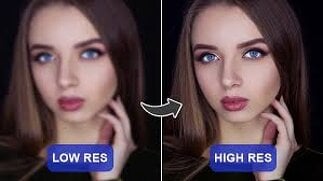
What Is Image Resolution, and Why Does It Matter?
Image resolution is the number of pixels that comprise a photograph. The larger the number of pixels, the better and sharper the image will be. A low-resolution image usually appears fuzzy or pixelated since there are not sufficient pixels to show the minute details.
Resolution, or the number of pixels, can be improved either by resizing intelligently or by using AI to predict and fill in missing detail. This is now easy with the modern tools that can fix low-resolution pictures and regain clarity in a few seconds.
How to Change or Improve Image Resolution
To change the resolution of a picture, you have to do the following steps for increasing the quality of your image without any difficulties:
1. Choose an AI Photo Enhancer Tool
Install an AI-based image sharpening program, such as Photo Enhancer by Pixelfox.AI that will automatically identify and fix blurry or low-resolution pictures. These applications have the capability of enhancing the quality of JPEGs and revealing concealed features without distorting the pictures.
2. Upload Your Low-Quality Image
Add your photo to the platform. The majority of tools can work with such formats as JPG, PNG, and JPEG.
3. Adjust or Auto-Enhance
Pick the choices, such as the way to adjust the resolution of the image, upscale by AI, or improve the photo. The system will be examining your photo and raising the resolution of the picture automatically.
4. Fix Colors and Lighting
To repair image resolution coloring, change the contrast, brightness and tone in order to correct the natural color balance.
5. Download the Enhanced Image
View your work, and save your quality photo resolution image to print, for social media or for personal use.
Top Features of Image Resolution Fix Tools
The current AI photo enhancer pixel and blurry fix applications are loaded with numerous features:
AI Upscaling: When the photo is upscaled, natural sharpness is retained.
Noise Reduction: Get rid of digital grain and enhance clarity.
Color Correction: Rebuild original colors and correct bad coloring.
JPEG Quality Boost: Automatically increase JPEGs' quality for the web or print.
AI Detailing: Recreating lost textures and edges.
Batch Processing: Improve more than one image at a time.
Preview Comparison: See before and after images in real time.
The innovative features allow one to easily fix poor-quality pictures and attain crystal-clear output.
Best Tools to Fix Low-Resolution Photos for 2025
The following are the best sites to repair low-resolution pictures and sharpen images without any difficulty:
· Pixelfox AI Photo Enhancer
It is one of the strongest photo quality enhancing tools. Pixelfox is an advanced AI tool that can automatically fix low-resolution pictures, erase blurred effects, and sharpen pixelated images. It operates directly on your browser, and it is absolutely free to use, so it is ideal for repairing old photos or enhancing a digital image in real time.
· Remini Photo Enhancer
One of the most downloaded mobile applications that apply AI to enhance the clarity of a picture and facial features in portraits.
· Let’s Enhance
It is a web-based strengthener which allows a user to adjust photo resolution and enlarge small pictures without compromising on the quality.
· VanceAI Image Upscaler
It is a professional-level AI photo enhancer based on neural networks that repair the low resolution and produce ultra-clear and high-resolution results.
· HitPaw Photo Enhancer
This AI-based solution is ideal to fix poor image quality and enhance resolution with single-click automation and is also suitable for beginners.
Final Thoughts
Quality is important in the visual first world today. Knowing how not to make an image not low quality gives you the opportunity to convert poor-quality pictures into high-quality, professional images in a matter of seconds.
Now you can use AI-powered applications such as Pixelfox to fix low-resolution photos, change photo resolution, and regain sharpness and clarity with a single click.
These tools will make your photos crisp, clear and alive whether you are a photographer, a content creator or even just that person who is preserving some memories. Therefore, do not wait because of low-resolution images; sharpen them immediately and brighten any photograph.
FAQs:
How can I make an image not low quality?
AI photo enhancers by Pixelfox can be used to automatically fix low quality photos and sharpen edges to give them a clean, professional appearance.
What is the process of change the resolution of a picture?
Take your photo and place it in an online app, and then choose increase resolution' or 'AI upscale' to enhance it without any blurriness.
How to improve the resolution of a photo online?
Enhance the picture online by using Pixelfox tools or Remini to automatically increase the resolution of the image and improve clarity.
How do can i fix low resolution pictures from my phone?
Install an artificial intelligence mobile application that provides pixel and blur fixes of photos to improve the quality of the photos in a short time.