 Credit

Have you ever tried enlarging a photo, only to see it turn blurry or pixelated? That’s where image scaling tools powered by AI come in. They don’t just resize your photo — they actually improve its quality, keeping it sharp and detailed.
With platforms like Pixelfox AI, you can scale images online for free, adjust resolution, and change image size in seconds. Whether you need to enlarge product photos, fix low-quality images, or optimize visuals for print or web, this simple online tool makes it effortless.
What Is Image Scaling?
Image scaling means changing the dimensions of an image — either enlarging or reducing it — while maintaining quality as much as possible.
When you increase the size, you add more pixels. When you reduce it, you remove pixels. The challenge is keeping the picture clear and sharp after resizing.
Why Image Scaling Matters
Image scaling is more than just resizing. It affects how your images look and load across different devices and formats.
Here’s why it’s important:
For web: Optimized image sizes reduce load times and improve SEO.
For print: Higher resolution ensures sharp, detailed prints.
For e-commerce: Clear, large product images increase buyer trust.
For design: Scalable images maintain consistency across platforms.
How Traditional Image Scaling Works
In traditional photo editors, scaling simply stretches or shrinks pixels. This can lead to:
Blurry enlargements (when new pixels are guessed inaccurately)
Loss of detail (when shrinking images too much)
Distorted proportions (if not scaled correctly)
These methods use mathematical interpolation (like bicubic or bilinear scaling), which guesses what the missing pixels should look like — but results often fall short.
How AI Image Scaling Works
AI image scaling, like the technology used at Pixelfox AI, works differently. It uses deep learning to predict and recreate missing details intelligently.
Here’s how it works step-by-step:
Analyze the image: The AI scans features like edges, textures, and lighting.
Reconstruct missing pixels: Instead of guessing, AI fills gaps with realistic detail.
Enhance resolution: AI adds clarity, removes noise, and restores sharpness.
Upscale output: The final image looks crisp and high-resolution, even when enlarged.
Benefits of Using an Online Image Scaling Tool
AI-driven image scaling tools offer several advantages compared to traditional software:
1. Maintain Image Quality
AI keeps textures and edges sharp, even when enlarging by 2x, 4x, or more.
2. Adjust Resolution Easily
You can scale to exact dimensions (e.g., 1080p, 4K, or custom sizes) with no quality loss.
3. Save Time and Effort
No need for manual editing — upload your image and let AI handle the rest.
4. Free and Accessible
Tools like Pixelfox AI don’t require downloads, signups, or payment.
5. Perfect for Any Use Case
Whether it’s product photos, portraits, or logos, AI scaling adapts to all image types.
How to Change Image Size & Resolution Online
Here’s how to use Pixelfox AI’s Resolution Scaler:
Step 1: Visit Pixelfox AI
Open your browser and go to the website — it works on desktop and mobile.
Step 2: Upload Your Image
Click on the upload button and select your image file.
Step 3: Choose the Scaling Option
Select how much you want to scale your image (2x, 4x, or custom).
Step 4: Let AI Process the Image
The AI automatically enhances details, colors, and edges during scaling.
Step 5: Download the Result
Preview your new high-resolution image and download it instantly.
What Is a Resolution Scaler?
A resolution scaler is a tool that adjusts the number of pixels in an image — increasing or decreasing resolution to match your needs.
Higher resolution means more detail and better print quality. Lower resolution reduces file size for faster web performance.
Pixelfox AI’s resolution scaler uses AI to boost clarity while maintaining smooth gradients and natural tones.
When Should You Use Image Scaling?
Here are common situations where scaling images is useful:
Printing Large Posters – Turn small photos into large, detailed prints.
Restoring Old Photos – Upscale low-resolution scans to HD quality.
E-Commerce – Make product images sharp and zoomable.
Web Optimization – Resize for faster website load times.
Social Media – Match image size to platform requirements (e.g., Instagram, YouTube).
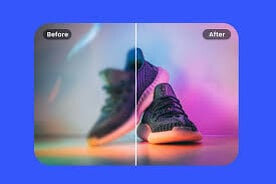
Why Pixelfox AI Is the Best Image Scaling Tool
Pixelfox AI stands out because it combines simplicity with professional-grade results.
1. Free to Use
No subscription or signup required.
2. AI Precision
Every pixel is analyzed and enhanced intelligently.
3. Fast Processing
Images are scaled in seconds, not minutes.
4. Multiple Format Support
Supports PNG, JPG, JPEG, and WebP files.
5. Safe & Secure
Uploads are automatically deleted after processing for privacy.
Advantages of Scaling Images with AI
Restores lost details instead of stretching pixels.
Improves texture and contrast automatically.
Removes noise and compression artifacts.
Retains natural color balance.
Works for any image type or resolution.
For example, an old 800×600 photo can be scaled up to 4K resolution while maintaining clarity and depth.
Tips for Best Image Scaling Results
Start with the Best Available Image – The clearer the original, the better the output.
Avoid Over-Enlarging – Scaling beyond 8x can reduce realism.
Use Consistent Aspect Ratios – Prevent stretching or distortion.
Try Moderate Upscaling First – Test 2x or 4x before larger jumps.
Keep Lighting Balanced – Well-lit photos scale better.
Common Mistakes to Avoid
Using compressed or low-quality originals.
Ignoring aspect ratio (causes distortion).
Over-editing after scaling (reduces detail).
Skipping previews before download.
Is AI Image Scaling Safe?
Yes. Pixelfox AI processes your images securely and deletes them after enhancement. Your photos aren’t stored, shared, or used for training data.
The platform uses HTTPS encryption and cloud-based privacy protection, ensuring safe online processing.
Use Cases of AI Image Scaling
Here’s how different people use online scaling tools:
Photographers: Upscale low-res shots for exhibitions.
Designers: Resize visuals for print and web layouts.
Marketers: Improve product and banner images.
Students & Professionals: Prepare presentations or reports with HD visuals.
Casual Users: Restore and enlarge family photos.
FAQ
Q: What is image scaling?
A: It’s the process of enlarging or reducing an image’s size or resolution while maintaining quality.
Q: What is a resolution scaler?
A: A tool that adjusts the pixel density of an image to make it clearer or lighter for different uses.
Q: Can I scale images online for free?
A: Yes, Pixelfox AI offers a free online image scaling tool with no signup required.
Q: Will scaling make my images blurry?
A: No. AI scaling enhances details so enlarged images remain sharp and natural.
Q: Does it work on all file types?
A: Yes. You can upload JPG, PNG, and WebP formats easily.
Q: Is it safe to upload personal photos?
A: Absolutely. Pixelfox AI deletes files automatically after processing.
Final Thoughts
Resizing photos doesn’t have to mean losing quality. Thanks to AI-powered image scaling, you can now change image size and resolution instantly — and still get crystal-clear results.
Pixelfox AI offers one of the best free online tools for this. It’s fast, accurate, private, and completely free. Whether you’re resizing for print, social media, or design, you’ll get professional-quality images every time.
So next time you need to upscale a blurry photo or adjust image size, skip the complex software — just upload to Pixelfox AI and let the resolution scaler do the work. It’s the easiest way to make any image look sharp, detailed, and high-quality.