 Credit

What Is “Make Face Clear AI”?
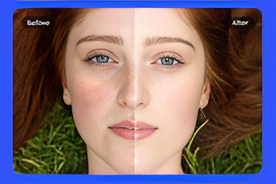
The term make face clear AI refers to using artificial intelligence to automatically detect facial imperfections, such as acne, scars, dullness, or uneven tones, and correct them while keeping your natural features intact. Unlike heavy editing or fake-looking filters, AI-based enhancements from Pixel Fox focus on realism and natural beauty.
Using a clear skin filter online, you can instantly brighten your face, balance skin tone, and highlight your best features. Whether for a professional photo, social media post, or portfolio, this technology ensures your pictures look clean, confident, and beautifully real.
Why Use Pixel Fox to Make Your Face Clear with AI
Pixel Fox is one of the most advanced and user-friendly AI platforms for photo enhancement. It combines creativity with artificial intelligence to offer professional-quality results with just one upload. Here’s why millions trust Pixel Fox for making face clear AI transformations:
Natural Results – Instead of creating unrealistic plastic effects, Pixel Fox enhances your photo naturally. The AI understands facial features and keeps textures consistent, so your skin looks smooth yet authentic.
Fast and Easy – You don’t need to download any app or learn photo-editing tools. Simply use the clear skin filter online, and within seconds, your face looks refreshed and spotless.
Smart Detection – The AI automatically detects areas that need improvement, like acne, spots, or dark circles, and corrects them intelligently.
Safe and Private, Pixel Fox values your privacy. Every uploaded photo is processed securely and never shared.
Benefits of Using a Clear Skin Filter Online
When you use a clear skin filter online with Pixel Fox, you experience more than just good looks. You enjoy a full digital glow-up that improves the overall quality of your image.
1. Instant Skin Clarity
With a single click, AI removes unwanted blemishes, pimples, and marks. Your skin appears smooth, clean, and photo-ready.
2. Even Skin Tone
Uneven lighting or shadows can make your skin look patchy. AI adjusts tones and brightness to give you a balanced, glowing complexion.
3. Professional-Grade Enhancement
The make face clear AI tool by Pixel Fox delivers studio-like editing without expensive software. Perfect for influencers, photographers, and everyday users.
4. No Overediting
Unlike beauty filters that blur or distort your face, Pixel Fox enhances skin clarity while keeping every detail, like freckles and natural highlights, realistic.
5. Confidence Boost
A clear, polished photo helps you look your best on social media, LinkedIn, or any professional platform. It’s your best version, made smarter by AI.
How to Use Pixel Fox to Make Face Clear AI
Here’s a simple step-by-step guide to using Pixel Fox’s clear skin filter online effectively:
Visit Pixel Fox’s Website
Open the official Pixel Fox platform on your browser.Upload Your Image
Click “Upload Photo” and choose the picture you want to enhance. The make face clear AI feature supports all major image formats.Apply the Clear Skin Filter
Select the clear skin filter online from the enhancement tools. The AI will start analyzing your face instantly.Wait for the Magic
In just seconds, the AI smooths your skin, adjusts lighting, and removes imperfections while maintaining your natural look.Preview and Download
Review the changes, make any final adjustments, and download your new image in HD quality.
That’s it, no complicated editing, no manual retouching, just clean, clear, and stunning results powered by Pixel Fox.
Why Pixel Fox Is Different from Other AI Editors
While many online tools offer filters, Pixel Fox focuses on precision and realism. Here’s what makes it stand out:
Smart AI Algorithms: Designed to mimic real skin texture and tone.
Custom Adjustments: Let users control smoothness levels for a balanced look.
All-in-One Enhancement: Apart from a clear skin filter online, Pixel Fox also offers tools to enhance lighting, sharpen details, and retouch photos.
High-Speed Processing: Get results in seconds, even for large files.
No Downloads Needed: 100% online and accessible from any device.
Whether you’re retouching selfies, portraits, or fashion photos, Pixel Fox’s AI ensures every image looks naturally flawless.
The Perfect Tool for Every Creator
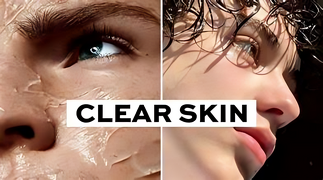
From social media influencers to photographers and business professionals, everyone benefits from the make face clear AI tool. Here’s how different users make the most of it:
Influencers: Post polished, radiant selfies that stand out on Instagram or TikTok.
Photographers: Save editing time by using a clear skin filter online to touch up clients’ portraits quickly.
Professionals: Improve profile photos for resumes, LinkedIn, and business portfolios.
Everyday Users: Create confident, clear, and beautiful pictures to share with friends and family.
With Pixel Fox, your photo editing journey becomes effortless, creative, and truly transformative.
Final Thoughts
In a world that’s increasingly visual, having clear, professional-looking photos can make a lasting impression. Thanks to Pixel Fox, achieving perfect skin in photos has never been easier. The platform makes face clear AI tool and an intelligent, clear skin filter online, bringing together the power of artificial intelligence and artistic design to deliver flawless, natural-looking results.