 Credit

Ever put on a popular perfect face filter and thought, “Wait… do I actually look like this or did my real face just get fired?”
You’re not alone.
In 2025, “perfect face” effects are everywhere. TikTok, Snapchat, Instagram, YouTube thumbnails, dating apps… and yes, even your coworker’s “totally natural” Zoom profile pic. People search for perfect face filter because they want three things:
- Fast, pretty results for photos and videos
- Less effort than makeup or Photoshop
- A boost in confidence, not a full-blown identity crisis
This guide will break down what a perfect face filter really does, how it works, what it messes up, and how to use it smartly with tools like Pixelfox AI. So you get great photos, and you keep your sanity.
What is a perfect face filter, really?
In plain words, a perfect face filter is an AI-powered effect that tweaks your face to match some “ideal” look.
It usually:
- Smooths skin
- Brightens eyes
- Slims the jaw
- Sharpens the nose
- Adds soft makeup
- Balances the face so it looks more “symmetrical”
A lot of these filters follow ideas from the “golden ratio” of beauty. You might have seen that 1.618 magic number. Some apps use it to judge how “perfect” your face is. They look at:
- Space between your eyes
- Width of your nose
- Height of your forehead
- Shape of your jaw
Then they move things a bit to make your face closer to that ratio.
Do humans really see a “perfect face” like that?
Studies in psychology say that people do tend to prefer clear skin, symmetry, and certain proportions. But real life is messy. Culture, race, age, and personal taste all change what “perfect” means.
So the short answer:
A perfect face filter is not truth. It is a beauty preset designed by someone, somewhere, with a specific standard in mind.
And that’s where the fun and the trouble both start.
Why perfect face filters blew up (and what changed in 2025)
Face filters were cute dog ears in 2016. Now they are full-on digital cosmetic surgery in 0.5 seconds.
A few reasons they exploded:
- Phone cameras got better
- AI models got scary good at finding faces
- Social platforms pushed filters to keep people posting
- Beauty and selfie culture never slowed down
According to Statista, beauty and face editing apps have hundreds of millions of downloads worldwide. And tools like FaceApp showed people how extreme and realistic these edits can look.
In 2025, two things changed the game:
-
Hyper‑realistic filters
These filters don’t just slap a blur on your face. They track your expressions, your pores, and your lighting. The face can look perfect but still look like you — at least at first glance. -
Cross‑platform use
People now want the same “perfect face” look:- In selfies
- In TikTok stories and Reels
- In long‑form YouTube or vlogs
- In pro portraits and product shoots
That’s why tools like Pixelfox AI matter. They don’t live inside just one app. You can upload your photos or videos and get a consistent look across all your content.
The hidden problem: when the filter becomes the standard
Here’s the dark side.
According to reports discussed by the American Psychological Association, many teens and young adults say that filters on social media change how they see their own face. That sounds mild. In practice, it can be rough.
Common things people feel:
- They hate photos without the perfect face filter
- They avoid video calls without a beauty filter
- They start to want real surgery to match their filtered face
- They compare their “normal” photos to edited celebrity content all day
When the filtered face becomes the default, your real face starts to feel like the error.
That does not mean you must stop using filters. It means you need:
- A clear idea of what the filter is doing
- Limits on how far you push it
- Tools that let you control the intensity, not just “on / off”
This is where a controlled setup like Pixelfox AI helps way more than a random viral filter. You can dial things in, instead of just letting the app remake your face from scratch.
How perfect face filters work under the hood (simple version)
Let’s keep this light. No math panic.
Most modern perfect face filters use a few key steps:
-
Face detection
The AI finds your face, eyes, nose, lips, and jaw. -
Landmark tracking
It marks key points. For example: corners of the eyes, tip of the nose, outline of the lips, edges of the jaw. -
Proportion check
The model compares your face to a learned “ideal” set of proportions. This may be based on:- The golden ratio
- A huge training set of faces rated as “attractive”
- A target style (like K‑beauty style, or Western glam style)
-
Adjustments
It then reshapes and edits:- Resizes eyes and lips
- Narrows nose or jaw
- Smooths skin
- Brightens shadows
- Sharpens details
-
Blend and render
The AI blends the edit with the original image so it looks natural. Or very unnatural. Depends on the tool.
Tools like Pixelfox AI use this pipeline but give you control at each step. You are not just slapping one generic perfect face filter on your selfie. You are choosing what to change and by how much.
Step‑by‑step: use a perfect face filter on your photos
Let’s get practical.
Fast method with Pixelfox AI (for photos)
Say you want that smooth, perfect face look for your profile photo, but you don’t want to look like a wax statue.
You can use a mix of tools inside Pixelfox AI:
-
Clean up the skin and details
Use the AI Face Beauty tool.- Upload your image
- Set smoothing to a moderate level
- Add a bit of brightness, but not too much
- Let it run and check the result
This handles:
- Blemishes
- Uneven skin
- Slight blur
It keeps the shape of your face but makes it more polished.
-
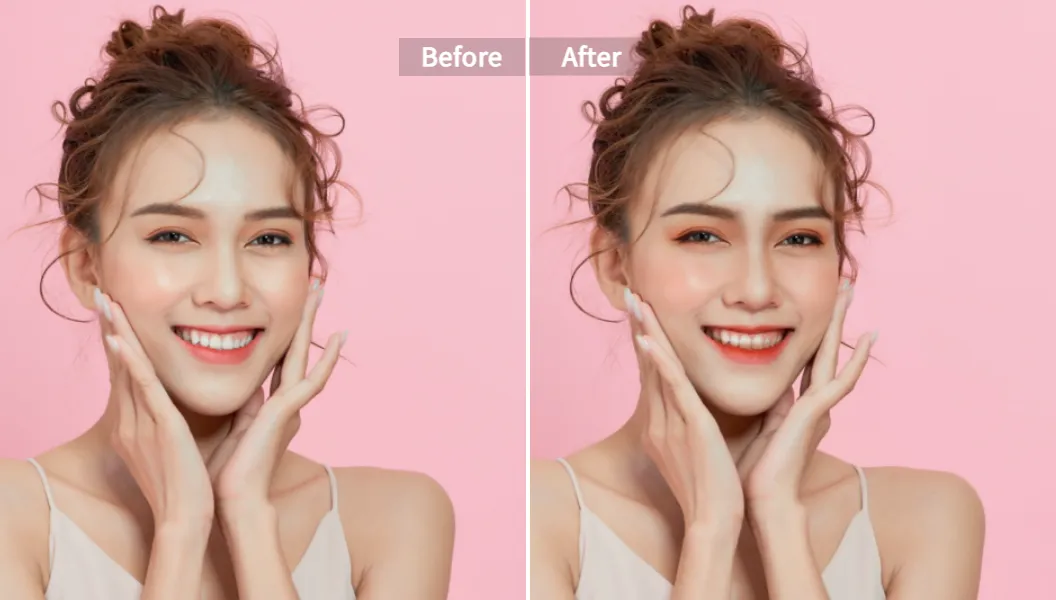
Add a subtle makeup layer
Switch to the AI Makeup Filter - Virtual Makeup Try On.- Upload the same photo
- Pick a “Natural” or soft glam style
- Try one that enhances lips, eyeshadow, and light contour
- Adjust until it looks like you on a good day, not “completely new person”
Now your “perfect face filter” is not just one click. It’s a tailored stack of real changes.
-
Fix shape issues if needed
Some people hate how their jaw or nose shows up in photos. Lighting and angle can make it worse than real life.
Here you can use AI Face Reshape.- Gently slim the face
- Slightly enlarge eyes
- Nudge the nose contour if it looks too flat or too wide from the camera
Keep changes small. If you notice the edit right away, it is too much.
-
For fuller slimming
If you only want a slimmer look with soft contour, the AI Face Slimming Tool can handle that in one go.- Upload your image
- Let the AI auto‑slim the face
- Check the jaw and cheeks, and make sure your head does not look too small for your body
Tip
When you create your “perfect face” look, save a few versions with different intensities. Use the light edit for LinkedIn, a stronger one for Instagram, and keep an unedited version for yourself. Your self‑esteem will thank you later.
For videos, vlogs, and Reels
Stills are easy. Video is harder because your face moves and lights shift.
This is where the Instant AI Portrait Enhancer for Videos & Selfies in Pixelfox helps.
You can:
- Upload your vlog clips or portrait videos
- Let AI even out skin, add soft lighting, and refine the face
- Keep the style close to your photo edits so your “perfect face filter” look stays the same across platforms
This way:
- Your TikTok, Reels, and YouTube shots all match
- You avoid that weird jump from ultra-edited selfie to harsh raw video
Best tools and apps for the perfect face effect in 2025
Let’s talk options.
You have three main paths if you want a “perfect face”:
-
Built‑in social filters
- Pros: fast, fun, no extra steps
- Cons: lack of control, can be very biased, change with trends
-
Mobile apps like FaceApp, BeautyPlus, etc.
- Pros: more controls and presets
- Cons: can be heavy on the “plastic” look, and not always clear on data use
-
Dedicated AI editors like Pixelfox AI
- Pros: web‑based, higher control, better image quality, batch options
- Cons: you need to upload and export, so one extra step
From a content strategy point of view, if you care about:
- Brand consistency
- High‑res exports
- Multiple channels (social + pro work)
Then a flexible AI editor like Pixelfox AI gives you way more room to work than a one‑shot social filter.
Pixelfox AI playbook: get the look you want, not a plastic doll
Let’s drill into what Pixelfox can actually do for your “perfect face” setup.
1. Clean, natural base with AI Face Beauty
The AI Face Beauty tool is your foundation layer.
It is made to:
- Remove small blemishes
- Smooth uneven tones
- Fix slight blur and low‑res issues
- Keep pores and texture so you don’t look fake
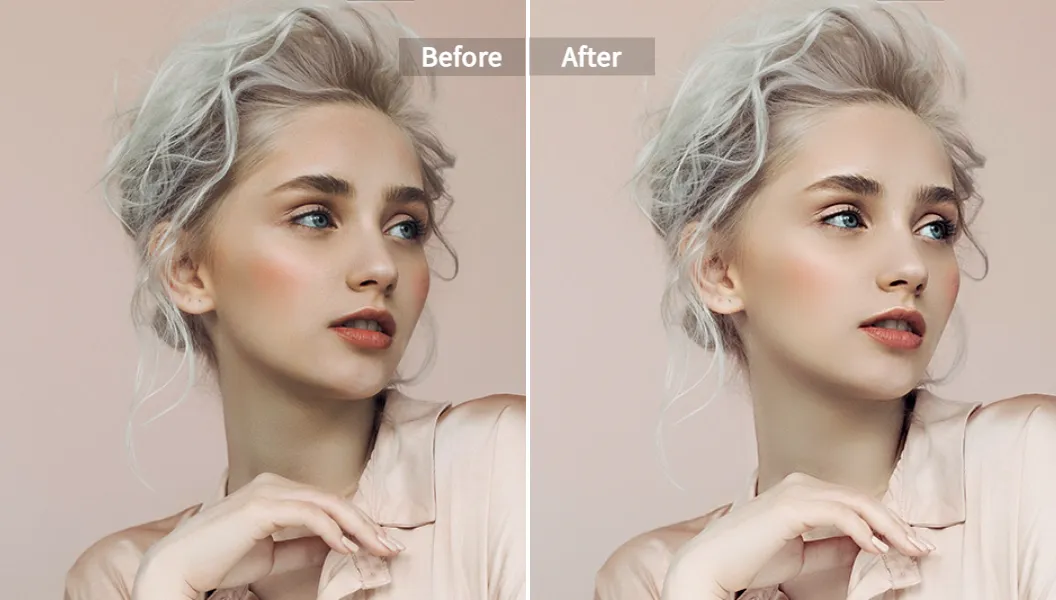
According to UX research from groups like Nielsen Norman Group, users trust images more when they still show natural detail. Over‑airbrushed faces often cause a drop in trust. This lines up with what we see in real use: photos that keep detail get better engagement and feel more “real”, even when they are edited.
Pixelfox AI leans into that. The Face Beauty tool is built to enhance, not erase you.
2. Style and tone with AI Makeup Filter
Now you add flavor.
With the AI Makeup Filter - Virtual Makeup Try On, you can:
- Test soft daily looks
- Try glam or bold color for campaigns or nights out
- Match makeup to brand colors (for creators or influencers)
This is huge if:
- You shoot product photos
- You do beauty content
- You need a consistent “on‑camera” face
Because you can copy the same makeup style across photos, you basically create your own perfect face preset.
3. Shape control with AI Face Reshape
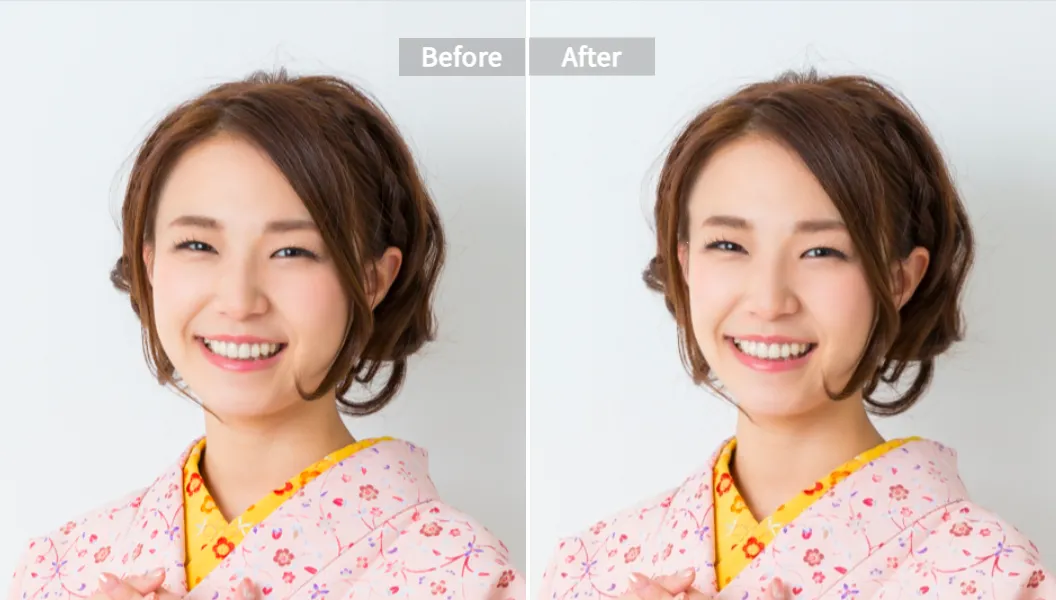
Cameras distort faces. Front camera + bad angle = your face looks wider and your nose looks bigger. Nice.
The AI Face Reshape tool fixes that. You can:
- Slim the jaw just a bit
- Adjust the nose contour
- Balance the mouth size
- Enhance eye size in a subtle way
This is not about changing your identity. It is about undoing what the lens did and nudging your features toward how people see you in real life.
4. Overall contour with AI Face Slimming
Sometimes you just want that slim, soft V‑line look.
The AI Face Slimming Tool handles that in a single pass.
It is ideal for:
- Fashion or beauty shoots
- Profile pics where the angle made your face look fuller
- eCommerce photos where the model needs a light, clean contour
5. Video consistency with AI Portrait Enhancer
The Instant AI Portrait Enhancer for Videos & Selfies keeps your “perfect face” look flowing through video.
You can:
- Fix harsh lighting
- Soften skin without blurring motion
- Keep eyes and facial features sharp
- Maintain a consistent style across a whole playlist
Tip
Pick one “signature look” and use it everywhere. Same kind of smoothing, similar makeup tone, similar face shape tweaks. This creates a “brand face” that people recognize, without needing to go all‑in on heavy or strange filters.
Perfect face filter vs Photoshop and manual retouch
Let’s be honest. Photoshop is powerful. But for most people, it is like bringing a rocket to toast a slice of bread.
AI perfect face filter vs Photoshop
Photoshop / manual retouch
- High control over every pixel
- Needs skill, a lot of time, and often a pen tablet
- Great for pro retouchers and full campaigns
AI perfect face filter with Pixelfox
- Works in your browser
- No deep skills needed
- Most edits done in seconds
- Good enough for:
- Social content
- Brand pages
- Influencer shots
- Even some pro work when time is short
According to creative industry reports from firms like Forrester, speed and scale now matter as much as raw quality. Teams are judged on how fast they can ship assets across all channels. AI tools like Pixelfox fit that demand.
So if you are an agency or creator, you can still keep Photoshop for complex composites. And you use Pixelfox AI for fast, clean “perfect face filter” style images that you need daily.
Pixelfox AI vs random online face editors
There are tons of free “make me pretty” websites. Some are okay. Many are sketchy.
What usually goes wrong with random tools:
- Over‑edited, cartoonish faces
- Weird artifacts around eyes and hair
- Low‑res export
- Very unclear data and privacy policies
Pixelfox AI focuses on:
- High‑res output that still looks sharp
- Privacy: images are processed with strict confidentiality rules
- Control: you can tweak levels instead of accepting one heavy filter
- Tool set: beauty, reshape, makeup, slimming, and video enhancement in one place
So you can build a full workflow: from raw selfie to refined “perfect face” across photo and video.
Advanced tricks that power users actually use
Let’s move past simple smoothing. Here are a few pro‑level moves that even high‑end creators use.
1. Build a “filter stack” instead of one heavy effect
Instead of one strong perfect face filter, combine 2–3 light tools:
- Light pass with AI Face Beauty for cleanup
- Very soft AI Face Slimming for jaw and cheeks
- Minimal AI Makeup Filter for lips and eyes
This gives a more realistic result. Your followers see “wow, you look great”, not “which anime is this?”
2. Use filters to test real‑world changes
Thinking about a new makeup style? Or a different contour for your brand photos?
Use Pixelfox to:
- Test various makeup looks with the AI makeup tool
- Try different face shapes and angles with reshape and slimming
- Export options and compare on your website or profile
You can then decide what to do in real life. This is useful for:
- Content creators planning a rebrand
- Makeup artists testing looks for clients
- eCommerce brands setting a “face style” for their product shots
Real‑world case studies
Let’s walk through two practical stories. Names are changed, problems are very real.
Case 1: Creator who hated every unfiltered video
Mia is a 23‑year‑old TikTok creator. Beauty content, GRWM videos, that kind of thing.
She used heavy in‑app perfect face filters for months.
Her problem:
- Her TikTok live streams showed her real face
- She felt exposed without filters
- She delayed brand deals that needed raw video footage
She moved to a Pixelfox‑based setup:
- Used AI Face Beauty and AI Makeup Filter to define a soft, natural signature look
- Used AI Portrait Enhancer for Videos to bring that same mood into pre‑recorded videos
- Kept lives with only light real makeup, but aligned the style with her edited content
Result after a few weeks:
- Her audience still noticed she looked good, but comments about “you look so different on live” dropped
- She felt less pressure to hide off camera
- She had a clear boundary: light AI edits are for content, real face still shows up often
Case 2: Small brand that needed consistent “perfect” product faces
A small skincare brand needed model shots for their site and ads.
Budget was tight. No full‑time retoucher.
Problems:
- Different photographers
- Different lighting styles
- Models with different skin conditions on shoot days
They used Pixelfox AI to build a consistent “perfect skin, soft glam” look:
- Ran all product portraits through AI Face Beauty to fix small skin issues
- Added a very light AI Makeup Filter to keep lips and eyes polished but natural
- Used AI Face Reshape only when the camera angle distorted the jaw too much
Result:
- Site and ads looked like one coherent brand
- No one looked fake
- They saved hours of manual retouch per image
This is how you use a “perfect face filter” mindset in a smart, controlled way.
Common mistakes with perfect face filters and how to fix them
You can mess this up. A lot of people do.
Mistake 1: Over‑smoothing until you lose pores
This gives you the classic “plastic doll” face.
Fix
Use weaker settings. Let some lines, freckles, and pores stay. Human faces have texture. The Pixelfox AI Face Beauty tool is built to keep that if you do not max it out.
Mistake 2: Changing your facial structure too much
You slim the jaw, shrink the nose, enlarge the eyes. Then one day you see your real face and you feel like a stranger.
Fix
Keep face shape edits under control. Ask yourself:
“Would someone who meets me tomorrow in person recognize me right away?”
If the answer is no, dial it back.
Mistake 3: Using different filters on every platform
People see one face on TikTok, another on Instagram, a third on LinkedIn. Trust goes down.
Fix
Build one base “perfect face filter” look in Pixelfox, and use it everywhere. Same level of smoothing, similar color tone, same basic shape.
Mistake 4: Editing only your face and ignoring background and light
Your face looks studio perfect. Your background looks like a noisy cave.
Fix
Match lighting and color a bit in your overall edit (you can do this in whatever app you use after Pixelfox). A great face in a bad frame still looks off.
Tip
When in doubt, aim for “me on my best day with good sleep and good lighting”. If your perfect face filter makes you look like a different person or a game character, it is probably too much for daily use.
FAQ about perfect face filters
How does a perfect face filter actually change my face?
It tracks key points like eyes, nose, lips, and jaw. Then it shifts them slightly toward an “ideal” set of proportions, while also smoothing skin and adjusting light. Tools like Pixelfox AI let you control each step so the result stays close to your real face.
Why do I feel worse about my real face after using perfect face filters?
Your brain gets used to the edited image. That becomes the “normal” version in your mind. When you see your unedited face, it feels like a downgrade. This is common, and it is why experts warn against heavy filter use every day.
Can perfect face filters be used in a healthy way?
Yes. You can use them as a creative tool, as light polish for content, or as a way to fix camera issues like bad lighting. The key is to keep edits moderate, use unfiltered images sometimes, and remind yourself that the filter is a design choice, not a truth meter.
How is Pixelfox AI different from simple app filters?
Normal app filters are one‑click presets with little control. Pixelfox AI gives you a full set of tools: Face Beauty, Makeup, Reshape, Slimming, and Video Portrait Enhancer. You can tune each one and keep a consistent look across photo and video, which is better for content creators and brands.
What is the difference between a perfect face filter and normal beauty mode on my phone?
Phone beauty modes are basic and often just blur the face or sharpen eyes. A modern perfect face filter uses advanced AI to adjust shape, symmetry, detail, and light in a more balanced way. Pixelfox AI goes further by letting you customize these steps instead of locking you into one baked‑in style.
Your face is not a bug that needs a patch
Perfect face filters are not going away. They are getting better, faster, and more common. You can either:
- Let random viral filters decide how your face “should” look
- Or use smart tools and clear rules so you stay in control
If you want a clean, consistent, and actually flattering perfect face filter setup for 2025, start by building your own look with Pixelfox AI:
- Use AI Face Beauty for a natural base
- Add style with AI Makeup Filter
- Fix lens distortion with AI Face Reshape or Face Slimming
- Keep video on‑brand with AI Portrait Enhancer
Your real face still matters. The goal is not to erase it. The goal is to show the best version of you in a way that fits your work, your story, and your sanity.
👉 Try Pixelfox AI today, build your own perfect face filter stack, and see how good “you, but well lit and well edited” can look.
Disclaimer: This article is for information and creative guidance only. It is not mental health advice. If filters or appearance worries are hurting your daily life, talking with a licensed professional is always a good idea.