 Credit

A lot of people think they “have a big nose”… until they take a selfie and the camera basically roasts them 😅. If you’ve ever looked at a photo and thought, “Why is my nose doing that?”, you’re exactly why a nose editor exists. This guide breaks down nose editing the smart way (no creepy plastic-face vibes), how nose editor AI tools actually work, and how to get realistic results fast with Pixelfox AI—without learning Photoshop like it’s a college major.
Suggested URL: /nose-editor
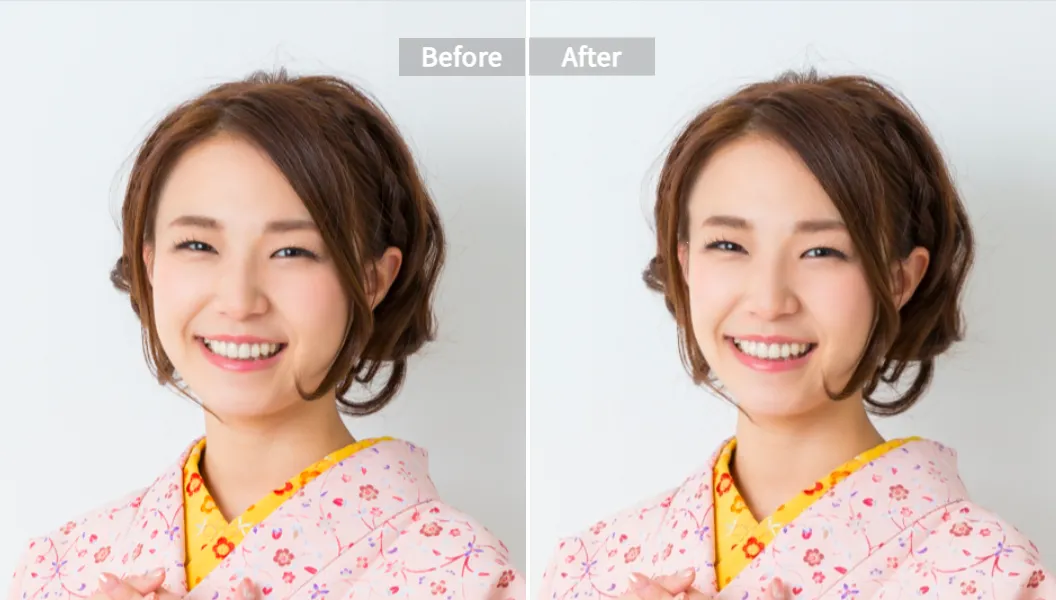
What a nose editor really is (and what it isn’t)
A nose editor is a photo tool that lets you reshape the nose in an image—make it slimmer, straighten a bump, lift the tip, narrow the bridge, even out nostrils, that kind of thing.
There are two big “schools” of nose editing:
- Classic/manual nose editing: liquify-style pushing pixels around (fast to mess up, slower to master).
- Nose editor AI: detects facial landmarks and reshapes the nose with controls that are less “drag this blob” and more “adjust the bridge width.”
What it isn’t:
- A medical simulation of surgery outcomes.
- A guarantee of what you’ll look like after rhinoplasty.
- A free pass to over-edit and pretend it’s “natural” (people can tell… trust me 🙃).
Why your nose looks bigger in selfies (you’re not crazy)
This part matters because it tells you when you need nose editing, and when you just need to back the camera up.
A key reason is lens distortion. Selfie cameras are wide-angle. Wide-angle makes anything closer to the lens look bigger. Guess what’s closest? Your nose.
There’s even published medical discussion around this. A widely-cited piece in JAMA Facial Plastic Surgery (often referenced as the “selfie distortion” discussion) describes how close-up selfies can noticeably exaggerate central facial features like the nose. That’s not insecurity talking. That’s optics.
Other common reasons:
- Lighting from above creates harsh shadows under the bridge and tip.
- Slight head tilt can make the nose look crooked even when it’s not.
- Front camera mirroring makes you think your face is “off” because it flips what you’re used to seeing.
So yeah… sometimes the “problem” is the camera being dramatic.
Nose editor AI vs manual nose editing: what changes under the hood
Manual editing (Photoshop Liquify style) works like this: you shove pixels and hope the background, nostrils, and skin texture don’t warp into a disaster.
Nose editor AI works differently:
- It tries to detect facial landmarks (bridge, tip, nostrils, symmetry points).
- It applies shape changes while trying to keep edges clean and texture natural.
- Good tools reduce that “melted wax museum” look.
That’s the promise, anyway. Some apps still mess it up and give you a nose that looks like it was edited in 2013. The trick is choosing a tool that keeps control simple and output believable.
Pixelfox AI nose editor: the clean, fast way to fix photos
If you want a nose editor that doesn’t punish beginners, start with Pixelfox AI’s face reshape tool. It’s web-based, so no installs, no “why is this app 1.8GB” pain.
Use this: Pixelfox AI Face Reshape Tool
It’s built to reshape facial features (nose included) with controlled adjustments, so you can keep your face looking like you, just on a better day.
Step-by-step: natural nose editing with Pixelfox AI (no weird warping)
- Open the tool and upload a clear photo (good lighting helps a lot).
- Choose the face reshape controls (nose reshaping is part of the feature set).
- Adjust slowly. Small changes look expensive. Big changes look like a prank.
- Download the final image in your format (PNG/JPG/PDF supported).
That’s it. No layers. No liquify brush. No “why did my nostril teleport.”
Tip: Keep edits subtle—aim for “I slept well and the lighting is nice” instead of “I swapped faces with an influencer.” If your edit is obvious at thumbnail size, it’s too much.
How to get realistic results (the stuff most apps won’t tell you)
A nose editor AI can’t save every photo. Garbage in, garbage out, as the internet politely says.
Here’s what actually improves realism:
Use the right photo (this matters more than the tool)
Pick a photo with:
- Face looking mostly forward (3/4 angle is okay)
- No heavy shadow across the nose
- No extreme wide-angle distortion (if your nose is 2 inches from the lens, good luck)
Edit in “micro moves”
Do tiny adjustments, then pause and check:
- nostril size consistency
- bridge straightness
- edges around the nose (where warping usually shows)
Always compare with your unedited version
According to Nielsen Norman Group’s readability research, people scan fast and notice visual inconsistencies quickly. Translation: your friends won’t analyze your pixels, but they’ll feel something is off in half a second.
Tip: Flip your image horizontally after editing and look again. Your brain catches mistakes faster when the face is “new” to you. (Annoying, but true.)
Advanced nose editing “plays” (for creators, dating apps, and brands)
Basic nose editing is easy. Getting consistent, professional results is where people level up.
1) Multi-angle consistency (dating app cheat code, but ethical-ish)
If you edit only one photo, then upload 6 other angles, the difference screams “edited” 😬.
Do this instead:
- Edit your main front-facing photo lightly
- Use the same level of adjustment on your second-best 3/4 angle
- Keep the “identity” markers the same (nostril shape, tip height)
The goal is consistency, not perfection.
2) Fix the lighting lie after reshaping (pro workflow)
Sometimes your nose looks “bigger” because the shadow makes it look wider. After you reshape, the shadow might still scream “wide nose.”
That’s where AI prompt editing helps.
Use Pixelfox AI Image Editing with Text Prompts and try simple prompts like:
- “Soften harsh shadow on nose”
- “Even out lighting on face”
- “Reduce highlight on nose tip”
This combo (reshape + lighting correction) is how edits look natural instead of “why is your nose smooth like plastic.”
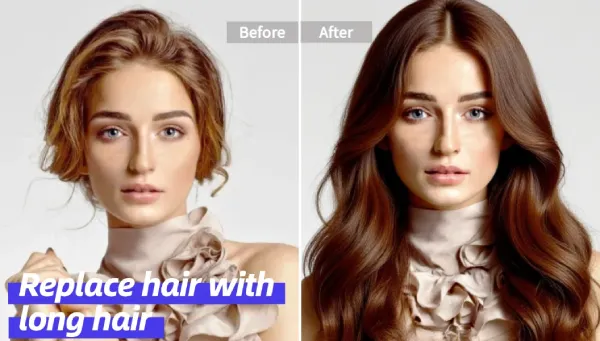
3) Full look test (nose + hair = the real “before/after”)
People judge the nose in context: hairstyle, face shape, even expression. If you’re testing a look, don’t stop at the nose.
Try pairing nose edits with a hairstyle preview using Pixelfox AI Hairstyle Changer. It’s way easier to decide what you actually like when the whole vibe matches.
Real-world case studies (composite examples, based on common workflows)
I’m going to be transparent: these are composite case studies built from common user stories and editing patterns (so you get practical lessons without the fake “my client made $9,000,000 overnight” nonsense).
Case study 1: The selfie distortion problem (creator workflow)
Scenario: A lifestyle creator shoots mostly handheld selfies indoors. Nose looks wider in every front-camera shot. They don’t want “Facetune face.”
What worked:
- They used Pixelfox AI Face Reshape to make small nose width adjustments.
- They kept changes consistent across 3 hero images used for profile + pinned posts.
- They avoided tip-lift changes (those can look fake fast).
Result: Photos looked more like their mirror appearance. Comments didn’t say “nice edit.” They said “you look great.” That’s the win.
Case study 2: A small brand polishing team headshots (batch mindset)
Scenario: A small company needs clean, consistent headshots for a website. Lighting varies. Some shots make noses look wider due to camera distance and angle.
What worked:
- Editor picks the 10 best photos, then applies light, consistent facial reshaping.
- Nose edits stayed minimal. Most improvement came from symmetry + subtle contour fixes.
- For a few images, prompt-based editing was used to soften shadows around the nose.
Result: The set looked cohesive. Nobody looked “AI-generated.” The brand looked more premium without turning employees into cartoons.
Best nose editor tools compared (and where they’re weak)
Most competitor pages are basically app-store blurbs. Let’s be more useful than that.
| Tool | Type | Best for | What to watch out for |
|---|---|---|---|
| Pixelfox AI Face Reshape | Web-based AI reshape | Fast, natural face + nose edits | Don’t overdo sliders; subtle wins |
| LightX AI Nose Editor | AI sliders | Nose-specific controls (tip/bridge/width) | Some features locked behind Pro |
| HeyPhoto | AI face tuning | Quick edits like gaze + nose shape | Can feel “preset-ish” if pushed hard |
| RetouchMe | Human retouch service | Highest realism when you need perfection | Paid per edit, turnaround time |
| Facetune | Mobile reshape | Social-ready selfies | Easy to go too far, “Facetune look” risk |
| Tune Face & Body | Manual distortion | DIY liquify-style reshaping | Can warp background; ad-heavy in free use |
| Nosefix | One-tap AI app | Quick “try a new nose” previews | Paywalls + mixed user trust concerns |
| Photoshop (Liquify) | Pro manual editing | Full control for pros | Learning curve, time cost, easy to mess up |
If you want speed + natural output without a steep learning curve, Pixelfox AI is the best starting point for most people. If you need magazine-level retouch, a human service can win. If you want to suffer for your art, Photoshop is always there 😄.
Pixelfox AI vs Photoshop (Liquify): honest comparison
Photoshop is powerful. It’s also a trap for casual users.
Where Photoshop wins
- Total control over every pixel
- Best for advanced retouchers who know anatomy and light
Where Photoshop loses (for nose editing)
- Liquify can warp pores, edges, and shadows fast
- You need time, skill, and a good eye
- You can spend 40 minutes to create a result that still looks “edited”
Pixelfox AI is built for the opposite:
- Quick edits
- Simple controls
- Consistent results
If your goal is “look good in photos,” not “become a retouch wizard,” Pixelfox is the sane move.
Pixelfox AI vs other online nose editor AI tools
A lot of tools claim “natural results.” Then they give you:
- a blurred nose edge
- a strange nostril shape
- a face that doesn’t match your real features
What I like about Pixelfox’s direction is it’s part of a full face reshape system, not a gimmicky “one weird nose filter.” That matters because your nose shape must match:
- cheek contour
- face width
- jawline balance
- expression and lighting
If you want to explore more than the nose (without downloading five different apps), the broader Pixelfox toolkit helps. You can even play with expression edits via Pixelfox AI Facial Expression Editor for content, memes, or just having fun (ง’̀-’́)ง.
Common nose editing mistakes (and how to fix them)
Here are 7 mistakes I see beginners make with a nose editor, plus fixes that actually work.
1) Making the nose too small
Fix: shrink less than you think. Keep nostrils believable.
2) Over-sharpening the tip
Fix: a natural tip has soft transition. Sharp tips look like CG.
3) Breaking symmetry in a “symmetry edit”
Fix: zoom in, check nostrils, then zoom out and re-check.
4) Editing the nose but not the shadow
Fix: after nose editing, correct lighting with prompt edits or gentle retouch.
5) Warping the background edge near the nose
Fix: use AI-based reshape instead of pure liquify tools when possible.
6) Using one edited photo among five unedited ones
Fix: keep your “set” consistent, especially for profiles and portfolios.
7) Believing an AI nose editor equals surgery preview
Fix: treat it as a style visualization, not a medical prediction.
How to avoid nose editing that backfires (aka “uncanny valley nose”)
- Don’t chase “perfect.” Chase “plausible.”
- Keep skin texture intact.
- If your edited nose doesn’t match your face shape, scale it back.
Pro advice: best practice for nose editor AI results
- Work at 100% zoom for detail checks
- Work at “phone thumbnail” size for realism checks
- If it looks good in both, you’re golden ✨
Privacy and trust: don’t hand your face to sketchy tools
Some apps claim they delete photos. Some apps also claim they’re “free,” then hit you with a paywall after you upload your face. That’s… a choice.
Basic safety checklist:
- Check the app’s privacy label (on iOS, it’s right there)
- Avoid tools with unclear retention policies
- Prefer reputable web tools with transparent privacy language
Even when a tool says “we delete files,” your best move is still to upload photos you’re comfortable sharing, and avoid sensitive backgrounds.
FAQ
How can I make my nose look smaller in pictures naturally?
Use a nose editor for subtle width and bridge adjustments, and fix lighting so shadows don’t re-create the “wide” look. Also: step back from the camera and zoom in slightly—distance reduces distortion.
Why does my nose look different in selfies than in the mirror?
Wide-angle selfie lenses can exaggerate the center of the face. Mirror views also flip your face compared to most photos, so your brain reads them differently.
Can nose editor AI replace rhinoplasty planning?
No. Nose editor AI is great for visualizing style ideas, but it’s not medical imaging and it won’t predict healing, breathing outcomes, or real structural limits.
What’s the difference between nose editor AI and Photoshop Liquify?
AI tools reshape using face detection and guided adjustments. Liquify is manual pixel pushing. Liquify gives more control but takes more skill and time, and it’s easier to create warped, fake-looking results.
Can I do nose editing on group photos?
Yes, but results depend on face clarity. If faces are small or turned sideways, any editor (AI or manual) has less to work with.
The takeaway (and your next move)
A good nose editor should fix what the camera got wrong, not make you look like a different person. That’s the whole point. If you want fast, natural nose editing without fighting layers and liquify tools, go try Pixelfox AI—it’s built for realistic face reshaping, including nose tweaks that don’t scream “edited.”
Start here: Pixelfox AI Face Reshape Tool
If you want to polish lighting after reshaping, pair it with: Pixelfox AI Image Editor
About the author / disclosure: This guide was written from a content strategy + SEO lens, using publicly available product information and widely discussed photography/UX research. It is not medical advice, and AI edits are not surgical predictions. For the tool recommendations, Pixelfox AI is prioritized because it offers a practical, beginner-friendly workflow for face and nose reshaping in one place.