 Credit

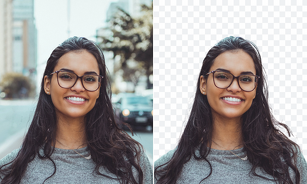
A PNG maker is exactly what you require when you need to eliminate a background, make a clean cut-out, or transform a regular photo into a transparent PNG. It is incredibly easy today with the help of AI tools, as you upload a picture, and in several seconds the background is gone. No airbrushing, no sloppy lines, no Photoshop.
It saves you dozens of hours of work whether you are creating product photos, or are designing a logo, or simply need a transparent background image to use.
What Is a PNG?
A PNG file is a high-quality image file format and has the option of transparency, which means that some sections of the image can be totally see-through.
PNG is the most suitable in:
· Logos
· Stickers
· Product cutouts
· Social media graphics
· Website icons
PNG enables images to blend with any design, as opposed to JPG that has a solid background at all times.
Why Use a PNG Maker?
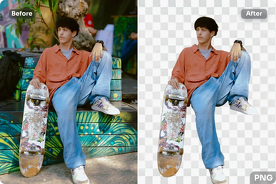
· To Remove Backgrounds Instantly
The primary motivation for using a PNG maker is to acquire a clear-cut and transparent background with no advanced manipulation. AI identifies the primary object and eliminates the background flawlessly.
· For Professional Product Photos
When you operate an online store, transparent PNGs can polish your products in order to have them appear presentable in catalogues, listings, or advertisements.
· For Logo Design & Branding
Logos should be clear enough to be placed anywhere: websites, posters, and social banners. A PNG designer produces sharp, clear edges.
· For Creative Projects & Animations
PNGs are used in collages, stickers, animations, overlays, and digital art by designers.
Best Uses of a PNG Maker Online
· Transparent Photo Maker
Transform any portrait, item, or drawing into a clear cutout in a single click. It is ideal to use as a profile photo, thumbnail, or for editing.
· Transparent Background Generator
The background is automatically erased with pixel-level accuracy by AI, and the details such as hair, edges, and shadows are left intact.
· Photo-to-PNG Conversion
Instantly convert any file (JPG, WEBP, HEIC) to a high-quality PNG file.
· Transparent Logo Creator
Add your logo and immediately take the background away to make it work anywhere.
A Quick Guide to How to Use a PNG Maker
1. Upload Your Image
Select an image to be transformed into a transparent PNG.
2. Let AI Remove the Background
The clear background generator identifies the subject and clears the background automatically.
3. Refine Edges (Optional)
The edges can be cleaned or little bits can be restored, but most AI tools can already do a clean job.
4. Download Your Transparent PNG
The last image should be saved as a PNG file in full transparency.
Best Online PNG Maker Tools
· Pixelfox BG remover
Pixelfox offers fast and accurate background removal and clean transparency. It is ideal in product photography, portraits and logos.
· Remove.bg
It is famous for automatic cutouts.
· Adobe Express Background Remover
Easy and fast conversion to PNG.
· PhotoRoom
Good with transparent PNGs and product lists.
Why PNG Makers Matter Today
Clear photographs are indispensable in all aspects of eCommerce, branding, YouTube thumbnails, graphic design, and AI editing programs.
A PNG maker gives you:
· Clean transparency
· Smooth edges
· Instant conversions
· Creative flexibility
· Professional-quality edits
Now, any person can use AI-powered tools to make transparent PNGs of the same quality in a few seconds.
Tips for Creating the Best Transparent PNGs
· Use a high-quality photo to have sharper edges.
· Even better accuracy is to avoid busy backgrounds.
· Make sure that the subject is light so that AI can identify the lines.
PNG is the only format that can save transparency, which JPEG is not able to save.
Final Thoughts
The PNG maker of the present generation is not only a background remover; it is a full solution to transparent photos, logos, product pictures and creative designs. AI software allows you to make pictures transparent, create a transparent picture, or transform files into professional work easily, quickly, and without cost.