 Credit

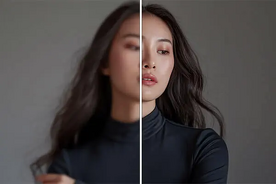
Have you ever used your phone to take a photo and then when you saw it on the big screen, it was pixelated? That’s where AI comes in. Using the latest AI upscaling software, photos initially captured in 2D can now be upscaled to 4K and reveal a glorious clarity, intense textures, and real-world details in moments.
You can use a 4K image converter regardless of the project you are doing, whether it's posters, sharing on social media or working on design projects, because it makes your graphics look clean and professional in any size. The best part? There is no need to install any complicated software; these tools are web-based and are driven by intelligent AI.
Now we are going to discuss how it is possible to convert any image into a stunning 4K format and where to do so.
What Does It Mean to Upscale Photos to 4K?
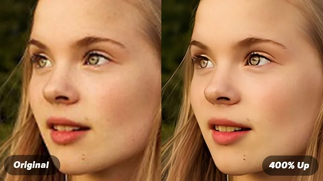
Upscaling a photograph to 4K is the process of enhancing its resolution to ultra-high-definition (UHD) – normally 3840 x 2160 pixels. Compared to basic resizing, which stretches images, AI resizing is based on machine learning to recover lost detail, refine edges, and deblur.
And the result is a naturally detailed, professionally enhanced image even when blown up 4x or more. The AI-powered upscalers maintain the texture, light, and realism. without any difficulty regardless of whether you are working on the portraits, product pictures, or artworks.
Why Use AI to Upscale Images to 4K?
AI upscaling is not just a simple resizing process but, in fact, reproduces lost information. That is why a larger number of creators and professionals prefer AI upscalers nowadays:
No Pixelation: Uses AI to fill in gaps between pixels to produce smooth and detailed results.
Sharper Edges: Ideal with landscapes, faces or products.
Texture Restoration: Retrieves lost depth and natural contrast.
Fast and Automatic: No copywriting or guesses are required.
Professional Output: Excellent printing, web, and marketing graphics.
With an AI 4K image converter, you will have the capability of reviving old, blurry or low-resolution photos easily.
Best Tools to Upscale Photos to 4K Online
Comparison Table
All these AI upscalers make your image clearer, brighter and better organized, making sure that your images will be flawless on any screen.
Benefits of 4K Image Upscaling
Upscaling your photo with an AI photo upscaler does not only make it bigger, but it also changes the quality of your photo. Here’s how:
Enhanced Detail: Ideally suited to zoomed-in shots or oversized prints.
Better Color Accuracy: AI optimizes tones to achieve real-life outcomes.
Texture Preservation: Maintains faces, objects and backgrounds naturally.
Versatile Output: Can be used with wallpapers, websites or ads.
Quick & Accessible: It is an online application, and it does not need any installations.
With AI, it is easier than ever to come up with high-resolution perfection in a single upload.
Best Use Cases for 4K Photo Upscaling
· Photography and Portfolios
Professional photos can be improved to display on HD or print exhibitions.
· eCommerce & Marketing
Luxury product images on online shops to enhance high visualization and numbers of clicks.
· Social Media & Content Creation
Create profile pictures, banners and thumbnails and make them sharp to enhance more engagement.
· Film and Animation Projects
Enhance background pictures and stills to 4K quality images.
· Personal Photos & Memories
Repair damaged pixelated images into sharp, colored memories.
Tips for the Best 4K Upscaling Results
· Begin with the best image of yours.
· Select the 4x or 8x upscale to be as clear as possible.
· Do not upscale highly compressed or low-light images.
· Compare pre- and post-versions to make the best changes.
· Export improved 4K images using PNG format.
These little details play a great role towards professional realistic outcomes.
FAQs
Is it possible to enlarge photos to 4K without paying?
Yes! Pixelfox AI Upscaler and Upscale.media are both 4K photo enhancing tools that are free of charge.
Is upscaling effective in enhancing the quality of photos?
Yes, upscaling with AI brings back lost detail, sharpens edges and recovers color accuracy.
Can I upscale old or blurry photos?
Absolutely, AI upscalers have been shown to be very useful in enhancing low-quality or old photographs.
Is 4K resolution suitable for printing?
Indeed, 4K images provide high-quality clarity and detail when it comes to large-format prints and digital screens.
Final Thoughts
Using the appropriate AI image upscaler, one can convert basic photographs into beautiful 4K images without any difficulties. It impressively increases all the details, color, texture, and clarity and upgrades photos to 4K without any effort, whether it is a personal work or a professional design or social content.