 Credit

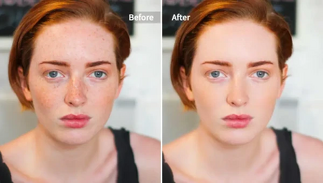
Have you ever seen a picture where your skin was not so smooth or the lighting was not so good? And that is where a free retouch app saves the day. These apps allow you to edit portraits, remove dots, and make details brighter with AI accuracy in a second or two.
You do not even necessarily have to use photos on social media or a professional portfolio; just open up your photos and run them through a free photo retouch program to get your photo looking like it was photographed on silk. No Photoshop experience? No problem. All these smart touch-up applications do everything.
Now it is time to learn what these apps can and cannot do, how they work, and which of them may be the best one to fit your needs with photo-editing needs.
What Is a Retouch App?
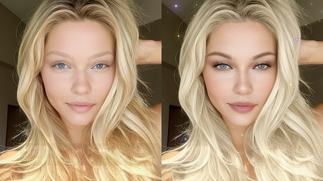
A retouch app is a photo editing program that is used to smooth out and make portraits look beautiful and fix minor imperfections such as blemishes, dark spots, or lighting problems. In contrast to the classical editors, the new AI-driven touch-up apps begin to recognize the features on the face and improve them with a natural look without turning the photos into over-edited ones.
Why Use a Free Retouch App?
The modern user desires clean, bright, and real photos. That is why when you use a free photo retouch app, you can make your pictures look much better at once:
AI-Powered Touch-Ups: Automatically improve portraits using advanced algorithms.
Flawless Yet Natural Look: Do not over-filter textures.
One-Tap Corrections: Ideal for busy users, they need no editing skills.
Completely Free: A majority of the tools are free of charge and provide quality results.
Perfect for All Uses: Best used to take a selfie, business headshots, or lifestyle.
Free retouch application lets you say goodbye to the boring light, dark circles, or uneven skin, and hello to the world of refined, professional-looking photos.
Best Free Retouch Apps Online
The following is a brief Comparison Table that gives the most appropriate free retouch apps available over the web:
All these AI retouch-up apps provide easy and free versions to improve images without losing their natural quality.
Best Features to Look For in a Retouch App
The best free photo retouch app must integrate automation and personalization. Search the following key characteristics:
AI Skin Enhancer: The program automatically pulls out blemishes, acne, and uneven tones.
Lighting Adjuster: Adjusts photos that were either underexposed or overexposed.
Facial Balancer: Increases subtle symmetry and proportion.
Color Correction: Recreates the warmth and vibrancy of lifeless images.
HD Export: Maintains sharpness of quality even after editing.
These functions will ensure that your photos will be natural and the magazine-quality after editing.
Use Cases for Free Retouch Apps
· Selfies and Portraits
Good for everyday use, perfect, smooth skin, makes eyes look bright and brightens your natural beauty before you post it.
· Professional Headshots
Make confident and clean photos on resumes, LinkedIn or company profiles.
· Travel and Lifestyle Photos
Publicize your travel pictures and eliminate distractions.
· Creative and Artistic Edits
Light airbrushing and tone adjustment give an editorial or cinematic look.
· Product and Marketing Images
Correct lighting, background, or reflections to make product pictures sleek.
Tips for Natural-Looking Retouching
· Do not over-smooth anyone in the image; it should not be lifelike.
· Moderate the brightness and contrast.
· Concentrate on lighting and tone adjustment rather than on heavy filters.
· Compare the before and after results always.
· Apply portrait-orientated tools to get the best results.
A minor change can be the most significant when it is performed thoughtfully and cautiously.
FAQs
Is there a free app to retouch photos?
Yes! Such tools as Pixelfox AI Retouch and YouCam Perfect have free versions and provide swift and efficient photo editing.
Can I retouch photos online without downloading an app?
Absolutely, numerous web applications allow you to edit photos on the internet using a touch-up tool right within your browser.
Can I use these tools for commercial photos?
Yes, as long as you own the rights to the original image, you may use the retouched copies, either personally or commercially.
Final Thoughts
In the digital photography era, you do not need to spend hours in photo editing to appear good in your photos; all you need is the appropriate free photo editing program. The refining of the photos becomes simpler with such tools that are AI-based and someone can refine them in real time, providing the result of a professional level without any effort.
Be it changing the light, evening your skin or making pictures better, these touch-up apps provide clean and natural changes that give a boost to your pictures.