 Credit

You know that feeling. You snap the perfect group shot. The lighting is absolute fire. Your outfit is on point. The background looks amazing. But then you zoom in on your face (or maybe your grumpy uncle's face), and it looks like someone just cancelled Christmas.
Total mood killer, right?
In the past, you had two choices: trash the photo or spend hours in Photoshop trying to use the "Liquify" tool without making yourself look like an alien. But it’s 2026, and we don't do that anymore. Now, you can add a smile to a photo in seconds using AI. And I’m not talking about those creepy, sticker-looking grins that look pasted on. I mean natural, "I’m genuinely happy" smiles that reach your eyes.
Whether you're fixing a LinkedIn headshot that looks too serious or just trying to save a family memory, finding a reliable AI smile filter is a game changer. Let’s dive into how you can fix those expressions instantly, why Pixelfox AI is crushing the competition, and how to do it without spending a dime.
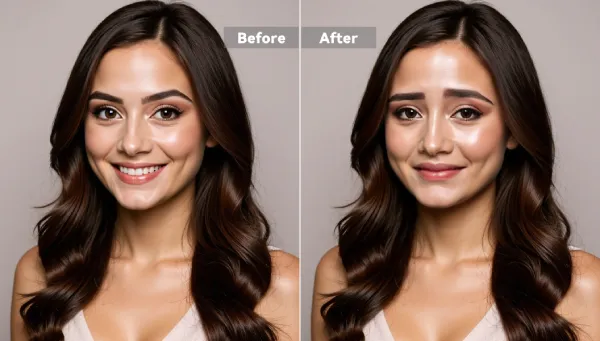
The "RBF" Problem: Why We Need an AI Smile Generator
Let's be real for a second. We aren't always beaming with joy when a camera is shoved in our faces. Resting B*tch Face (RBF) is a real struggle. But beyond vanity, there are legitimate reasons why everyone is searching for an online smile tool.
1. The Professional "Vibe Check"
According to research by Photofeeler, profile photos with a slight smile are viewed as significantly more likeable and competent than neutral expressions. If you are hunting for a job, your serious mugshot might be scaring recruiters away. You need to make smile adjustments that look professional, not like you're laughing at a joke at a funeral.
2. Saving the "Almost Perfect" Shot
We’ve all been there. You took 50 photos. Only one is in focus. Only one has good lighting. But in that one photo, your eyes are open, but your mouth looks flat. An AI smile generator saves the day by tweaking just the mouth while keeping the rest of the magic intact.
3. The Psychology of Trust
A pic smile isn't just about looking pretty; it's about trust. Humans are wired to trust smiling faces. Whether it's a dating profile or a "Meet the Team" page on a company website, a frown creates a subconscious barrier.
Tip: Don't just look for a tool that stretches your lips. True happiness involves the "Duchenne marker"—the crinkling around the eyes. The best smile editor tools know this.
How Does an AI Smile Filter Actually Work? (Simple Version)
You might be wondering, "Is this magic?" Kinda.
Old-school editing tools (like early Photoshop) just pushed pixels around. They stretched your skin. That’s why the results looked blurry or distorted.
Modern AI smile tools, like the one found in Pixelfox AI, use something called Generative Adversarial Networks (GANs). Think of it like a debate team inside a computer.
- The Generator creates a new version of your face with a smile.
- The Discriminator judges it against millions of real human smiles.
- If it looks fake, it gets rejected. If it looks real, it gets served to you.
This technology doesn't just stretch your lips; it generates teeth that fit your skull structure, adjusts your jawline, and lifts your cheeks. This is why a smile filter online today looks a million times better than the apps from three years ago.
Top Solution: Why Pixelfox AI is the Best Way to Add a Smile
I've tested a lot of tools. From the heavyweights like Adobe to the random apps on the App Store that steal your data. If you want a free AI photo editor that balances quality, speed, and privacy, Pixelfox AI is the current champion.
Here is why it stands out in the crowded smile filter market:
1. Natural "Micro-Expressions"
Most smile generator tools give you the "Joker" look—a wide, creepy grin that stretches ear to ear. Pixelfox is trained to handle subtle emotions. You can go from "deadpan" to "polite smile" without looking like a serial killer.
2. No Download Nightmare
You don't need to install a 500MB app just to edit one pic. Pixelfox is a browser-based online smile editor. You upload, edit, and download. Done.
3. It Handles the Whole Face
When you smile, your eyes squint a little. Your cheeks puff up. Pixelfox’s AI smile tech adjusts these areas too, so the mouth matches the rest of the face.
4. Privacy First
A lot of free apps store your face data to train their models. Pixelfox AI deletes your uploaded images automatically after 24 hours. Your face stays yours.
Step-by-Step: How to Add a Smile to Photo Online
Ready to turn that frown upside down? Here is the foolproof guide to using an AI smile generator like Pixelfox to fix your pics in under a minute.
Step 1: Choose Your Image Wisely
The AI is smart, but it's not a miracle worker.
- Good: Front-facing photos, decent lighting, clear face.
- Bad: Blurry photos, face covered by hands, extreme side profiles.
Step 2: Upload to the Editor
Head over to the AI smile generator tool. Drag and drop your gloomy photo into the box.
Step 3: Select Your Vibe
You usually get a few options. Do you want a "closed mouth smile" (polite, professional) or an "open mouth grin" (happy, energetic)?
- Pro advice: If your original photo is very serious, start with a closed smile. Jumping from "angry" to "laughing" can sometimes look unnatural because the jaw change is too drastic.
Step 4: Let the AI Cook
Click "Generate" or "Apply." The smile filter will analyze your facial landmarks (lips, nose, eyes) and reconstruct the expression. This takes about 3-5 seconds.
Step 5: Download
Check the result. Does it look like you? If yes, hit download. If not, try a different intensity level.
Comparison: AI Tools vs. Traditional Methods
Is it really better to use an automated smile editor than to do it manually? Let's break it down.
| Feature | Pixelfox AI (AI Smile) | Photoshop (Manual Liquify) | Mobile Apps (FaceApp etc.) |
|---|---|---|---|
| Speed | Instant (< 10 seconds) | Slow (10-30 minutes) | Fast |
| Skill Level | None (One-click) | High (Professional skills) | Low |
| Teeth Generation | Yes (Creates realistic teeth) | No (Must copy/paste teeth) | Yes |
| Cost | Free / Freemium | Expensive Subscription | Free (with watermark/ads) |
| Natural Look | High (Adjusts whole face) | Depends on user skill | Variable (Can look plastic) |
| Privacy | High (Auto-delete) | High | Low (Data mining common) |
Winner: Unless you are a professional retoucher getting paid $100/hour, the AI smile filter wins every time for speed and ease.
Advanced Playbook: Beyond Just "Smiling"
Okay, so you know the basics. But let's get fancy. Here are some pro tips on how to use pic smile tools for things other than just selfies.
Trick 1: The "Digital Dental Work"
Got a photo where you are smiling, but your teeth look a bit yellow or jagged? Sometimes, running it through an AI smile tool with an "open smile" prompt can actually regenerate a set of perfect, straight, white teeth. It’s like instant braces and whitening for free.
Trick 2: Restoring Ancestor Photos
Old black and white photos are often very serious because people had to hold still for a long time.
- Colorize the old photo first.
- Upload it to the smile generator.
- Add a very subtle smile. Suddenly, your great-grandfather looks like a real, approachable person, not a statue.
Trick 3: Make Your Photos Talk
This is the coolest part. Once you have added a smile to your photo, why stop there? You can use Pixelfox AI to make pictures talk.
- Take your newly smiling headshot.
- Upload it to the Talking Photo tool.
- Add audio (or type text). Now that smiling photo is greeting people on your website or roasting your friends in a group chat.
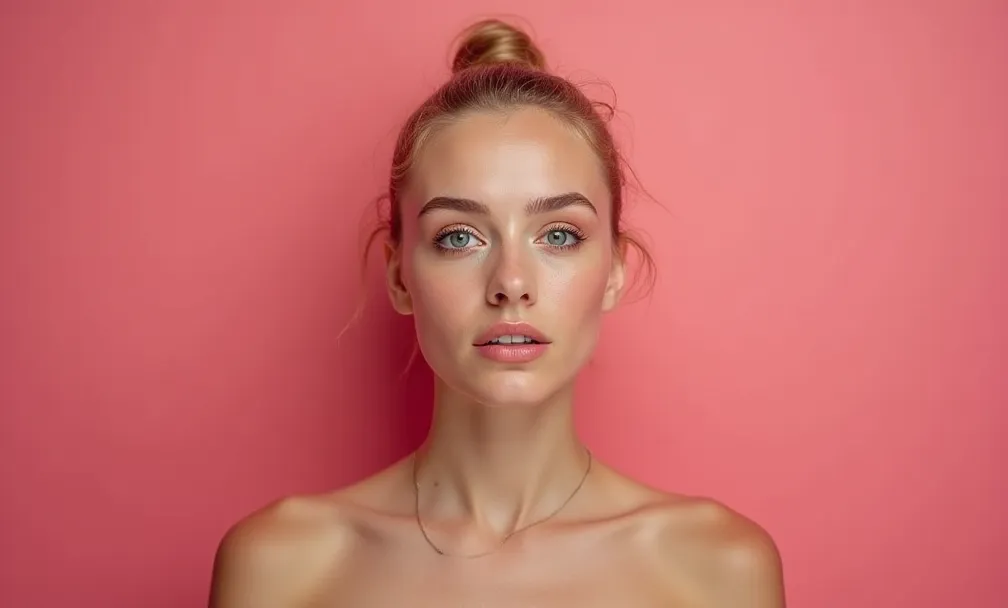
Common Mistakes When Using Smile Filters (And How to Fix Them)
Even the best online smile tools can fail if you use them wrong. Here is how to avoid the "Uncanny Valley."
Mistake 1: The "Dead Eyes"
You added a massive grin, but your eyes didn't change. This signals to the human brain that the emotion is fake (or psychopathic).
- Fix: Use a tool like Pixelfox that adjusts the whole expression, or choose a subtler smile setting.
Mistake 2: The Face Shape Shift
Sometimes, adding an open mouth lengthens the chin too much.
- Fix: If the make smile feature distorts your jaw, stick to a closed-mouth smirk. It requires less pixel manipulation and usually retains your original face shape better.
Mistake 3: Group Photo Inconsistency
You smiled everyone in the group photo, but now everyone has the exact same set of teeth. Creepy.
- Fix: Vary the intensity. Give one person a grin, another a smirk, and leave one neutral. It looks more organic.
Tip: If you are editing a photo for a passport or official ID, check the regulations first! Most government IDs forbid smiling (neutral expression required). Do not use an add smile to photo tool for your passport—you will get rejected.
FAQ: Everything You Asked About AI Smiles
Q: Can I add a smile to a photo for free? A: Yes! Tools like Pixelfox allow you to add smile to photo for free. Many competitors force you to pay or slap a giant watermark on your face, but there are solid free options available.
Q: Will the AI smile filter change my identity? A: Good question. High-quality AI preserves your identity features (nose shape, eye distance, skin texture) and only modifies the expression muscles. You will still look like you, just happier.
Q: Can I use this on animals? A: Most smile editor algorithms are trained on human faces. Using it on a dog might result in a terrifying human-dog hybrid smile. Proceed with caution (or for meme potential).
Q: Is it safe to upload my photos to an online smile editor? A: It depends on the platform. Always check the privacy policy. Reputable sites like Pixelfox AI process images securely and delete them afterwards. Avoid sketchy apps that ask for "full gallery access."
Q: Why does my smile look blurry? A: This happens if the source image is low resolution. The AI tries to generate detailed teeth, but if the rest of the face is pixelated, the mismatch looks weird. Always use the highest resolution photo you have.
The Verdict: Stop Being So Serious
Life is too short for grumpy photos. Whether you are trying to look more approachable for a job, fixing a wedding photo where the groom looked panicked, or just messing around with friends, the ability to add smile to photo instantly is a tool everyone should have in their digital pocket.
Forget the complex Photoshop tutorials. Forget the expensive subscriptions.
If you want a natural, quick, and free way to boost the mood of your images, you need to try the AI advantage. Don't let a bad mood ruin a good picture.
Ready to see yourself smile? Go to Pixelfox AI right now. Upload that grumpy selfie, hit the button, and see the magic for yourself. It’s free, it’s fast, and it might just brighten your day.